EN Dateq BCS70 Manual Installation 5
Setting the type of equipment connected
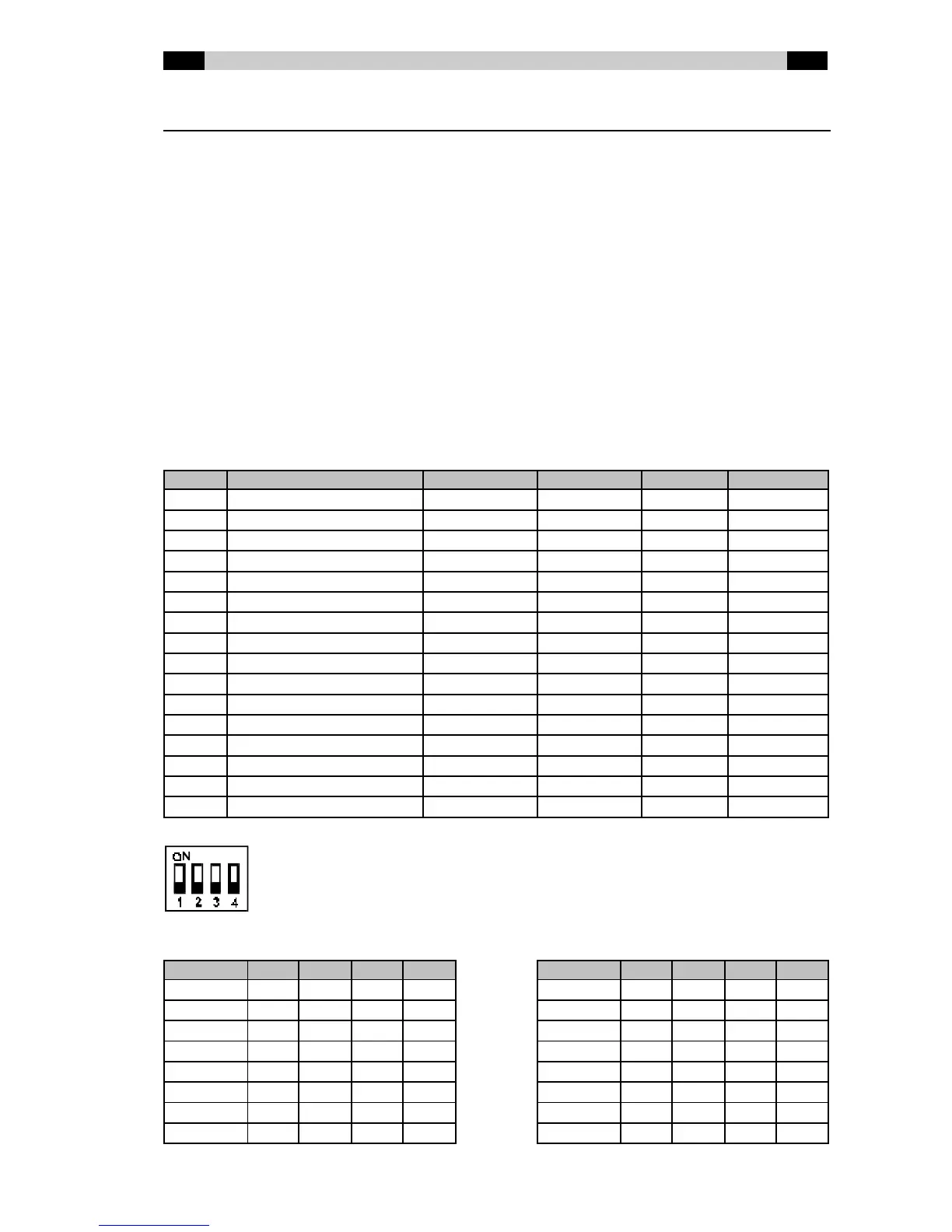
Each module has a quad DIP sw itch f or selecting the type of control of equipment connected
to an input. Theref ore, on the BCS71 and BCS72 you w ill find tw o sets of DIP-sw itches (one
for each input). On the BCS73 you w ill f ind a set of DIP-sw itches for other f unctions.
BCS71 and BCS72 DIP-sw itch settings
For each input you can select from 16 types of operation for the equipment connected.
Whereas previously the only choice w as pulse or continuous contacts, now equipment-
specific operation can also be selected. This concerns equipment w hich, in addition to
standard operation, also has special functions or has to be operated in a non-standard w ay.
As standard, a choice can be made betw een continuous or pulse contacts (short or long
pulses), indication of internal or external tally on the ON and OFF buttons, giving a start pulse
again by pressing the ON button (Restart) and activating the CUE function by putting the
equipment w ith sw itched off module into the 'PLAY' state (Remote Cue).
Equipment control patterns available:
Type Description Start / Stop Tally Restart Remote Cue
0 Normal consumer (default) Continuous Internal No No
1 Normal consumer Pulse 100ms Internal No No
2 Normal consumer Pulse 500ms Internal No No
3 Normal pro Continuous External No No
4 Normal pro Pulse 100ms External No No
5 Normal pro Pulse 500ms External No No
6 Reserved
7 Reserved
8 360 Systems DigiCart Pulse 100ms External Yes Yes
9 Denon DN- xxxF Continuous External No Yes
10 Tascam DA-30 Pulse 1s External No Yes
11 Reserved
12 Reserved
13 Tally switches on/off Continuous Internal No No
14 Tiesseci TS-35 Pulse 500ms Internal Yes No
15 Nautilus JukeBox Special Special No Yes
Í
ÍÍ
Í Type 0 (default)
The sw itches can easily be set w ith a ball-point pen.
DIP sw itch positions corresponding to certain types of equipment:
Type 1 2 3 4 Type 1 2 3 4
0 Off Off Off Off 8 Off Off Off ON
1 ON Off Off Off 9 ON Off Off ON
2 Off ON Off Off 10 Off ON Off ON
3 ON ON Off Off 11 ON ON Off ON
4 Off Off ON Off 12 Off Off ON ON
5 ON Off ON Off 13 ON Off ON ON
6 Off ON ON Off 14 Off ON ON ON
7 ON ON ON Off 15 ON ON ON ON



 To Next Page