14
Basic Operation
Program Mode
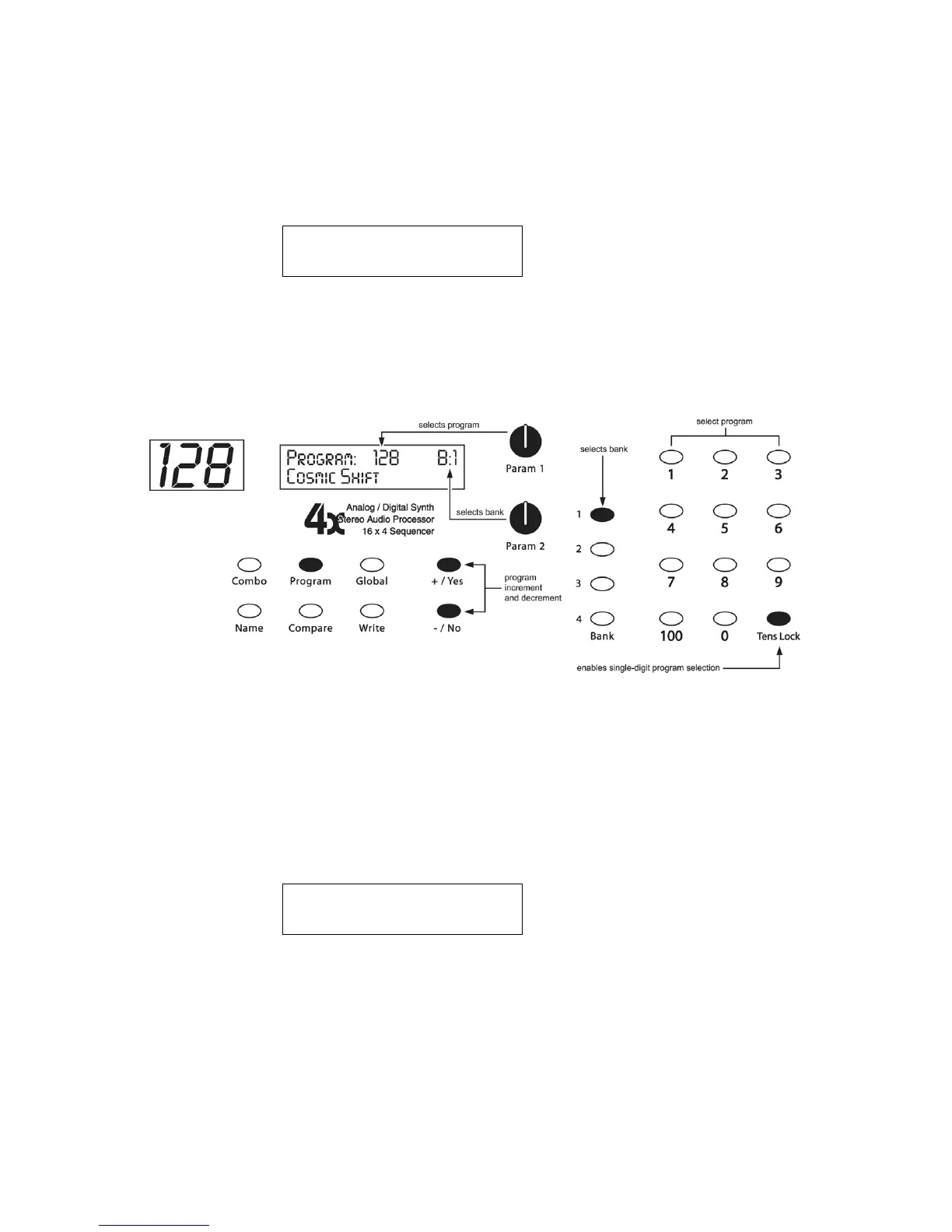
When you first turn the Poly on, it is in Program Mode with the P
ROGRAM
LED lit and
the following screen active:
Program: xxx B:x
xxxxxxxxxxxxxxxx
The top line shows the Program (1…128) and Bank (1…4) number of the currently
selected Program, and the bottom line shows the 16-character name of the Program.
The P
ARAM
1 knob changes the Program, and the P
ARAM
2 knob changes the Bank.
The Program can also be incremented or decremented by pressing the +/Y
ES
or -/N
O
switch respectively or selected with the numeric program selection switches.
To edit a Program, simply turn any knob while in Program mode. See the Program
Parameters section for a detailed list of all parameters and their functionality.
Combo Mode
When you press the C
OMBO
switch, the Poly switches to Combo Mode with the
following screen active:
Combo: xxx B:x
xxxxxxxxxxxxxxxx
The top line shows the Combo and Bank number of the currently selected Combo,
and the bottom line shows the 16-character name of the Combo. The P
ARAM
1 knob
changes the Combo, and the P
ARAM
2 knob changes the Bank. To increment or
decrement the Combo, press the +/Y
ES
or -/N
O
switch respectively.


 To Next Page