39
Prophet-6 Operation Manual
Sequencer
To transpose a sequence:
1. Press play. The sequence begins playback.
2. Press and hold
record and press a key on the keyboard. “Middle C”
is the reference point. Playing a note above middle C transposes the
sequence higher by that interval. Playing a note below middle C trans-
poses the sequence lower by that interval.
Sequencer Parameters
Here are the controls and parameters used when interacting with the sequencer.
Record: On, Off—This switch turns sequencer recording on and off.
Play: On, Off—This switch turns sequencer playback on and off.
BPM: 30…250—Sets the tempo for the Sequencer and Arpeggiator in BPM
(beats per minute). The
tap tempo LED ashes at the BPM rate. When lfo
sync is turned on, the BPM rate affects the LFO frequency. When syncing to
an external MIDI clock source, the BPM setting has no effect.
Tap Tempo: 30…250—Tap this button at least 4 times to quickly set the
tempo for the Sequencer and Arpeggiator. The LED ashes at the BPM
rate you set.
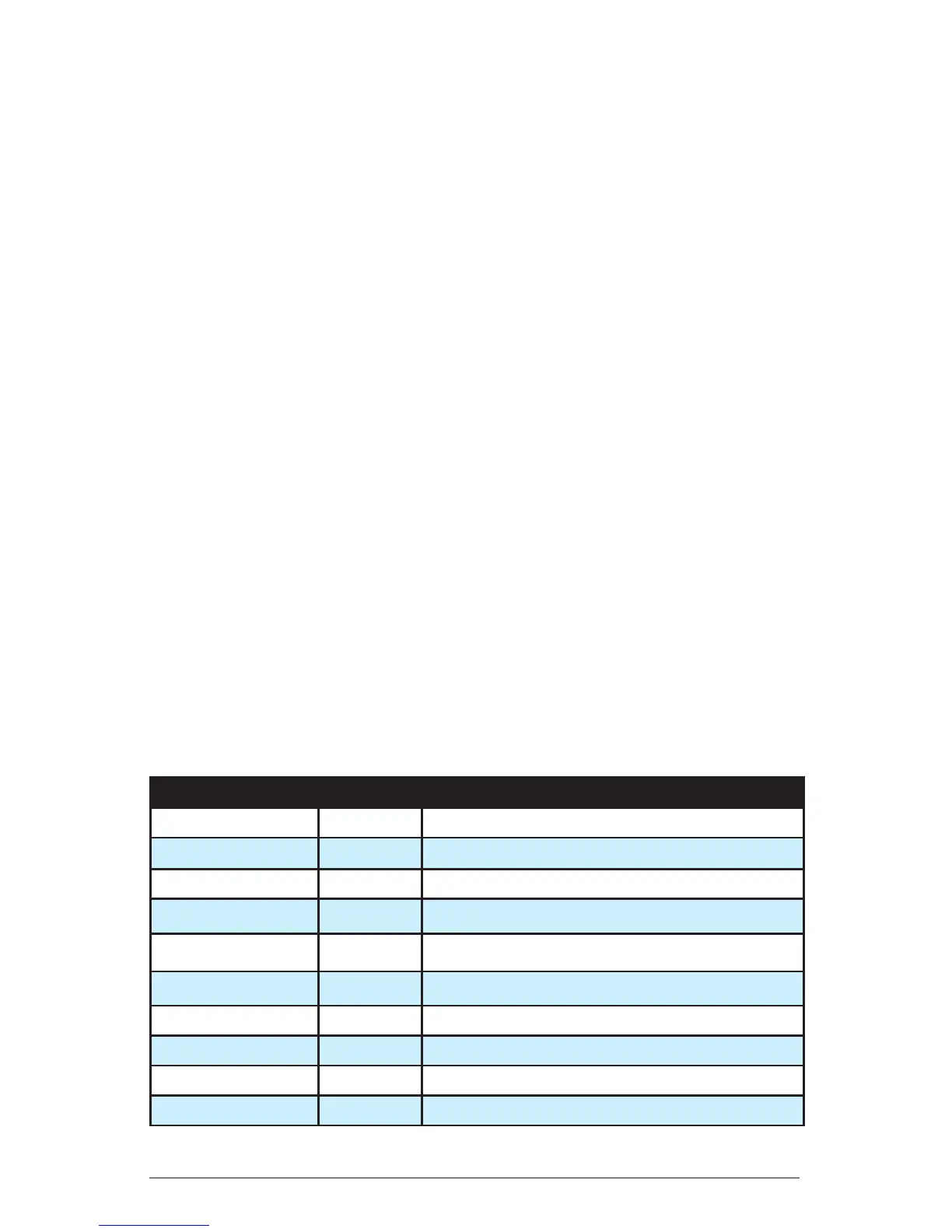
Value: Sets the note value for each sequencer/arpeggiator step relative
to the BPM. value works with both internal and external clock sources.
The following table lists the values:
Name Tempo Timing Division
Half BPM/2 Half note
Qtr BPM Quarter note
8th BPM x 2 Eighth note
8th D BPM x 2 Eighth note, dot
8th S BPM x 2 Eighth note, swing timing
8th T BPM x 3 Eighth note triplets
16th BPM x 4 Sixteenth note
16th S BPM x 4 Sixteenth note, full swing timing
16th T BPM x 6 Sixteenth note triplets
32nd BPM x 8 Thirty-second note


 To Next Page