4. Once the tapping process is
completed, apply a couple of
layers of PTFE sealant tape (not
supplied) to the thread on the
brass body, then screw it into the
thermostat housing.
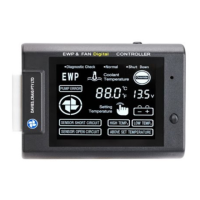
SETTING THE LCD EWP
®
/FAN DIGITAL CONTROLLER
It’s recommended as a minimum the Digital Controller’s set-point is fixed to that of the
engine manufacturer’s mechanical thermostat opening temperature. You may use a
lower ‘set-point’ to run the engine colder or a higher ‘set-point’ to run the engine hotter
if appropriate. Generally, running the engine slightly colder will increase the power and
running the engine slightly hotter will improve the fuel efficiency.
The LCD EWP & Fan Digital Controller has been set at the factory at 85°C/185°F. This
setting can be altered up or down by using the ‘set-point’ adjustment button on the
right hand side as follows:
1. Pushing the ‘set’ button once will indicate the present setting.
2. Push set button repeatedly until the desired set temperature displays. Hold set
button down 2 seconds until Controller beeps. The ‘set’ temperature will then
illuminate
3. If the new setting is not confirmed within 2 sec, the Digital Controller will revert to
previous ‘set’ temperature.
4. To check ‘set’ temperature, repeat Step 1 above.
Note: Controller will keep the last state of “Set Temp” memory, when disconnected
from the power source
NOTE: Monitor the existing engine temperature gauge to check that your set engine
temperature is similar to the actual engine temperature. The engine temperature sender
unit may be located in a different position than your Thermal Sensor and may display a
temperature variation.
Figure 4: Sensor Installation in to Thermostat Diagram


 To Next Page
 Loading...