05 06
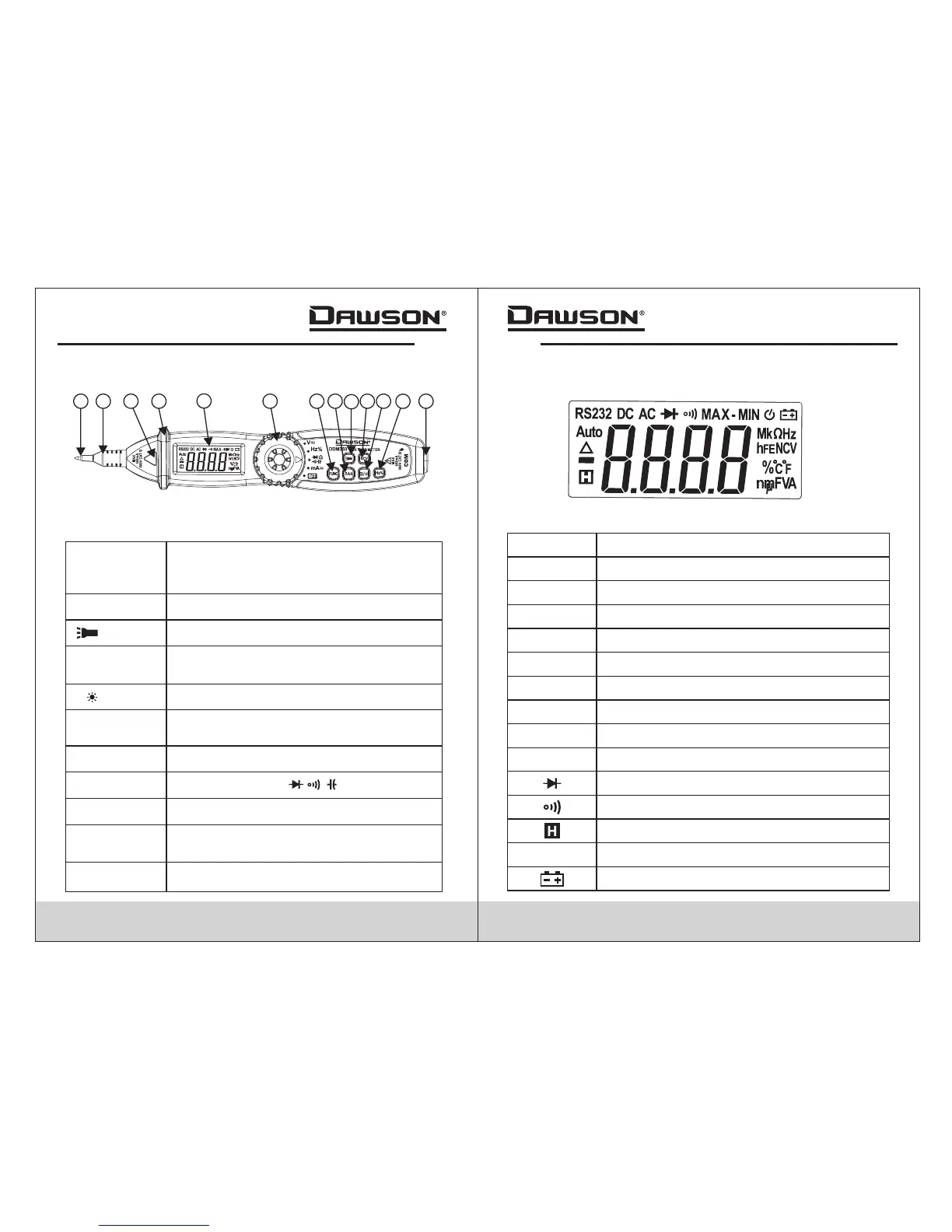
Buttons and Components Description
+ Input for V/A/Ω/ / / /Hz/%
COM
Common terminal
Probe Cap
Protective cap to be used when making
CAT III or above measurements
Protective Ring
Keep hand behind the ring for safety
FUNC Button
Switch between AC/DC or between
resistance, continuity, diode or
capacitance
RAN Button
Choose auto or manual range
Button
Hold to turn on the work light
Hold data reading/turn on/off backlight
NCV Button
Hold to activate Non-Contact Voltage
measurement
H/ Button
Switch between frequency/duty cycle
functions
Hz/% Button
Select different functions
Rotary Switch
Probe
Display Description
°C°F
n,µ,m,k,M
nano, micro, milli, kilo, mega
Ω
Ohms (resistance)
F
Farad (capacitance)
A
V
Ampere (current)
Volt (voltage)
Diode
Buzzer
Data hold
AUTO
Auto range
Low battery indicator
AC
Alternating Current
DC Direct Current
%
Duty Cycle
Frequency
Hz
Celsius/Fahrenheit
1
2
3
4
5
6
7
8
9
10
11
12
13


 To Next Page