09 10
Resistance Measurement
To avoid electrical shock and injury, power off the
circuit and discharge the capacitance before
measuring resistance.
Warning
• Insert the black test lead or lead with test clip in the
“COM” jack.
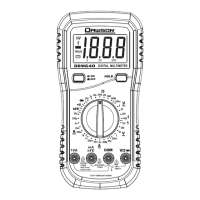
• Set the rotary switch to the “ ” position. Manual range
can be chosen by pressing the “RAN” button. Hold
“RAN” to go back to Auto range.
• Connect the probe tip of the meter and tip of the test
lead (or test clip) across the resistance or circuit under
measurement and read the measured value on the
display.
Ω
NOTE:
•
reading if the measured resistance is above 1MΩ.
• When the input is not connected (i.e. an open circuit)
“OL” will be displayed.
The meter may take a few seconds to reach steady
Diode Test
•
• Set the rotary switch to the “ ”position. Press “FUNC”
to choose diode measurement; “ ”is displayed.
• Connect the probe tip of the meter and tip of the test
lead (or test clip) across the diode under measurement
and read the measured value on the display.
Insert the black test lead or test clip in the “COM” jack.
NOTE:
The Meter shows the forward voltage drop. If the lead
connection is reversed, “OL” is displayed.
Capacitance Measurement
To avoid electrical shock and injury, power off the
circuit and discharge the capacitance before
measuring capacitacne.
Warning
• Insert the black test lead or lead with test clip in the
“COM” jack.
• Set the rotary switch to the “ ”
• position.Press “FUNC” twice to choose capacitance
measurement.There is no manual range available in
capacitance mode.
• Connect the probe tip of the meter and tip of the test lead
(or test clip) across the capacitance or circuit under
measurement and read the measured value on the
display.
NOTE:
The meter may take a few seconds to reach steadyeading
when making high capacitance measurements.
Continuity
To avoid electrical shock and injury power off the
circuit and discharge the capacitance before
measuring continuity.
Warning
•
“COM” jack.
• Set the rotary switch to the “ ”position. Press “FUNC”
3 times to choose continuity test; “ ”is displayed.
• Connect leads to the circuit terminals.
• If continuity exists (i.e. resistance is less than 50Ω), the
built-in buzzer will sound.
Insert the black test lead or lead with test clip in the


 To Next Page