
 Need help?
Do you have a question about the DaytonAudio DSP-LF and is the answer not in the manual?
Details powering the DSP-LF via USB Type-A port using standard micro USB cable.
Details connecting the DSP-LF to an AV receiver using RCA to 3.5mm cable.
Explains connecting the 3.5mm output to a subwoofer's line-level input using RCA cable.
Provides guidance on adjusting AVR/subwoofer settings and crossover points for optimal performance.
Guides users through downloading, pairing, and initial setup of the iWoofer app with the DSP-LF.
Offers tips on importing presets and troubleshooting common app messages for better user experience.
Lists prerequisites and initial steps before running room correction, including app settings and device preparation.
Explains settings like Auto Level, Auto Range Recognition, Optimism, and Delay for room correction.
Details the step-by-step wizard for performing room correction, including measurements and compensation modes.
Explains Boomy Region, Near Field, and Linear modes for tailoring room correction to specific needs.
Recommends High Pass Filter (HPF) at 20Hz and Low Pass Filter (LPF) up to 150Hz for bass shaker setup.
Explains using Parametric EQ (PEQ) and Subharmonic Synthesis for enhancing bass shaker performance.
Lists the version history of the manual, indicating updates and changes.
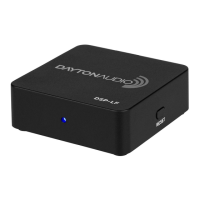
The Dayton Audio DSP-LF is a low-frequency DSP controller designed to enhance subwoofer performance through Bluetooth control via the iWoofer app. This device allows users to fine-tune various DSP functions, optimizing their subwoofer's sound in any room environment.
The DSP-LF acts as an intermediary between an AV receiver or subwoofer amplifier and the subwoofer itself. It receives an audio signal, processes it using digital signal processing (DSP) algorithms, and then outputs the refined signal to the subwoofer. The core functionality revolves around its integration with the iWoofer app, which serves as the control interface. This app, available in both free and premium (iWoofer Pro) versions, offers a comprehensive suite of DSP features.
The free version of the iWoofer app provides essential controls such as adjustable high/low pass filters with slopes up to 48 dB/octave, a parametric EQ with up to 25 bands, gain control, subharmonic synthesis, delay control, phase control, and a limiter/compressor. These features allow users to shape the frequency response, manage signal levels, and correct phase issues, all contributing to a more integrated and impactful bass experience.
The premium iWoofer Pro app, exclusively available on iOS, introduces a sophisticated room correction feature. This advanced algorithm utilizes the microphone of an iPhone or iPad to measure the room's acoustic response and automatically generates FIR (Finite Impulse Response) filters. These filters are custom-tailored to the specific room and subwoofer, effectively "flattening" the frequency response and minimizing adverse effects of room acoustics. The premium version also offers additional settings for the limiter/compressor and dynamic bass control, providing even greater flexibility for advanced users.
The DSP-LF is designed for ease of connection and setup. It can be powered via any USB Type-A port using a standard micro USB cable, offering flexibility with power sources like the supplied power brick, TV USB ports, or even USB ports on other Dayton Audio subwoofer amplifiers. For optimal results, however, the supplied power brick is recommended.
Connecting the DSP-LF to an AV receiver is straightforward. Users simply plug the RCA end of the provided cable into the 'sub out' port of their AV receiver (AVR) and the 3.5mm end into the input of the DSP-LF. The device supports single RCA connections, or users can employ an RCA Y adapter for dual inputs. For output, the 3.5mm jack on the DSP-LF connects to the line-level input of the subwoofer amplifier using the provided stereo 3.5mm to RCA cable. If multiple subwoofers are used, an 'aux splitter' or a stereo 3.5mm male to stereo RCA cable can be utilized to connect both subwoofers to the DSP-LF's output.
Before using the DSP-LF, it's crucial to adjust AV receiver and subwoofer amplifier settings to prevent conflicts. This involves setting the low pass dial on the AVR and subwoofer amp to the highest available frequency, preferably using the iWoofer software crossover instead. Any existing EQ settings for bass on the amplifier or AVR should be turned off, especially when using the iWoofer Pro's room correction. Additionally, any other processing on the subwoofer amplifier or AVR should be disabled unless confident it won't conflict with iWoofer's DSP settings. For AVRs with a single 'crossover' frequency setting, it's recommended to high pass main speakers at this frequency and set the iWoofer app's low-pass frequency to 500 Hz to prevent interference in the bass range.
The iWoofer app provides a quick start guide for connecting and controlling the DSP-LF. After installing the app, users will see a list of available DSP-LF devices. Selecting the device establishes a Bluetooth connection, allowing access to the app's home screen. A crucial initial step is to navigate to the "HW Controllers" screen in the app's options and ensure all settings are turned OFF, as the DSP-LF does not have physical hardware controllers. Leaving these on can cause frequency response distortion. This step must be repeated if the DSP-LF is restored to factory defaults.
The room correction process with iWoofer Pro involves several steps. Users are advised to remove any case from their iOS device for microphone accuracy and to ensure the subwoofer is powered on and audio connections are correct. All EQ settings in the X-Over menu should be removed before starting room correction. The process begins with a near-field measurement of the subwoofer, followed by measurements at the listening position. The app offers different correction types: "Boomy Region" for general subwoofers to address room reflections above 70 Hz, "Near Field" to match the subwoofer's near-field response, and "Linear" for high-performance subwoofers to achieve a flat frequency response. The app then calculates and applies FIR filters to correct the room's response.
For bass shaker tuning, the DSP-LF and iWoofer app offer precise control. The High Pass Filter (HPF) is recommended to be set at 20 Hz to allow infrasonic notes to be felt. The Low Pass Filter (LPF) is a matter of personal preference, typically around 150 Hz to avoid audible voices, or lower (around 100 Hz) for a more "fun" feel, or even lower when augmenting high-quality subwoofers to prevent "rumble interference." The Parametric EQ (PEQ) is essential for bass shakers, allowing users to boost or cut specific frequency ranges to eliminate undesirable resonances or enhance desired tactile feedback. Subharmonic synthesis can add energy to the output at half the frequency of the input signal's original bass tone, providing an enjoyable effect, especially for content lacking deep sub-bass.
The DSP-LF is designed for minimal maintenance. Its robust digital signal processing architecture ensures consistent performance. The device has a standby function, temporarily shutting off if no input signal is detected for a period. To reactivate it, users can unplug and replug the device or provide an input signal. If troubleshooting, ensuring no other smart device is connected to the DSP-LF with the iWoofer app is important. The iWoofer app itself provides clear instructions and prompts, such as when to import presets from the DSP, which helps maintain consistent settings across different smart devices. The ability to save and recall settings within the app further aids in managing configurations. The user manual also provides a revision log, indicating the initial guide version, which helps users track updates and changes to the device's operation and features.
 General
| Channels | 2 |
|---|---|
| Frequency Response | 20 Hz - 20 kHz |
| Sample Rate | 48 kHz |
| Bit Depth | 24-bit |
| Power Supply | 12 VDC |
| Parametric EQ | Yes |
| Input Impedance | 10k ohms |
| Output Impedance | 100 ohms |
| Maximum Input Level | 4 Vrms |
| Maximum Output Level | 4 Vrms |
| THD+N | < 0.01% |
| Signal to Noise Ratio | > 100 dB |
| THD | < 0.01% |
| Input Connections | RCA |
| Output Connections | RCA |
| Crossover Type | Linkwitz-Riley, Butterworth, Bessel |
| Crossover Slopes | 12 dB/Oct, 24 dB/Oct |

 To Next Page