Press the RECORD button again or press the STOP button
to terminate the recording. The RECORD button blinks and
is ready for
the
next
recording. The
new
recording
over-writes
the contents of the previous recording in unit of measure. In
this way, you can edit your recording.
Tip:
The Auto Start mode is recommended for over-
write and record with the pattern.
The metronome sound
is for
reference only.
It is
not
recorded.
STOP AND
SAVE
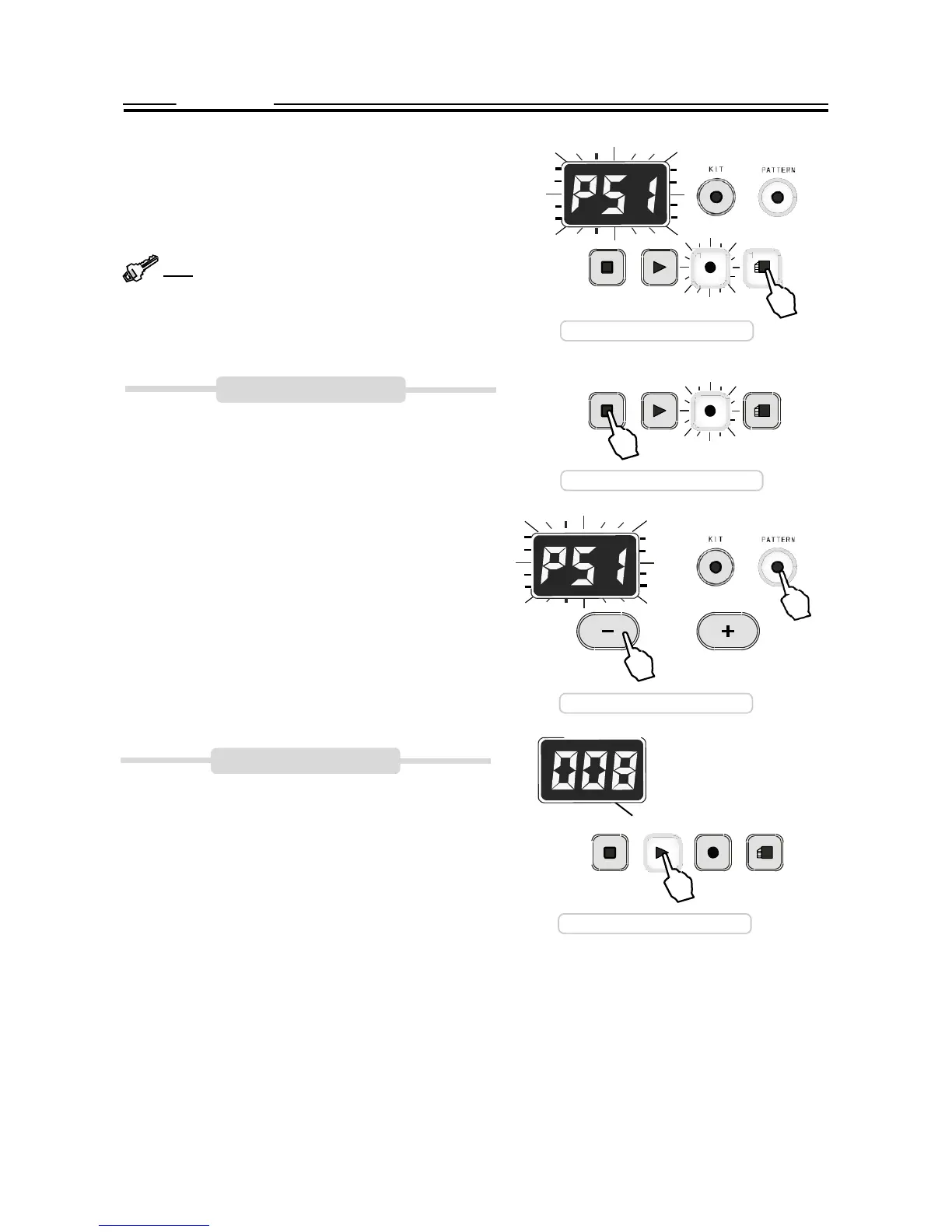
When the recording is finished and RECORD button blinks,
press the SAVE button to save
it as
Pattern 51. The
RECORD
button turns off and the PATTERN button keeps lit. The dis-
STOP
STOP
PLAY
RECORD
Save to P51
PLAY
RECORD
SAVE
SAVE
play
shows
P51. your setting is nonvolatile even when
you turn off the power.
When the RECORD button blinks, press the STOP button to
discard the current record. The RECORD button turns off
and the PATTERN button keeps lit. The display shows the
pattern number you selected before the recording. Please
note that your current record will be lost.
Press the KIT number anytime, the recording will be termi-
nated and the drum will turn to the Kit mode. Your current
record will be lost.
PLAYBACK
Discard the record
Select
recorded
pattern
Enter the Pattern mode, select P51, press the PLAY button
to play back your
recording.
Please refer to the <PATTERN>
section of this manual for details.
.
STOP
Measure
PLAY
RECORD
SAVE
Playback


 To Next Page