CONTROL
PANEL
1
CLICK TEMPO
MASTER
VOLUME
2 3
KIT
PATTERN
5 6
CRASH
HIHAT
TOM 1
15
TOM 2
RIDE
HI-HAT PEDAL SNARE
KICK
TOM 3
VOICE VOLUME DRUM
OFF
7
8
9
STOP
14
10
PLAY
RECORD
11
12
SAVE
13
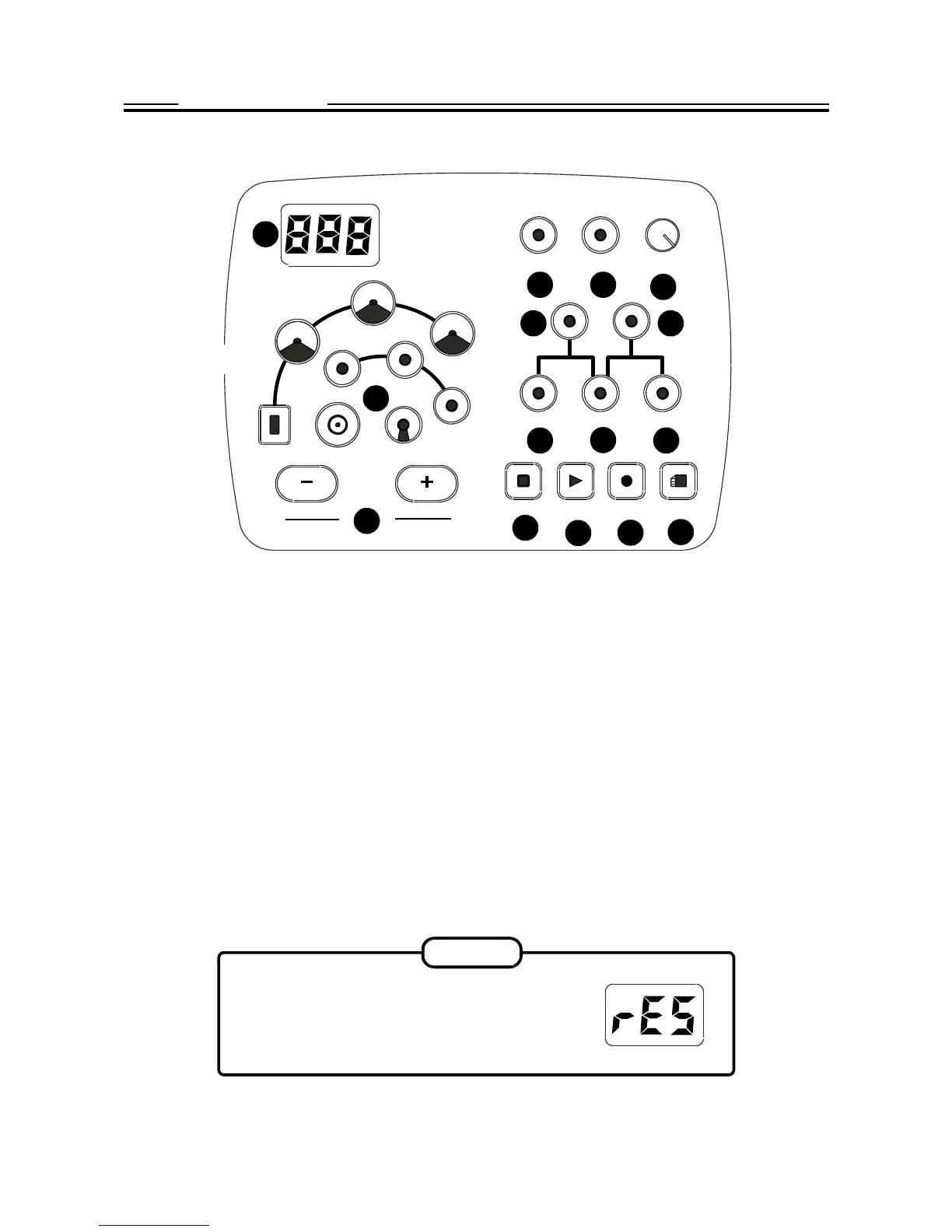
(1) Display: The display is a 3-digital 7-Segment LED type showing Information such as Kit number, Voice
number etc. .
(2) CLICK Button: Metronome On/Off switch
(3) TEMPO Button: Change the tempo of the metronome, it is also used for recording and Pattern playing.
(4) MASTER VOLUME Knob: Rotate the knob clockwise to increase the master volume and counter-clock-
wise to decrease the master volume
(5) KIT Button: Enter the Drum kit selection mode
(6) PATTERN Button: Enter the Pattern play mode
(7) VOICE Buttons: Enter the voice assignment mode
(8) VOLUME Button: Enter the volume adjustment mode
(9) DRUM OFF Button: Mute drum sound in the pattern
(10) STOP Buttons: Stop the pattern playing or recording
(11) PLAY Button: Play the Pattern
(12) RECOED Buttons: Enter the record mode
(13) SAVE Button: Save the record and setting
(14) +/- Buttons: It is universal in the kit, pattern selection and volume setting etc.
(15) Pad Select Buttons: Select a pad in kit edit and display pad performance in pattern playing.
R
ESET
Press and hold down both + and - button
when turn on the power until rSE appears on
the display. The factory setting will be re-
stored and recorded contents erased.


 To Next Page