EasyManua.ls Logo

dbx 160X - Page 17

dbx 160X
41 pages
Print Icon
To Next Page IconTo Next Page
To Previous Page IconTo Previous Page
Loading...
dbx
Professional
Products
For
all
connections,
refer
to
the
following
steps:
A.
Turn
Off
all
equipment
before
making
any
connections.
B.
Make
connections
via
XLR
or
%"
TRS
jacks
according
to
your
requirements.
C.
Plug
in
the
AC
power
cable
to
power
On
the
unit.
Multi-Channel
Connections
The
160XT
can
be
“strapped”
to
another
160XT
for
2-channel
stereo
op¬
eration.
This
will
force
one
of
the
units
(SLAVE)
to
track
the
other
(MAS¬
TER)
to
preserve
proper
stereo
imaging.
A
Va“
stereo
phone
cable
is
required
to
connect
the
two
160XTs
together.
To
operate
in
stereo,
designate
one
of
the
two
units
to
be
a
“MASTER”
(SLAVE
button
OUT)
and
switch
the
other
unit
to
“SLAVE”
mode
(SLAVE
button
IN,
SLAVE
LED
ON).
The
master
160XT
will
now
respond
to
the
combined
inputs
of
the
160XTs.
The
master’s
controls
will
adjust
the
amount
and
nature
of
the
compression
and
the
slave
will
track
accurately.
When
the
SLAVE
switches
on
both
units
are
not
depressed,
the
160XTs
operate
completely
independently.
If
both
SLAVE
buttons
are
depressed,
both
units
will
be
bypassed
(i.e.,
fixed
at
unity
gain).
The
strapping
cable
with
1
4“
TRS
plugs
on
both
ends
may
be
left
in
place
when
both
160XTs
are
to
be
used
independently
(i.e.,
both
as
MASTER).
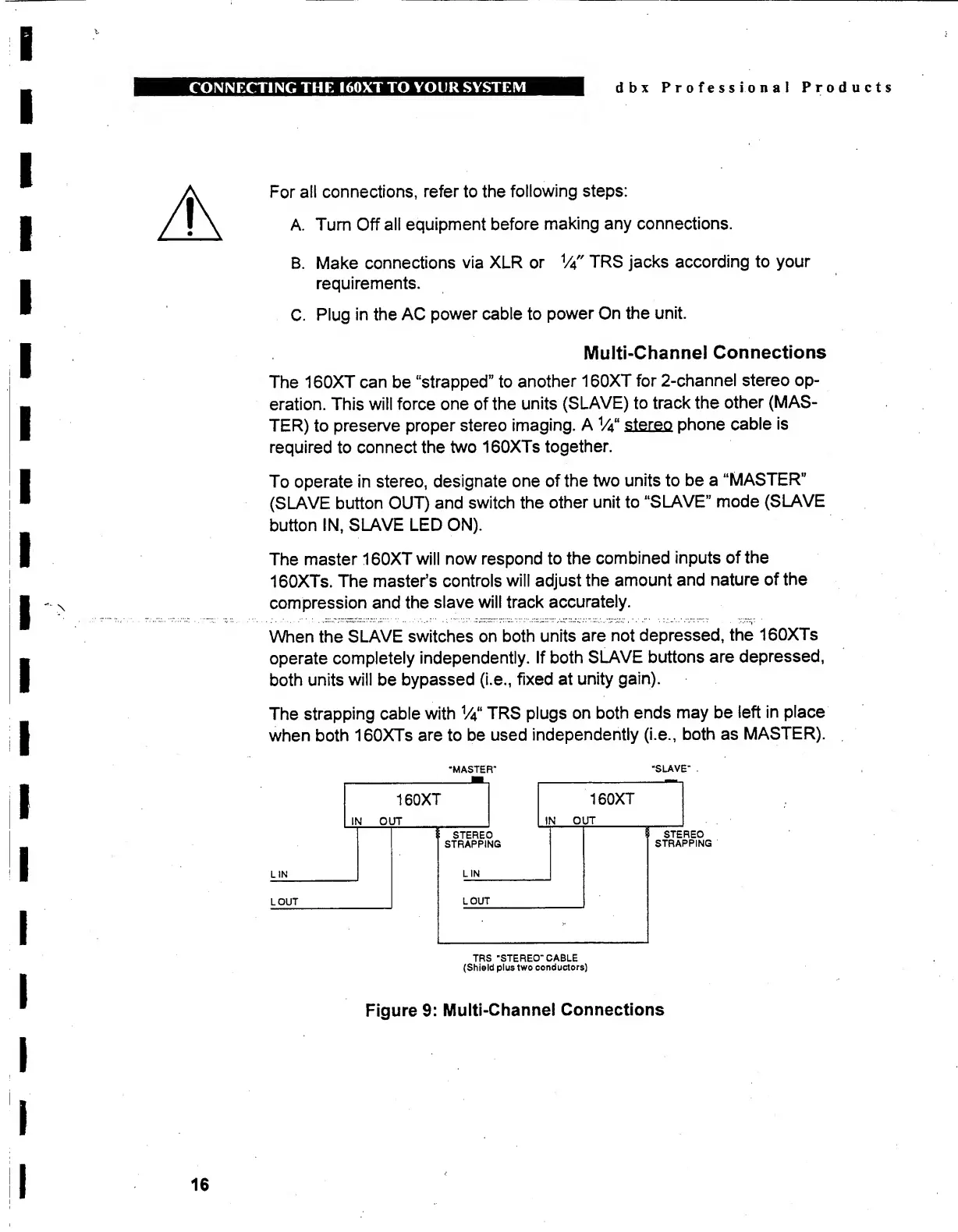
‘MASTER"
"SLAVE”
TRS
"STEREO”
CABLE
(Shield
plus
two
conductors)
Figure
9:
Multi-Channel
Connections
16

Other manuals for dbx 160X

Related product manuals