EasyManua.ls Logo

dbx 4BX - Operating Instructions; Front Panel and Remote Control Overview; Power On;Mute and Off Buttons; Volume Adjustment

dbx 4BX
18 pages
Print Icon
To Next Page IconTo Next Page
To Previous Page IconTo Previous Page
Loading...
o
o
OPERATING
INSTRUCTIONS:
FRONT
PANEL and
REMOTE
CONTROL
4BX
(=1
o
•
10CB
501
OdB
<0J
-!0<O
301
-?o«
Ml
-XXB
lot
DD DD
VOLU.C
EXPANSION
MULTI-BAND
F.XPANOIU
WITH
LOGICONTROL
SYSTEM
I^ACT RESTORATION
V
A
o
o o
o
o
[j
0
LI
G
^
LZJ
L_J I I
TRANSITION
IMPACT SOURCE
TAPE PRE
POST
BYPASS
DISPLAY
LEVEL
RESTORATION
-
ABC
D
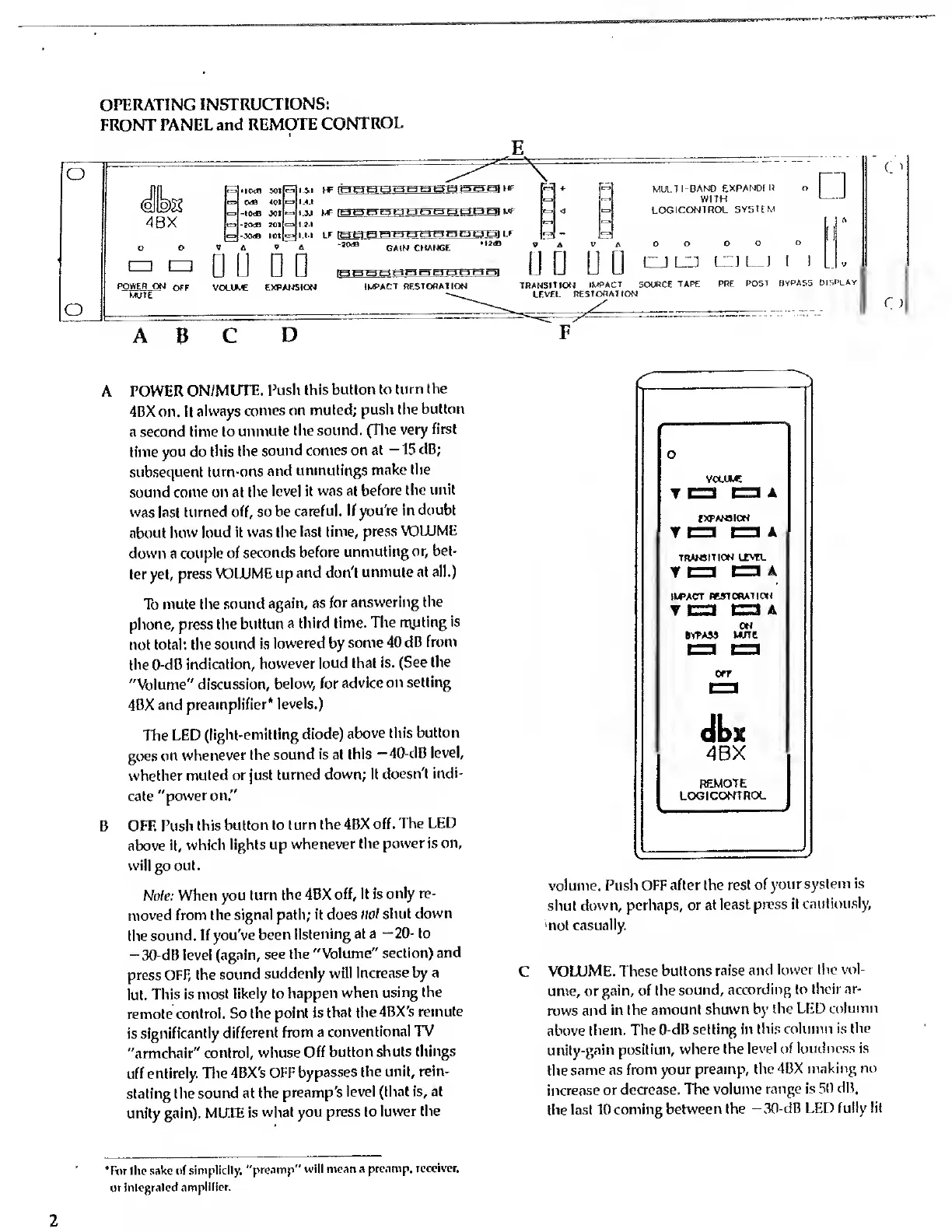
A POWER
ON/MUTE.
Push
this
button to
turn the
4BX on. It
always
comes on
muted;
push
the
button
a second time
to unmute
the
sound.
(The very
first
time
you do this
the
sound comes
on at
-
15
dB;
subsequent
turn-ons and
unmutings
make
the
sound come on at the
level it
was at
before
the unit
was
last
turned
off,
so
be
careful. If
you're in
doubt
about how loud
it was the
last time,
press
VOLUME
down a
couple of
seconds
before
unmuting
or, bet-
ter yet,
press
VOLUME up
and don't
unmute
at all.)
To mute the
sound
again, as for
answering the
phone, press the
button a
third time.
The
muting
is
not total: the
sound
is
lowered by
some 40
dB
from
the 0-dB
indication,
however
loud that
is. (See
the
"Volume"
discussion,
below, for
advice
on
setting
4BX and
preamplifier*
levels.)
The
LED
(light-emitting
diode)
above
this
button
goes
on
whenever the
sound is at
this
-40-dB
level,
whether
muted or just
turned down;
it
doesn't
indi-
cate
"power on."
B
OFF.
Push
this
button to
turn the 4BX
off.
The
LED
above
it, which
lights up
whenever the
power is on,
will
go out.
Note: When
you turn
the 4BX
off, it is
only re-
moved from the
signal path; it does
not shut
down
the
sound. If you've
been
listening at a
-20-
to
-30-dB level
(again,
see the
"Volume"
section)
and
press
OFF, the
sound
suddenly
will
increase
by
a
lot.
This is
most likely to
happen
when
using the
remote
control. So
the
point is
that the 4BX's
remote
is significantly
different
from a
conventional TV
"armchair"
control,
whose Off
button
shuts things
off
entirely.
The
4BX's OFF
bypasses
the unit, rein-
stating the sound
at the
preamp's
level (that is, at
unity gain).
MUTE is
what you
press to
lower
the
o
VOLUME
TD
DA
EXPANSION
TO
PA
TRANSITION
LEVEL
IWACT
RESTORATION
TP
Di
ON
bypass
Mine
4BX
REMOTE
LOGICONTROL
volume. Push
OFF after the
rest of
your
system is
shut
down, perhaps,
or at least
press it
cautiously,
not casually.
C
VOLUME. These
buttons
raise and
lower the vol-
ume,
or
gain, of the
sound,
according to
their ar-
rows
and in the
amount shown by
the LED
column
above
them. The
0-dB
setting
in
this
column
is the
unity-gain position,
where the
level
of loudness is
the same
as
from your
preamp, the 4BX
making no
increase or
decrease. The
volume range is 50
dB,
the last 10 coming
between
the -30-dB LED
fully lit
Tt>r the
sake
of
simplicity,
"preamp"
will
mean a
preamp, receiver,
or integrated
amplifier.

Related product manuals