EasyManua.ls Logo

dbx 4BX - Rear Jacks and Connections; Preamp and Tape Recorder Hookups

dbx 4BX
18 pages
Print Icon
To Next Page IconTo Next Page
To Previous Page IconTo Previous Page
Loading...
CONNECTIONS:
REAR
JACKS
and
CONTROLS
>.'*.< 1
1
«.»".»
rntkur
pcceiyc*
©i
F
G
o
o
MM
«COR0E«
J)
9
B
D
E
A
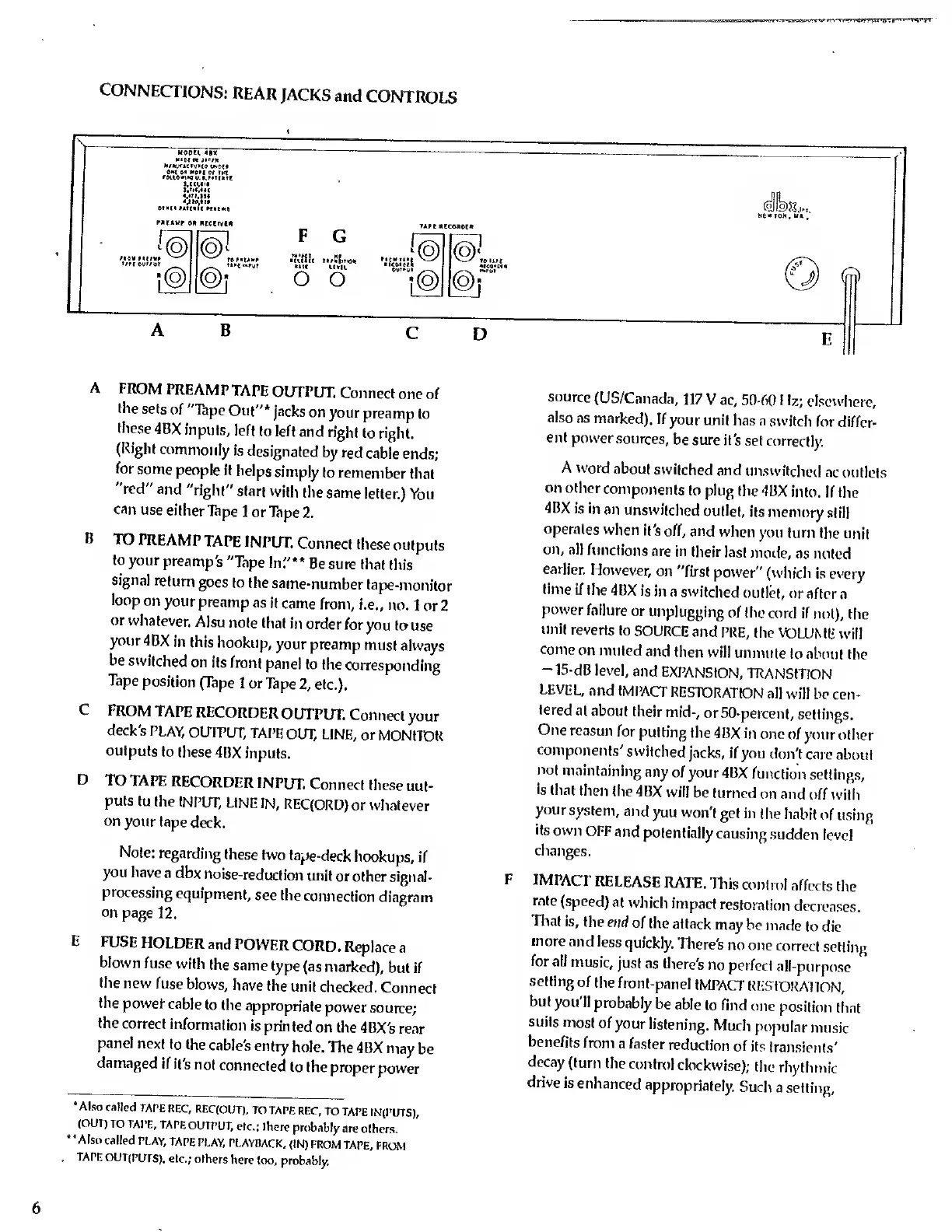
FROM
PREAMPTAPE
OUTPUT.
Connect
one
of
the
sets
of
"Tape
Out"*
jacks
on
your preamp
to
these
4BX
inputs,
left
to left
and
right
to right.
(Right
commonly
is
designated
by red
cable
ends;
for
some
people
it
helps
simply
to
remember
that
"red"
and
"right"
start
with
the
same
letter.)
You
can
use
either
Tape
1 or
Tape
2.
B
TO
PREAMPTAPE
INPUT.
Connect
these
outputs
to
your
preamp's
"Tape
In'.'**
Be
sure that
this
signal
return
goes to
the
same-number
tape-monitor
loop
on
your
preamp
as
it
came
from,
i.e.,
no.
1 or 2
or
whatever.
Also
note
that
in order
for
you
to
use
your
4BX
in
this
hookup,
your preamp
must
always
be
switched
on
its
front
panel
to
the
corresponding
Tape
position
(Tape
1 or
Tape
2,
etc.).
C
FROM
TAPE
RECORDER
OUTPUT.
Connect
your
deck's
PLAY,
OUTPUT,
TAPE
OUT, LINE,
or
MONITOR
outputs
to
these
4BX
inputs.
D
TO
TAPE
RECORDER
INPUT.
Connect
these
out-
puts
to
the
INPUT,
LINE
IN,
REQORD)
or whatever
on
your tape
deck.
Note:
regarding
these
two
tape-deck
hookups,
if
you have
a dbx
noise-reduction
unit
or other signal-
processing
equipment,
see the
connection
diagram
on
page
12.
E
FUSE
HOLDER
and
POWER
CORD.
Replace
a
blown
fuse
with
the
same
type
(as
marked),
but if
the
new
fuse
blows,
have
the
unit
checked.
Connect
the
power- cable
to the
appropriate
power
source;
the
correct
information
is printed
on the
4BX's rear
panel
next to
the
cable's
entry
hole.
The
4BX
may
be
damaged
if
it's
not
connected
to
the
proper
power
source
(US/Canada,
117
V ac, 50-60
1
\z; elsewhere,
also
as
marked).
If
your
unit
has a
switch
for
differ-
ent
power
sources,
be sure
it's
set correctly.
A word
about
switched
and
unswilched
ac
outlets
on
other
components
to plug
the 4BX
into. If
the
4BX
is in
an
unswilched
outlet,
its
memory
still
operates
when
it's
off, and
when
you
turn the
unit
on,
all
functions
are
in
their last
mode,
as noted
earlier.
However,
on
"first
power"
(which
Is every
time
if
the
4BX is
in a
switched
outlet, or
after
a
power
failure
or
unplugging
of the
cord if
not),
the
unit reverts
to
SOURCE
and
PRE,
the
VOLUME
will
come
on
muted
and
then
will
unmule
to
about the
-15-dB level,
and
EXPANSION,
TRANSITION
LEVEL,
and
IMPACT
RESTORATION
all
will be
cen-
tered
at
about
their
mid-,
or
50-percent,
settings.
One
reason
for
putting
the
4BX
in one
of your
other
components'
switched
jacks, if
you
don't care
about
not
maintaining
any
of your
4BX
function
settings,
is
that
then
the 4BX
will
be
turned
on and
off with
your
system,
and
you
won't
get in
the habit
of
using
its
own
OFF
and
potentially
causing
sudden
level
changes.
F
IMPACT
RELEASE
RATE.
This
control
affects
the
rate
(speed)
at
which
impact
restoration
decreases.
That
is,
the end
of
the
attack
may be
made
to die
more
and
less
quickly.
There's
no
one
correct
setting
for all
music,
just
as
there's
no
perfect
all-purpose
setting
of
the
front-panel
IMPACT
RESTORATION,
but
you'll
probably
be
able
to
find
one
position
that
suits
most of
your listening.
Much
popular
music
benefits
from
a faster
reduction
of its
transients'
decay
(turn the
contn>!
clockwise);
the
rhythmic
drive
is enhanced
appropriately.
Such
a setting,
Also
called
TAPE
REC,
REC(OUT),
TO
TAPE
REC, TO
TAPE
IN(PUTS),
(OUT)
TO TAPE,
TAPE
OUTPUT,
etc.; Ihere
probably
are
olhers.
"Also
called
PLAY,
TAPE
PLAY,
PLAYBACK,
(IN) FROM
TAPE,
FROM
.
TAPE
OUT(PUrS),
etc.;
olhers
here
too,
probably.

Related product manuals