32
CARE AND CLEANING
Removing and replacing the sliding shelves and side racks
1 To remove a sliding shelf, grip it by its two front corners (making sure you are gripping
the wire shelf and the sliding frame together), tilt upwards and pull it out of the oven.
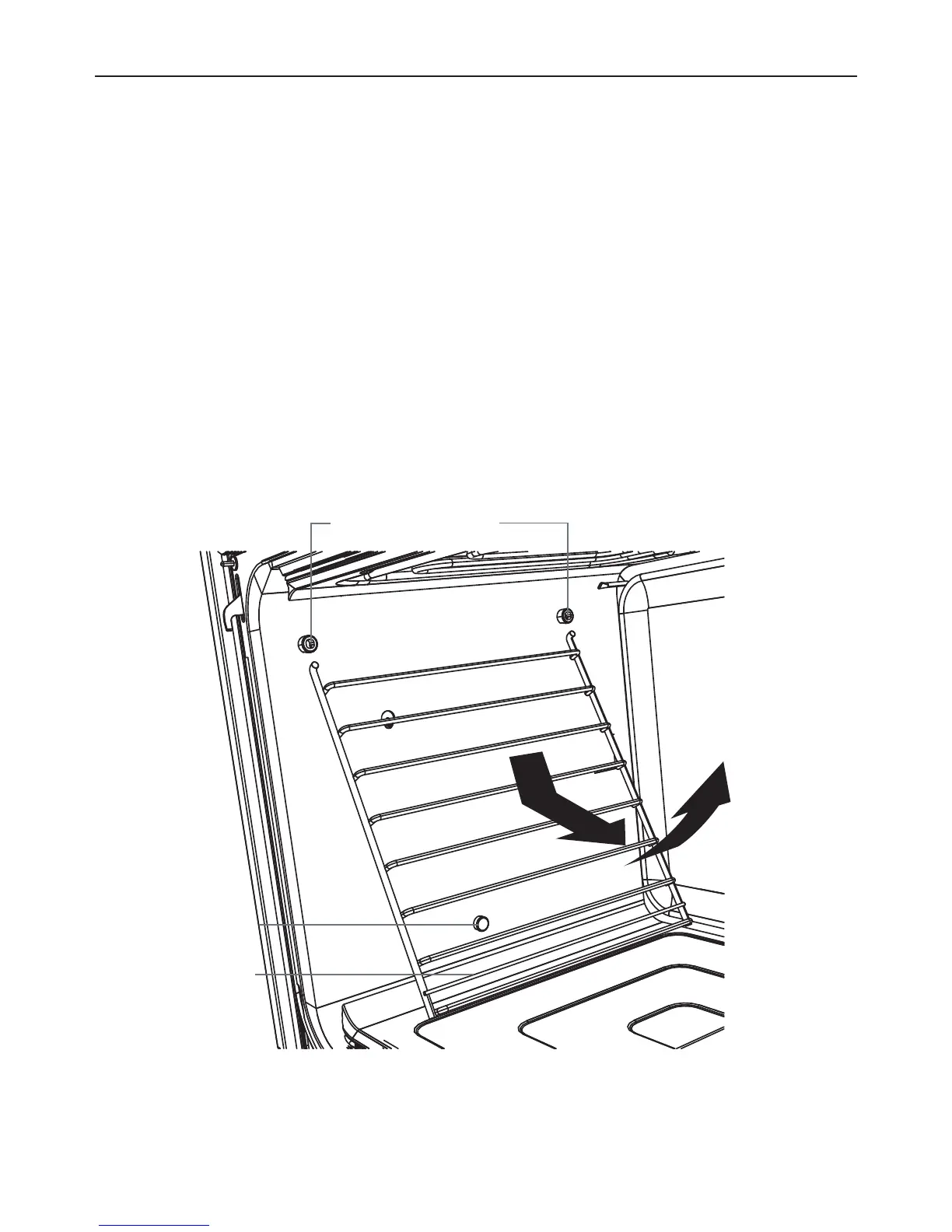
2 To remove the side racks, gently push the retaining wire from underneath the lock stud,
then swing the lowest edge of the side rack up and out towards the center of the oven
until the rack is almost horizontal. The prongs at the top will slide out of the mounting
slots.
3 To replace the side racks, hold them almost horizontally and locate the prongs into the
small mounting slots at the top of the oven cavity. While you are doing this, support the
rack with your hand from underneath, to ensure that both prongs perfectly locate into
the mounting slots.
4 Lower the side racks carefully and gently place the retaining wire underneath the lock
stud.
IMPORTANT!
Do not lower the side racks until the prongs are fully inserted into the slots so that
you do not chip the enamel.
Mounting slots
Retaining wire
Lock stud


 To Next Page