4
OPERATION
THERMOSTAT: To adjust the temperature
to your individual requirements, turn the
thermostat dial to the right (clockwise) to
increase the temperature and to the left to
decrease the temperature. This thermostat
control dial can only be used while the
I/O switch and heating switch are in the
“I” position. When the heater reaches
the desired temperature, the heater and
heating indicator light will turn off, but the
fan will continue to operate. Adjust this
knob to restart the heater.NOTE: When
the FLAME switch is turned to the OFF
position, all other heater functions will stop
even though the switches may be in the “I”
position.
THERMOSTAT CONTROL
The heat output is controlled by the
thermostat, according to the room
temperature. Set the thermostat dial fully
clockwise to the maximum position initially.
When the room is warm enough, reduce the
setting by slowly turning the thermostat dial
anti-clockwise until the heater just clicks OFF.
This will then maintain the room temperature
at the desired level.
CAUTION:
If you use this heater in conjunction with a
thermal control, a program controller, a timer
or any other device that switches the heater on
automatically, remember to observe all safety
warnings at all times.
The stove heater has safety overheat
protection. If the overheat protection trips,
switch off all switch buttons and wait
approximately 5 -10 minutes. It should reset
automatically once the unit cools down.
WARNING
Disconnect power and unplug the power
cord before attempting any maintenance or
cleaning to reduce the risk of fire, electric
shock or personal injury. The bulbs in your
unit can become extremely hot. Allow at least
10 minutes between turning off the unit and
removing the light bulbs to avoid accidental
burning of the skin.
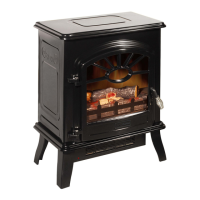
FLAME EFFECT
The fire effect is created with the use of a
40 watt B-10 candelabra light bulb with an
E-12 (small) socket base. The light bulb will
have to be replaced from time to time when
they burn out.
During normal operation, the stove heater will
always give you simulated flame function. If
the intensity of flame suddenly increases, it
means that the light bulb is going to burn out.
Replace the light bulb immediately, according
to the instruction. Do not operate the stove
heater when the light bulb burns out or without
the light bulb.
CHANGING THE
LIGHT BULB
STEP 1: Open the door of unit with the handle.
STEP 2: Loosen the 2 screws at the front of
the log set inside the stove. Carefully
lift the logset up far enough to access
the light bulbs. You will find 1 x 40 W
Type B-10 candelabra light bulb with
E-12 socket base at the bottom.
STEP 3: Replace the burned out light



 To Next Page