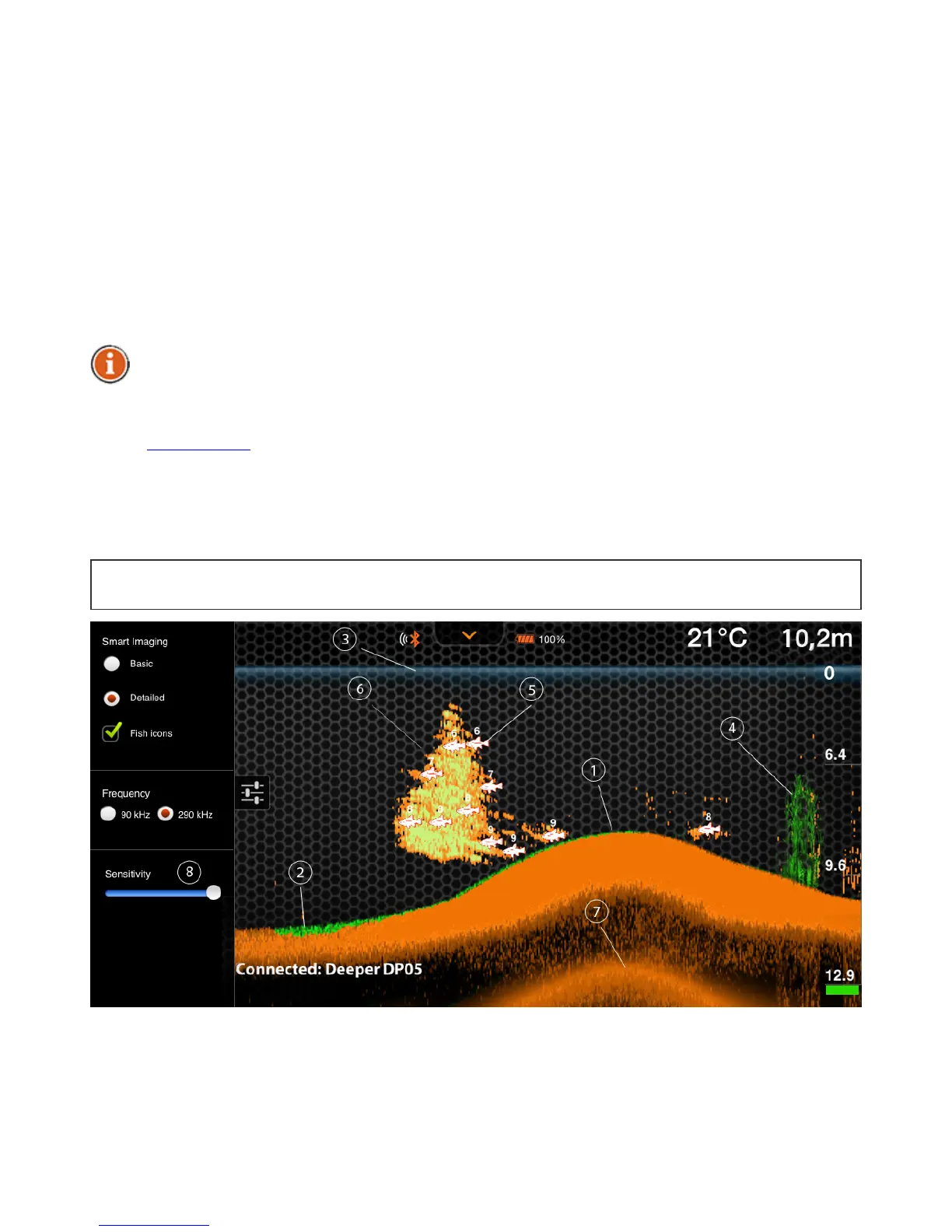
newsonarinformationisreceived,theviewisscrolledtotheleft.
Theapplicationstoreshistoryofthesonardata,whichcanbeaccessedbyclickingonthe
historybutton.Thehistoryviewcanbemanuallyscrolled,givingoverviewofallthe
informationwhichwasacquiredduringthelast15minutesbydefault.Thisperiodcanbe
changedinthesettings.
Theapplicationalsoplayssoundnotificationswhenitspotsafishunderneaththegadgetor
thedepthchangesaccordingtoyoursetvalueswhichcanbeaccessedintheapplication
settings.Thesoundnotificationscanbemutedbythemutebutton.Greenlightindicator
blinksuponreceptionofdatapackages.
Byusingthesoundnotifications,youcanobservethegadgetitselfwhilereelingitinand
getasenseofrealpositionofthefishesandfeaturesofthebottom.Thiscanalsoserveasan
incomingfishalarmwhenthegadgetiskeptstationary.Furthermore,when
navigatingwithaboatyoucanusetheminimumdepthalarmtoavoidgetting
grounded.However,thisshouldonlybeusedasanadditionalprecaution.
BacktoTOP
1. TheDeeperSmartFishfindercanhelpyoutodetermineifthebottomishardorsoft.
Whenthesonarsoundwavesarereflectedbackbythebottom,ahardbottomreturns
astrongersignalthanasoftbottom.Onyoursmartphoneortabletscreensonar
returnsaredisplayedasorange(strongest).brown(medium)andblack(weakest).
Thebottomofthewaterisalwaysgoingtobethestrongestsignal,andthereforethe
mostintensivecolor.Thebottomisthecontinuous,intenselycoloredlinerunning


 To Next Page