EasyManua.ls Logo

deeper Fishfinder - Main Screen Details

deeper Fishfinder
25 pages
Print Icon
To Next Page IconTo Next Page
To Previous Page IconTo Previous Page
Loading...
2014-9-24 Deeper User Guide
file://localhost/Users/MAD/Downloads/Manual/index_en.html 7/25
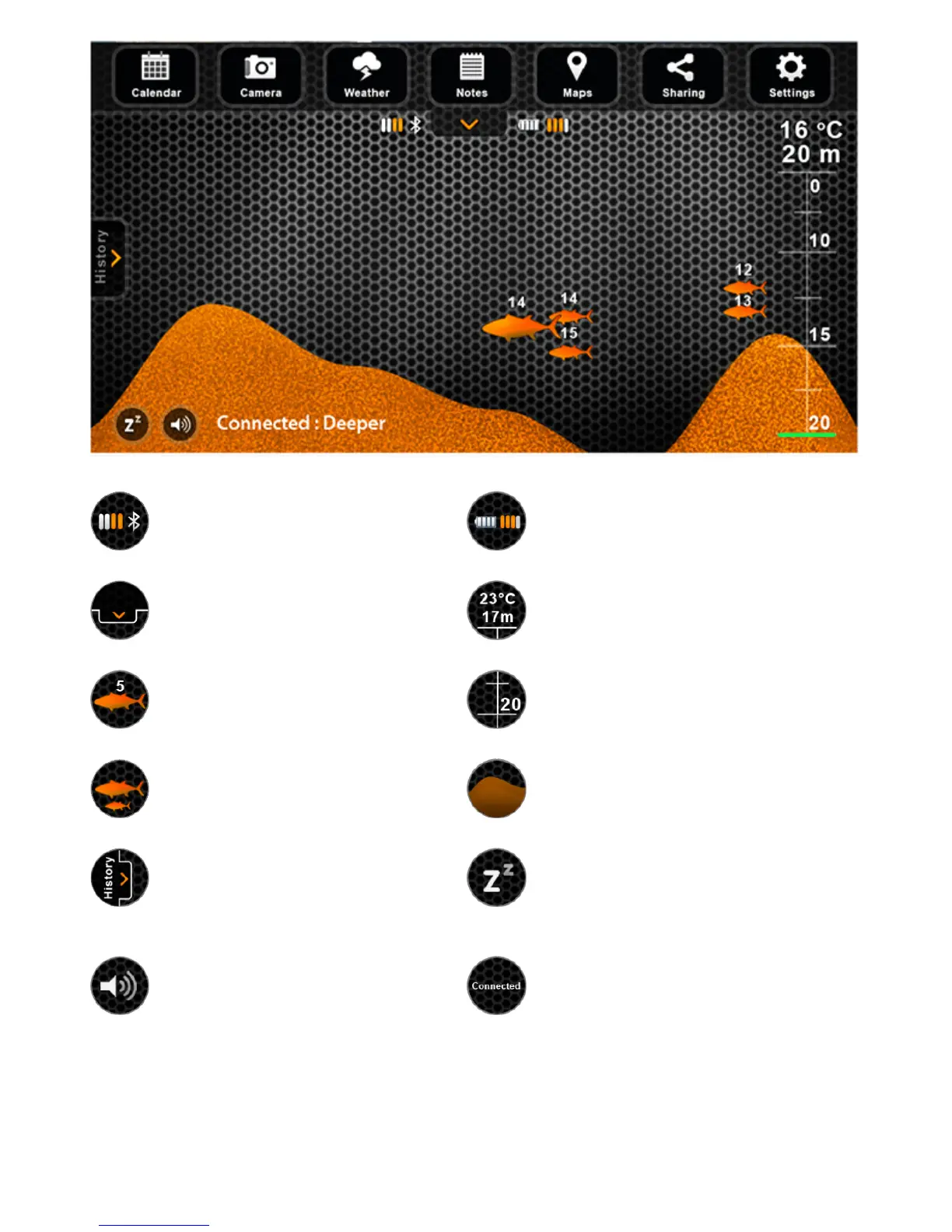
Bluetoothsignalstrength Batterylevelofthe
Deepergadget
Showsandhidesthe
menubar
Watertemperatureand
depthatthecurrent
gadgetposition
Depthofafish Selfadjustingdepthscale
Fishpositionandits
relativesize
Floor
Openshistoryofthe
sonarview
Putsthegadgetintoa
lowpowerconsumption
sleepmodeorwakesit
up
Mutes/Unmutessounds Statusofthedevice
Themainscreendisplaysinterpretedsonarinformation.Thetopofthescreencorresponds
tophysicalwatersurfaceattheclosestproximityofDeeper.Thebottomofthescreen
correspondstothewaterdepth.
Thesonarpicksuponlywhatisunderneathit.Therightsideofthescreendisplaysmore
recentsonarscaninformation,theedgeofitrepresentscurrentinformation.Whenever

Related product manuals