Need Help? Visit defendercameras.com/support
9
Setting Up Motion Detection
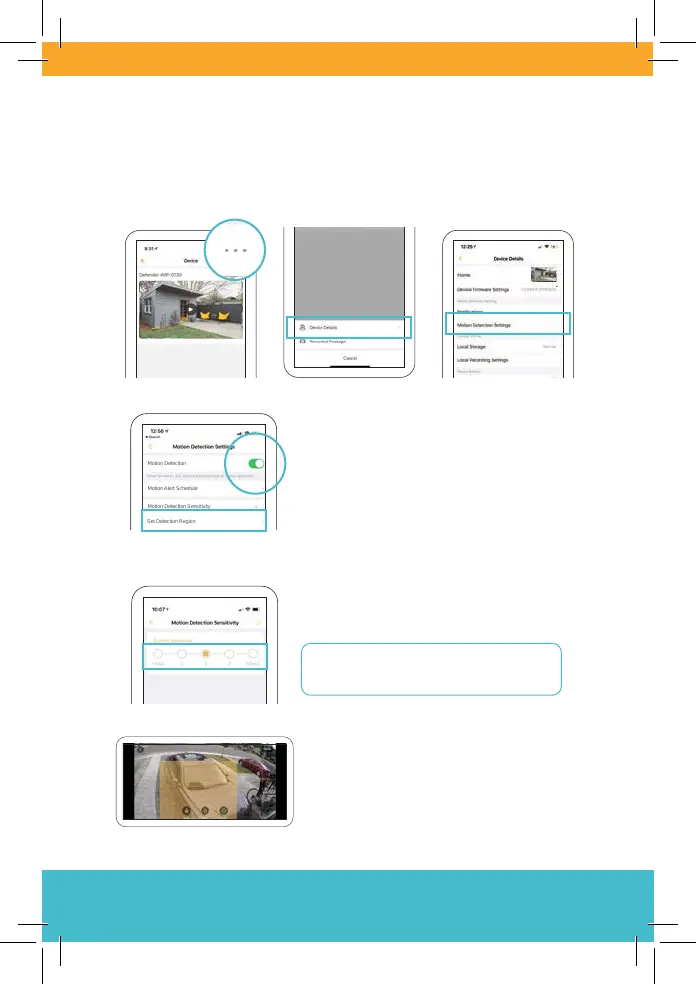
To access notication settings, open Device Details (on the home
screen, tap • • •) and then Motion Detection Settings.
You can turn on or o Motion Detection.
Set an activity region via Set Detection
Region so that you only get the most
important alerts.
Set how sensitive your camera is to
motion on a scale of 1-5 by tapping
Motion Detection Sensitivity.
Start with Level 2 or 3 for best results.
Levels 4 and 5 may be too sensitive!
Tap (or drag) to select a detection
region(s). Region(s) highlighted in
orange detect motion.
Motion Detection Sensitivity



 To Next Page