9 HOMEDEPOT.com
Please contact 1-866-308-3976 for further assistance.
Operation (continued)
7
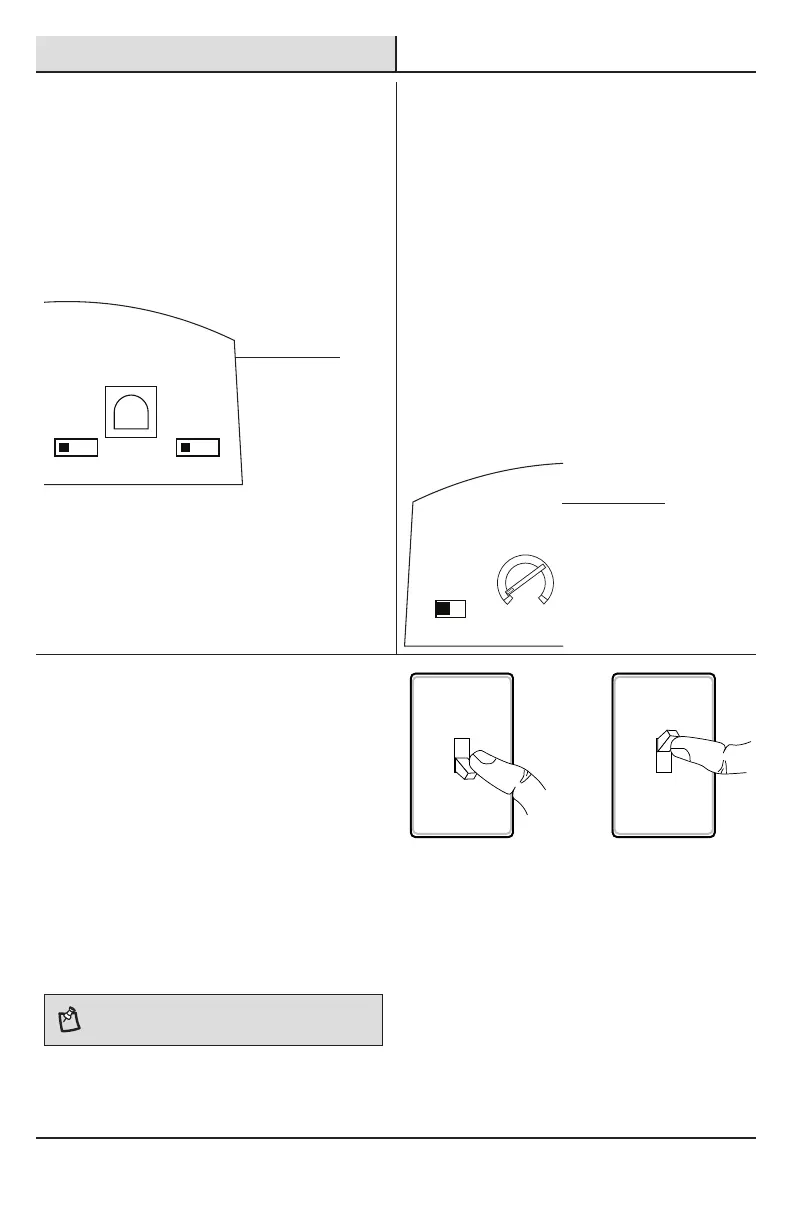
Adjusting the DUALBRITE
Switch
The “DUALBRITE” switch determines the amount of
time the lights stay on at a reduced light level after
sundown. Switching this setting to “OFF” will not
effect the “ON-TIME” setting.
□ Set the “DUALBRITE” switch to OFF, 3 hours, 6
hours, or dusk-to-dawn (sunset to sunrise).
ON-TIME DUAL BRITE
®
TEST 1 5 20
MINUTES
OFF 3 6 DUSK TO
HOUR DAWN
NORMAL SOFT FLASH
MAXMIN
RANGE
8
Adjusting the LAMP MODE
Switch
The “LAMP MODE” switch determines the way the
lights will turn on when motion is detected.
□ Security (“NORMAL”) - Light comes on instantly.
□ BulbSaver (“SOFT”) - Light comes on dim and
gradually increases to full brightness. When the
light turns off it will gradually dim to half-bright,
pause, and then will continue dimming until the
light turns off.
□ AlertFlash (“FLASH”) - Light ashes on
then off twice before turning on full
brightness.
□ Set the “LAMP MODE” to “NORMAL”, “SOFT”,
or “FLASH” position.
LAMP MODE
ON-TIME DUAL BRITE
®
TEST 1 5 20
MINUTES
OFF 3 6 DUSK TO
HOUR DAWN
NORMAL SOFT FLASH
MAXMIN
RANGE
9
Using Manual Mode
Manual mode overrides the motion sensor (C) and
“ON-TIME” control so the light will operate full bright.
This feature only works at night and only for one night
at a time. The motion sensor (C) will reset to motion
sensing mode after 6 hours or sunrise, whichever
comes rst. Manual mode can be toggled on and off
using a wall switch.
□ To turn manual mode on, switch the light off
at the wall switch for 3 to 4 seconds and then
back on.
□ To turn manual mode off, switch the light off
at the wall switch for 3 to 4 seconds and then
back on.
NOTE: If the power to the light xture is off for more than
5 seconds, allow the motion sensor to warm up prior to
switching to manual mode.
Turn the switch
OFF for 3 to 4
seconds
Turn the
switch
back ON
C
C




 To Next Page