9 HOMEDEPOT.CA
Please contact 1-866-308-3976 for further assistance.
Operation
1
Use the light
□ Once the light is activated by the motion detector, any
subsequent detection restarts the timer at the beginning.
□ The motion detector responds to heat radiation. When
outdoor temperatures are low, it is more sensitive to body
heat than when outdoor temperatures are warm.
□ Adjust the motion sensor so that it faces the area where
motion is most likely to be detected. You can move it up
and down by adjusting the screw on the neck of the motion
detector.
2
Use the control dials
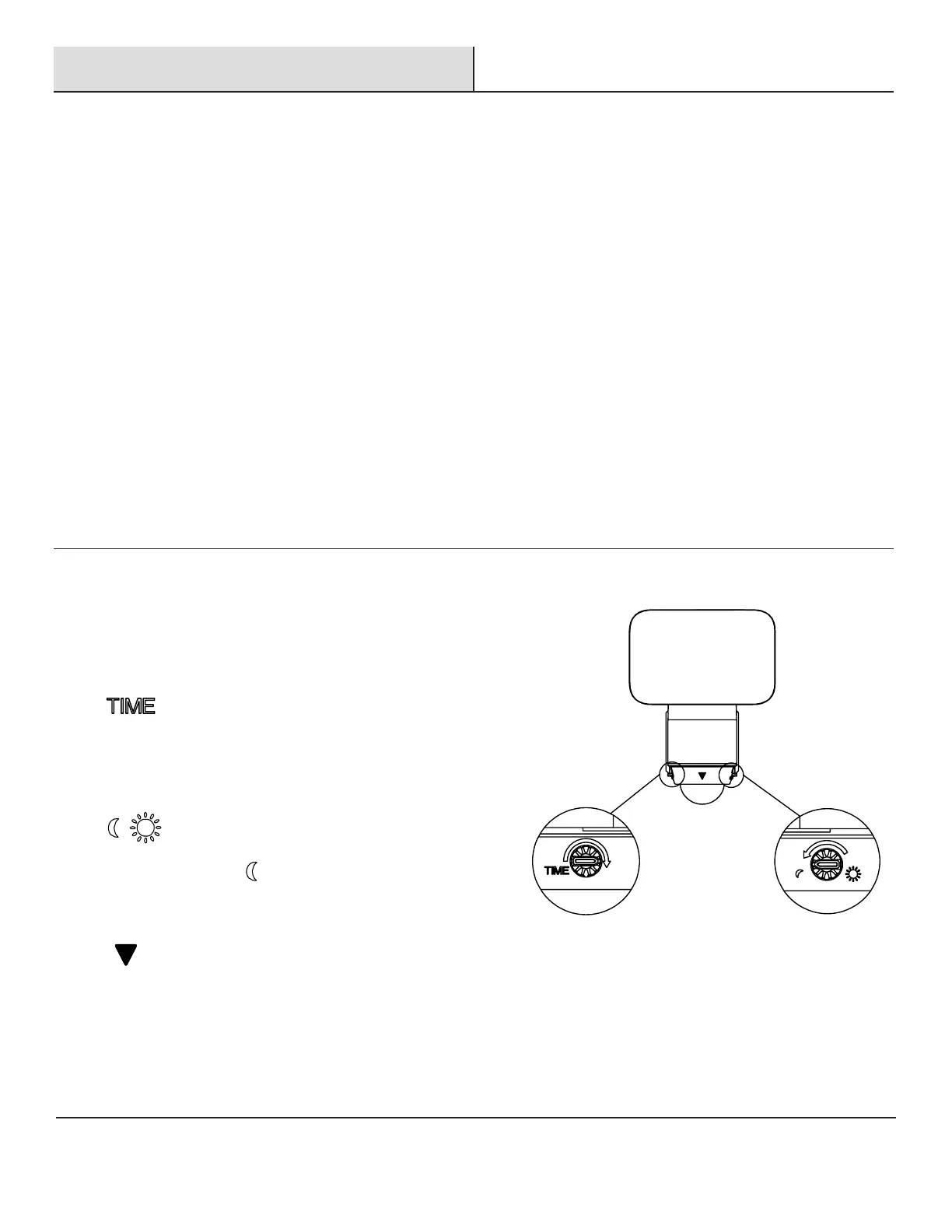
□ The security light has two different control dials which allow
you to adjust the settings. These control dials are located
underneath the motion detector head.
□ Time: This dial sets the duration of time that the
light will stay illuminated after motion has been detected.
The time can be adjusted from 3 seconds to 7 minutes.
Rotating the dial clockwise will extend the time the lamp is
illuminated.
□ Lux: This dial controls the sensitivity to light
which determines the level of darkness reached before the
light turns on. If set to level, the light will turn on in the
dark. This is the most ideal position for general evening
and night operation.
□ The triangle symbol marks the location of the front
of the sensor head.


 To Next Page