Keypad is temporarily disabled for 1 minute after 4 consecutive incorrect entries.
2 PROGRAMMING
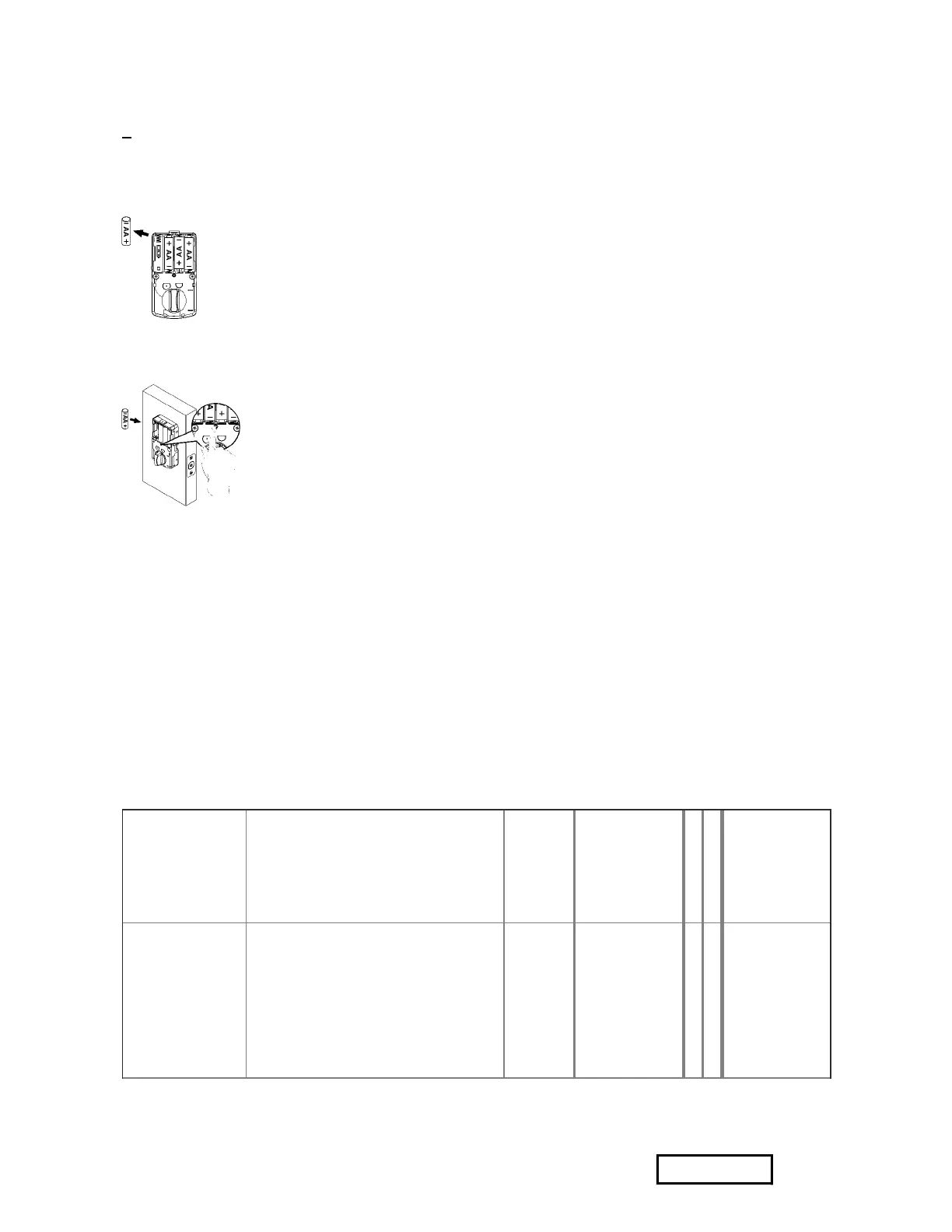
RESTORE TO FACTORY SETTINGS
(/fullviews/1749761/1749761_files/1749761-35.png)
Remove one battery
(/fullviews/1749761/1749761_files/1749761-36.png)
Press and hold SET button while inserting the battery back. Hold the set button until long beep
over.
1. This will erase all stored information, including bolt direction
2. Please re-enter the default Programming Code to set up the lock after restoring to factory
settings.
^ HOW TO PROGRAM THE LOCKSET
BASIC SETTINGS
Change
Programming
Code
・ Programming Code can be
used to program or unlock the
lockset. ・ The default
Programming Code is “123456”.
Press
[SET]
for 1
second.
Programming
Code (6
digits)
1 0
New
Programming
Code(6
digits)
Add a User
Code(S)
・ User Code can be used to
unlock the lockset.
・User Code cappcity: 10 sets (4-
6 digits).
Press
[SET]
for 1
second.
Programming
Code (6
digits)
2 0
New User
Code (4-6
digits)
Add another
code
Your experience on this site will be improved by allowing cookies. Allow cookies


 To Next Page