Page 20
Maximum time that can be set for end
of cooking is 5 hours 59 minutes.
Program will be cancelled in case of
power failure. You must reprogram
the oven.
While making any setting, related
symbols will flash on the display. You
must wait for a short time for the
settings to take effect.
If no cooking setting is made, time of
the day cannot be set.
Remaining time will be displayed if
cooking time is set when the cooking
starts.
Using the oven clock
To set a cooking duration:
(Please note that this function is applicable
to the bottom oven only).
The bottom oven can be programmed to
automatically turn off after a set amount of
time. To do this:
1. Touch (tap) until appears flashing
on the display for cooking duration
2. Set the desired cooking duration with /
keys.
>> The display counts down when cooking
commences. The symbol visualises the
progress of the cooking duration. The
symbol is divided into 4 equal parts which
turn off after each quarter of the cooking
duration has been completed.
3. After the cooking duration is completed,
“End” appears on the display and the timer
gives an audible signal.
4. The audio warning sounds for 2 minutes.
To stop the audio warning, press any key.
The audio warning will be silenced and the
current time will be displayed.
>> If you are not available to cancel the
audio signal, the bottom oven will switch off
and stay off until your next command.
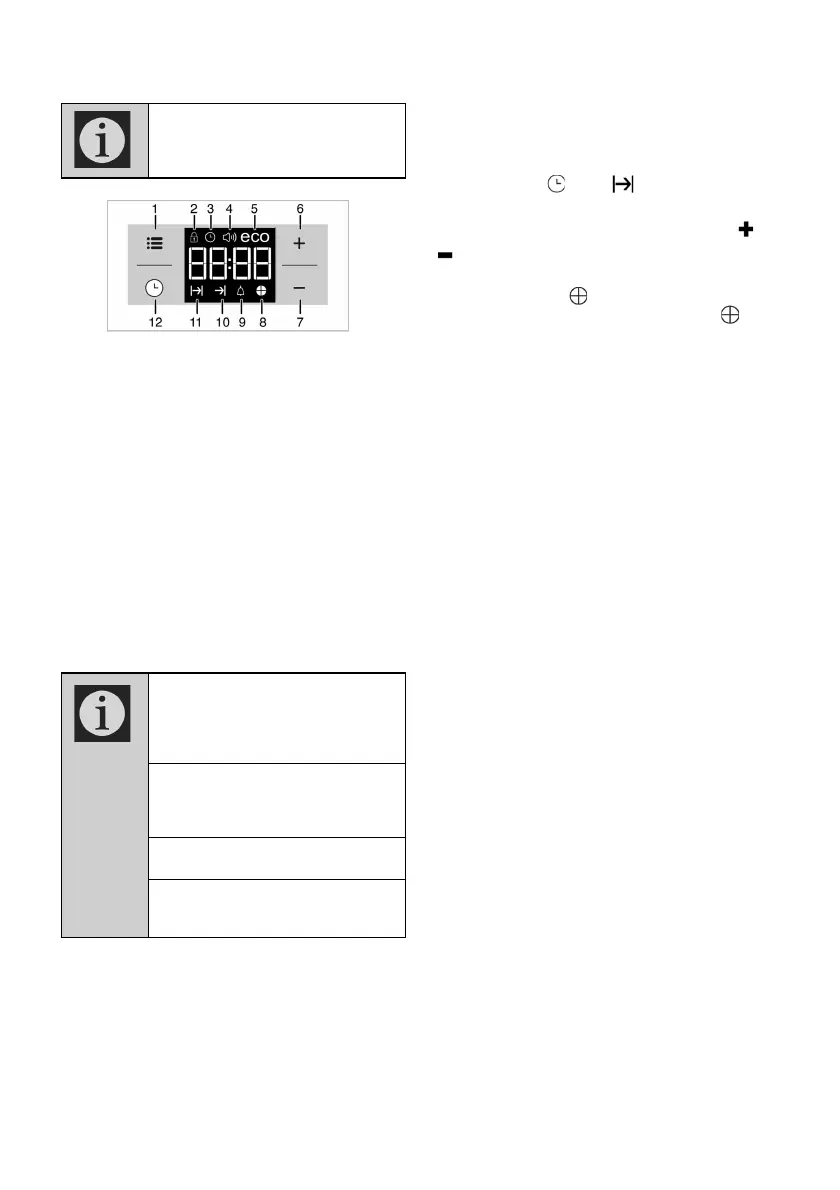
1
Adjustment key
2
Keylock symbol
3
Clock symbol
4
Alarm volume symbol
5
Eco mode symbol
6
Plus key
7
Minus key
8
Time pie symbol
9
Alarm symbol
10
End of Cooking Time symbol
11
Cooking Time symbol
12 Program key
Please note:
The clock with its functions relates to
the bottom oven only, and not to the
top oven.


 To Next Page