11
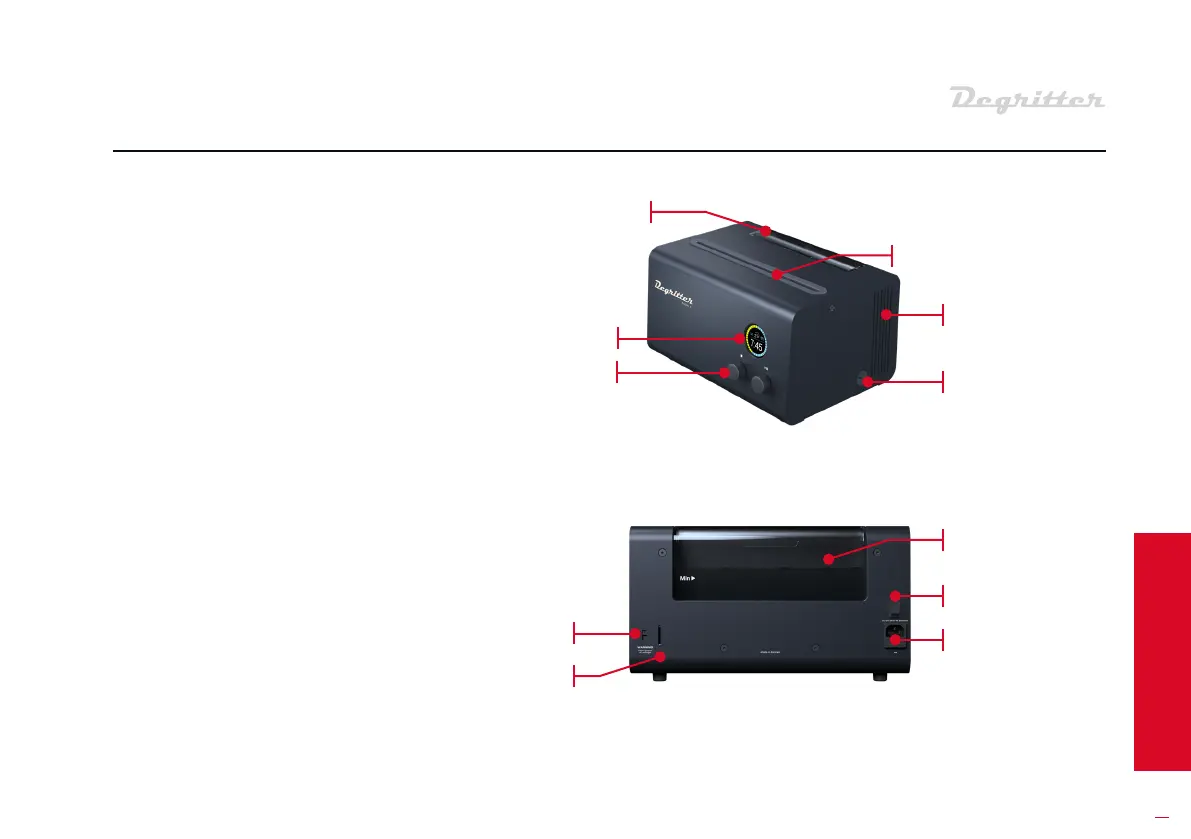
The Degritter is controlled using the
buttons on the front of the machine.
Records are inseed into the slot on
top of the machine. The water tank
is accessible from the top of the
machine. There are veical ventila-
tion openings on both side panels.
The circular cap in the lower half of
the right side panel is the access
po to the water filter.
On the right side of the rear panel
are the AC cable input and the AC
on-o switch. The AC cable input
socket contains the fuse drawer. On
the le side are the AC select slide-
switch and the SD card input slot.
03 MACHINE OVERVIEW
MACHINE REAR PANEL
MACHINE FRONT
& SIDE PANELS
WATER
TANK
SCREEN
BUTTONS
Record slot
WATER TANK
VENTILATION slots
AC SWITCH
AC INPUT
& FUSE
AC SELECT
SD card slot
Filter access


 To Next Page