-9-
12. TC Setting
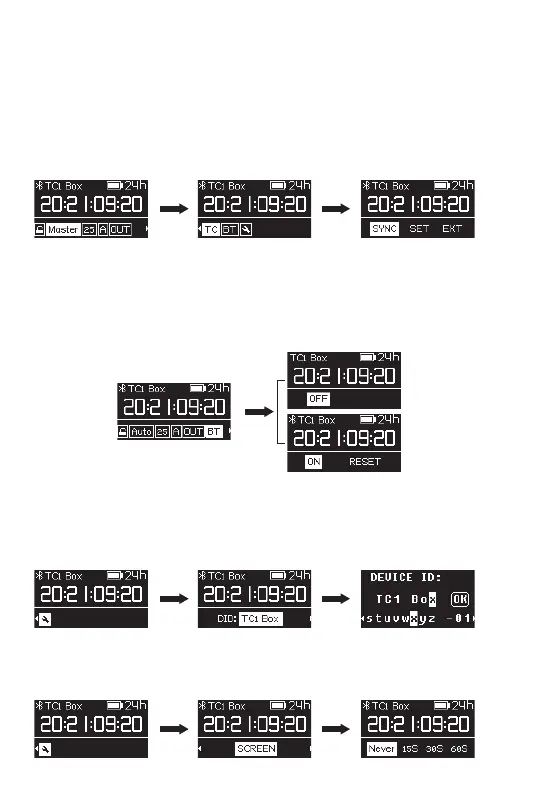
When the TC-1 working mode is set to "Master Run," there are three options for TC
setting:
SYNC: Feed timecode to other devices.
SET: Feed timecode to other devices starting from 00:00:00:00 or any custom
timecode starting point.
EXT: TC-1 can detect and be jam-synced by an external timecode source through
the 3.5mm jack.
13. BT setting
Select BT and you can turn the Bluetooth function on/off. Bluetooth is disabled by
default.
Select RESET and YES to reset the Bluetooth.The ”SUCCESS “ message indicates that
the reset is complete.
14. General Settings
(1) Enter the "DID" option in General Settings to set a new device name by simply
short-pressing the control wheel. Choosing different names for your TC-1 will help
to better identify different TC-1 units in the monitoring screen of the Sidus Audio™
App.
(2) Enter the “SCREEN” option in the General Settings menu to set the lock screen
time (system default 15s). The are four options: Never, 15S, 30S, 60S. After first use,
TC-1 will boot with your last screen lock setting.



 To Next Page