EasyManua.ls Logo

Deity TC-1 - User Manual

Deity TC-1
15 pages
Print Icon
To Next Page IconTo Next Page
Loading...
Product Manual
English
Wireless Timecode Expanded
Timecode Box TC-1
Question and Answer IconNeed help?

Do you have a question about the Deity TC-1 and is the answer not in the manual?

Summary

Foreword

Instructions

Product Handling and Safety

Guidance on proper handling, cleaning, and warnings for product use and storage.

FCC Compliance Statement

RF Warning Statement

Statement regarding RF exposure evaluation and usage conditions for the device.

Intended Use

Packing List

Nomenclature

Connecting to Recording Devices

Functions and Operations

Function Control Wheel

Explains how to use the function control wheel for navigation and selection.

MENU;BACK Button

Details the functions of the MENU/BACK button for power, navigation, and screen locking.

Mounting Options

Describes how to attach the TC-1 using the cold shoe mount or hook-and-loop fastener.

Charging

Information on the built-in rechargeable battery, charging cable, and LED indicators.

Built-In Microphone

Details the use of the built-in microphone for reference sound recording.

OLED Display Overview

An overview of the OLED display elements and their meanings.

Lock;Unlock Setting

Instructions on how to lock and unlock the screen to prevent accidental changes.

TC-1 Mode Selection

Explains the three operating modes: Master Run, Auto Jam, and Jam Once And Lock.

FPS Setting

Guidance on setting the frame rate for timecode output.

Channel Setting

Instructions for setting the channel for wireless synchronization between TC-1 units.

Out Type Setting

Details the different timecode output types (Line In, Line Out, Audio Out).

TC Setting

Configuration options for timecode settings in Master Run mode.

BT Setting

Instructions for managing the Bluetooth function, including turning it on/off.

General Settings

Covers settings for device ID, screen lock timers, and system resets.

Firmware Update

Steps for updating the device firmware via USB drive or Sidus Audio App.

Setup Sidus Audio App for IOS & Android

Timecode Synchronization

Cable Sync

Procedure for jam-syncing the TC-1 using a 3.5mm audio cable.

Wireless Master Sync

How to synchronize multiple TC-1 units wirelessly from a master unit.

Wireless Sync via Sidus Audio

Synchronizing TC-1 units wirelessly using the Sidus Audio App and Bluetooth.

Specifications

Overview

The Deity Timecode Box TC-1 is a wireless timecode synchronization device designed to streamline the workflow for various recording setups, including cameras, audio recorders, and smart slates. This product manual provides comprehensive instructions for its operation, maintenance, and integration into professional production environments.

Function Description

The primary function of the TC-1 is to generate and synchronize timecode across multiple recording devices, ensuring frame accuracy throughout a shoot. It utilizes a precision oscillator to maintain high timecode accuracy, with a deviation of less than 1 frame per 48 hours. The device supports SMPTE timecode and offers both wireless and wired synchronization options.

For wireless synchronization, the TC-1 employs 2.4G RF and Bluetooth technology. When operating in "Master Run" mode, a TC-1 unit can wirelessly output timecode to other TC-1 units set to "Auto Jam" or "Jam Once And Lock" modes within the same group. This allows for seamless timecode distribution without the need for physical connections. The device can also be controlled and monitored via the Sidus Audio™ App for iOS and Android, which enhances its functionality by allowing users to set timecode, frame rate, device names, output types, and perform firmware updates remotely.

In addition to wireless capabilities, the TC-1 supports wired synchronization via its 3.5mm input/output jack. This allows the device to be jam-synced by an external timecode source, automatically detecting and adopting the incoming frame rate and timecode. This flexibility ensures compatibility with a wide range of existing equipment and workflows.

The TC-1 also features a built-in omni-directional microphone, which can be used to record reference sound. When connected to a DSLR camera or similar device with a stereo 3.5mm mic input and operating at MIC level with plug-in power, the timecode signal is recorded on the left channel, and the reference sound from the built-in microphone is recorded on the right channel. This provides a convenient way to capture scratch audio alongside timecode.

Usage Features

The TC-1 is designed for ease of use with a clear OLED display and intuitive controls.

  • Function Control Wheel: This wheel allows users to navigate through menus, select various options, and confirm selections with a short press.
  • MENU/BACK Button: A long press of this button powers the TC-1 on or off. It also serves as a "back" button for navigating menus and setup screens. A quick triple-press can lock or unlock the screen, preventing accidental changes during operation.
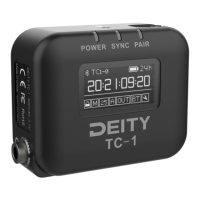
  • OLED Display: The 0.96" OLED display provides real-time information, including timecode, battery status, mode, channel, output type, and Bluetooth status.
  • Mode Selection: The TC-1 offers three main operating modes:
    • Master Run: In this mode, the TC-1 acts as the primary timecode source, wirelessly transmitting timecode to other TC-1 units or allowing wired jam-syncing.
    • Auto Jam: The TC-1 in this mode waits to be jam-synced by an external timecode source, automatically adjusting its timecode to match.
    • Jam Once And Lock: After being synced once, the TC-1 locks its timecode and will not accept further commands from a master TC-1 or the Sidus Audio™ App until manually unlocked.
  • FPS Setting: Users can select from various frame rates, including 23.98, 24, 25, 29.97, 29.97DF (drop frame), and 30, to match the requirements of their recording devices. The system default is 25 FPS.
  • Channel Setting: For wireless synchronization without a mobile device, TC-1 units can be set to the same channel (e.g., group A) to establish a wireless sync connection.
  • Out Type Setting: The output type can be configured as L-IN (Line level timecode input), L-OUT (Line level timecode output), or A-OUT (Mic level timecode output for DSLR devices, recording timecode as an audio signal on one track).
  • TC Setting (Master Run): When in Master Run mode, users can choose to SYNC (feed timecode to other devices), SET (start timecode from 00:00:00:00 or a custom point), or EXT (detect and jam-sync from an external timecode source).
  • Bluetooth Control: The Bluetooth function can be turned on or off, and can be reset if needed.
  • General Settings:
    • DID (Deity ID): Allows users to set custom device names for easier identification in the Sidus Audio™ App.
    • SCREEN: Configures the screen lock time (Never, 15S, 30S, 60S).
    • SYS RESET: Resets the system to default settings.
    • FIRMWARE: Displays the current firmware version and MAC address.
  • Removable Cold Shoe Mount: The TC-1 can be easily attached to cameras or other devices using the included cold shoe mount. Alternatively, it can be installed in a sound bag or other audio device using the backing hook-n-loop directly.
  • Synchronization Indicators: The SYNC LED provides visual feedback on synchronization status: slow flashing red indicates waiting or unsuccessful sync, quick flashing indicates ongoing sync, and solid green indicates successful sync or Master Run mode.

Maintenance Features

The TC-1 is designed for durability and user-friendly maintenance, with several features to ensure longevity and optimal performance.

  • Charging: The device features a built-in, rechargeable Lithium-Polymer battery (950 mAh) that is charged via a USB-C cable (included) connected to a DC adapter (not included). The power LED indicates charging status: flashing red/green during charging, solid green when fully charged, and solid red when approximately 30 minutes of operation time remain. A full charge takes about 3 hours and provides up to 24 hours of operation.
  • Battery Replacement: The battery is replaceable if its performance declines after years of use, extending the overall lifespan of the device.
  • Firmware Updates: Firmware can be updated via a U disk (exFat/Fat32 USB flash drive) using the included USB-C to USB-A Firmware Update Adapter. Users download the latest firmware from the Deity website, place it in the root directory of the U disk, and follow on-screen instructions. The TC-1 also supports firmware updates via the Sidus Audio™ OTA (Over-The-Air) process, offering a convenient wireless update method.
  • Cleaning: The product should only be cleaned with a microfiber or dry cloth.
  • Storage: Store the TC-1 in a dry, clean, dust-free environment to prevent damage.
  • Handling: Operate the device carefully to avoid dropping or hitting it, which could cause damage. Keep all liquids away from the product to prevent short-circuits or mechanical damage.
  • Authorized Service: In case of malfunction, the product should be serviced by an authorized shop. The warranty does not cover repairs for devices subjected to unauthorized disassembly, though chargeable repairs may be requested.
  • Compliance: The product is certified by RoHS, CE, FCC, KC, and Japan MIC, ensuring it meets various regulatory standards. Misuse of the product, however, voids the warranty for repairs.

Deity TC-1 Specifications

General IconGeneral
DisplayOLED
Charging PortUSB-C
TypeTimecode Generator
Mounting Options1/4"-20 thread
Timecode Rate24, 25, 29.97, 30
ConnectivityBluetooth
Timecode Accuracy±0.5 frames within 24 hours
Power SourceRechargeable lithium-ion battery