-8-
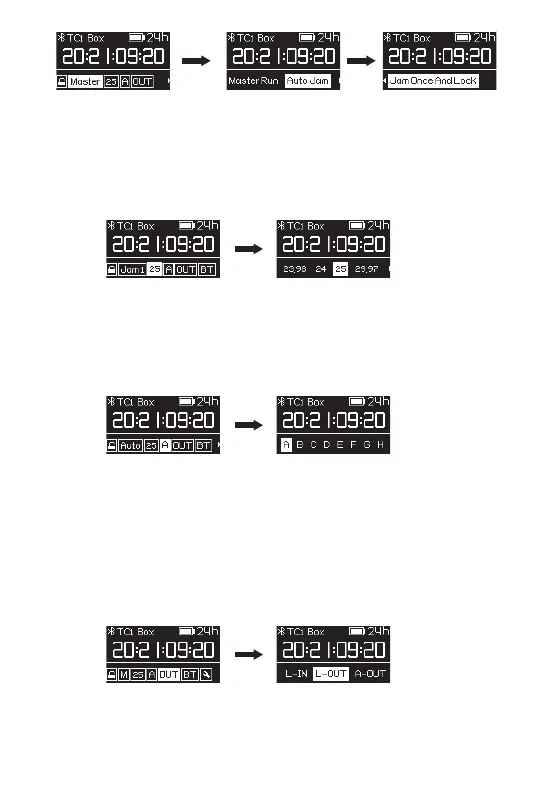
9. FPS Setting
Select "25" and you can set the frame rate for timecode as 23.98, 24, 25, 29.97,
29.97DF, 30. DF stands for drop frame. The system default frame rate is 25.
We recommend setting a suitable frame rate in advance so the TC-1 can feed each
recording device with timecode.
10. Channel Setting
If you don’t have a mobile device at hand, you can synchronize TC-1 units with each
other via wireless sync technology if they have the same channel setting.
The system defaults channel is group A.
11. Out Type Setting
Based on the TC-1 mode and the camera or audio recorder your TC-1 will connect
to, you need to select the correct out type of timecode
L-IN: Requires Line level timecode input.
L-OUT: Outputs Line level timecode .
A-OUT: Outputs Mic level timecode to a DSLR device and timecode is recorded as
an audio signal on one audio track.


 To Next Page