Dejavoo Systems Instruction Manual V525.15 29
RETAIL W/TIP TRANSACTIONS
Credit With Tip – Swiped (and clerk ID Prompt)
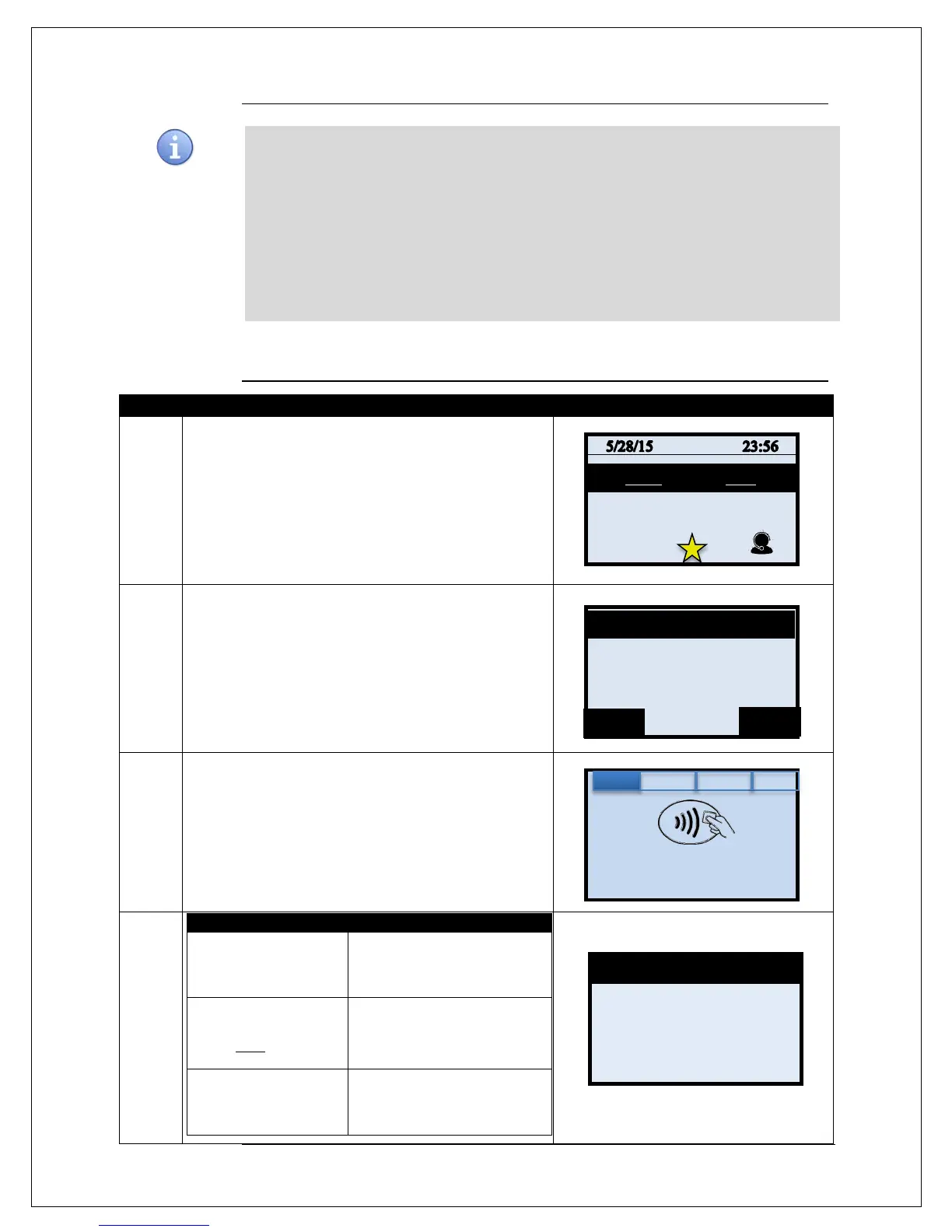
1.
Input the CLERK ID and press OK
2.
Input Sale Amount and Press OK
3.
Tap (contactless only), Swipe or Manually Enter Card
Number
4.
Presale Ticket was
used
Input the tip amount from the
presale ticket then Press OK.
Presale Ticket was
NOT used
Input the tip amount
requested by customer then
Press OK.
No tip is being left on
the card
Press OK to bypass the tip
amount.
Continued on next page
Use the charts in this section to process RETAIL Credit card and Debit card sale transactions
with a tip. For documentation purposes the steps provided include the transaction prompt for
entering CLERK ID, but it should be noted that this and other prompts are configurable in the
terminals SET UP (Transaction Prompts) menu and are optional. Retail with tip can be
enabled and disabled in the terminal menu.
This document includes the following retail with tip transactions:
Enter Amount
0.00
Enter Amount
0.00
CREDIT
Enter Card #
Sale: $5.00


 To Next Page