Dejavoo Systems Instruction Manual V525.15 74
EDIT PASSWORD (CORE MENU)
As stated in the About this Manual section, the Terminal’s default password is 1234. The
default password can be customized to an alphanumeric password of choice. When
changing the password from the default password the first time you are prompted to set up 1
of 3 security questions. If the customized password is ever forgotten it can be retrieved by the
terminal after providing the security information you provided here. For more information on
retrieving a password see page 139.
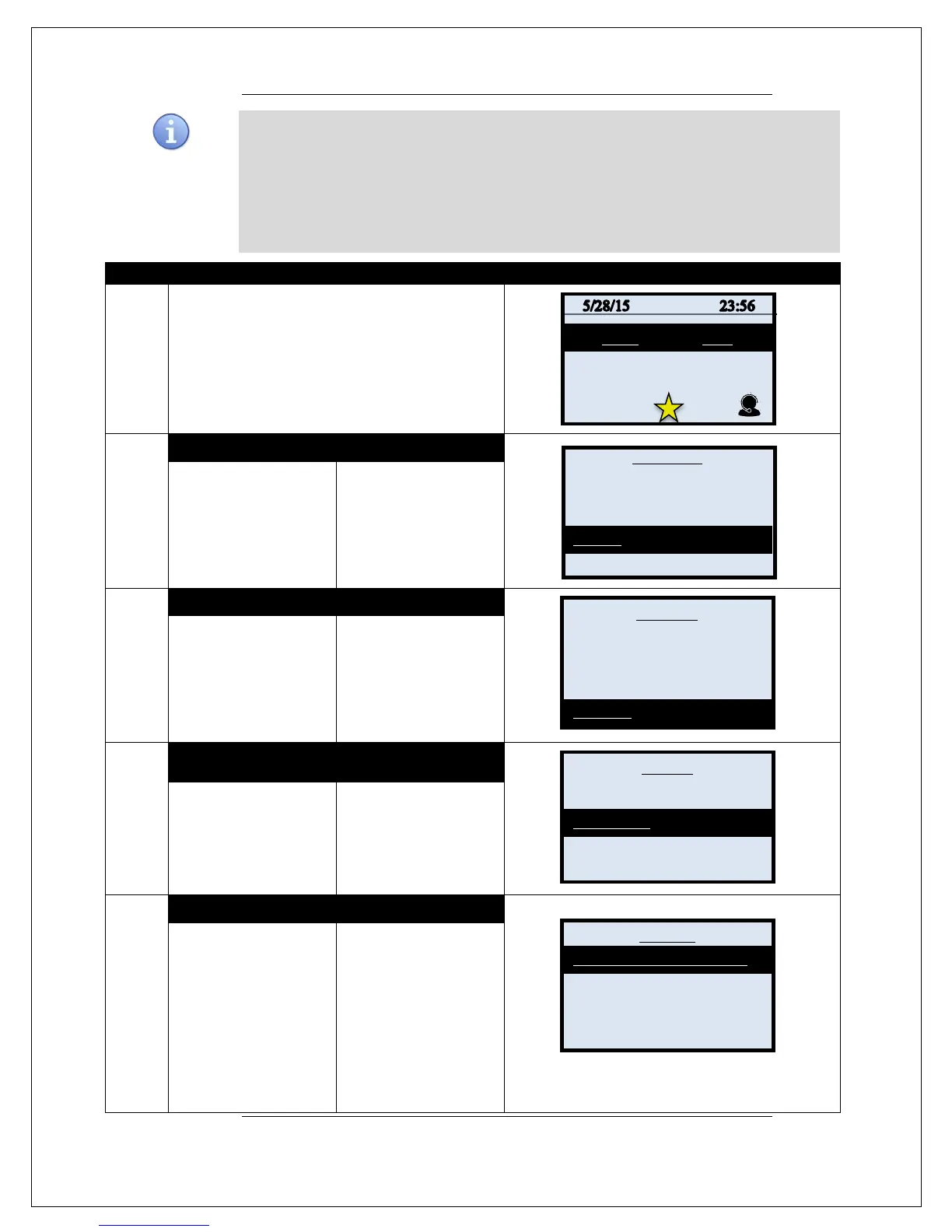
Use the steps below to Edit the current Core Menu password.
1.
From the idle prompt press the OK key to access
the Core Menu.
2.
NON TOUCH SCREEN TOUCH SCREEN
Using the down arrow
key highlight the word
UTILITY and press OK
* If prompted input
password, default is 1234
Using your fingertip
TAP the word UTILITY
* If prompted input
password, default is 1234
3.
NON TOUCH SCREEN
TOUCH SCREEN
Using the down arrow
key highlight the word
SECURITY and press
OK
Using your fingertip
TAP the word
SECURITY
4.
NON TOUCH SCREEN TOUCH SCREEN
Using the down arrow
key highlight the words
EDIT PASSWORD and
press OK
Using your fingertip
TAP the words EDIT
PASSSWORD
5.
NON TOUCH SCREEN
TOUCH SCREEN
Using the down arrow
key highlight a security
question to be set up
and press OK
Note: This will only
prompt the first time the
password is changed from
the factory default.
Using your fingertip
TAP a security
question to be set up.
Note: This will only
prompt the first time the
password is changed from
the factory default.
Continued on next page
Settlement ->
Reports ->
Favorites ->
Utility ->
Settings _>
Software Downalod ->
Communications ->
Favorites ->
Security ->
Menu Utility _>
Edit Password ->
Key Injection Pass ->
Mom’s Bday
Last 4 of SS#



 To Next Page