The center position of the control buton locks the tool in the OFF position. When changing the
position of the control button, be sure the switch is released.
Torque Adjustment Ring (18+1 Torque Settings)
Your tool has an electronic adjustable torque screwdriver system for driving and removing a
wide range of fasteners. Circling the torque adjustment ring are numbers and a drill bit symbol.
These numbers are used to set the ring to deliver a torque range. The higher the number on the
ring, the higher the torque and the larger the fastener that can be driven. To select any of the
numbers, rotate until the desired number aligns with the arrow.
2-Speed Gear Switch
The 2-speed feature of your tool allows you to shift gears for greater versatility. To select speed
1 (highest torque setting), turn the tool off and permit it to stop. Slide the gear switch all the way
forward to speed 2(highest speed setting).
WARNING: Do not change speed when the tool is running. Always allow the drill to come to
a complete stop before changing speeds.
Keyless Chuck
WARNING: Always lock off trigger switch and disconnect tool from power source when
changing accessories.
WARNING: Always ensure the bit is secure before starting the tool. A loose bit may eject
from tool causing possible personal injury.
Your tool features a double-sleeve keyless chuck . To insert a drill bit or other accessory, follow
these steps.
1. Turn tool off and disconnect tool from power source.
2. Hold the sleeve A to secure the chuck with one hand and grasp
sleeve B with the hand to change accesory. Rotate the sleeve
counterclockwise (as viewed from the front) far enough to accept
the desired accessory.
3. Insert the accessory into the chuck and tighten securely by rotating
the sleeve A clockwise.
LED Worklight
This drill features an LED worklight. This LED worklight could automatically be turned on when
the speed control trigger is squeezed.
WARNING: The light of this power tool is intended to illuminate the power tool’s direct area
of working operation and is not suitable for household room illumination.
Installing and Removing the Battery Pack
NOTE: For best results, make sure your battery pack is fully charged. To install the battery
pack into the tool handle, align the battery pack with the rails inside the tool’s handle and slide
it into the handle until the battery pack is firmly seated in the tool and ensure that it does not
disengage. To remove the battery pack from the tool, press the release button and firmly pull
the battery pack out of the tool handle.
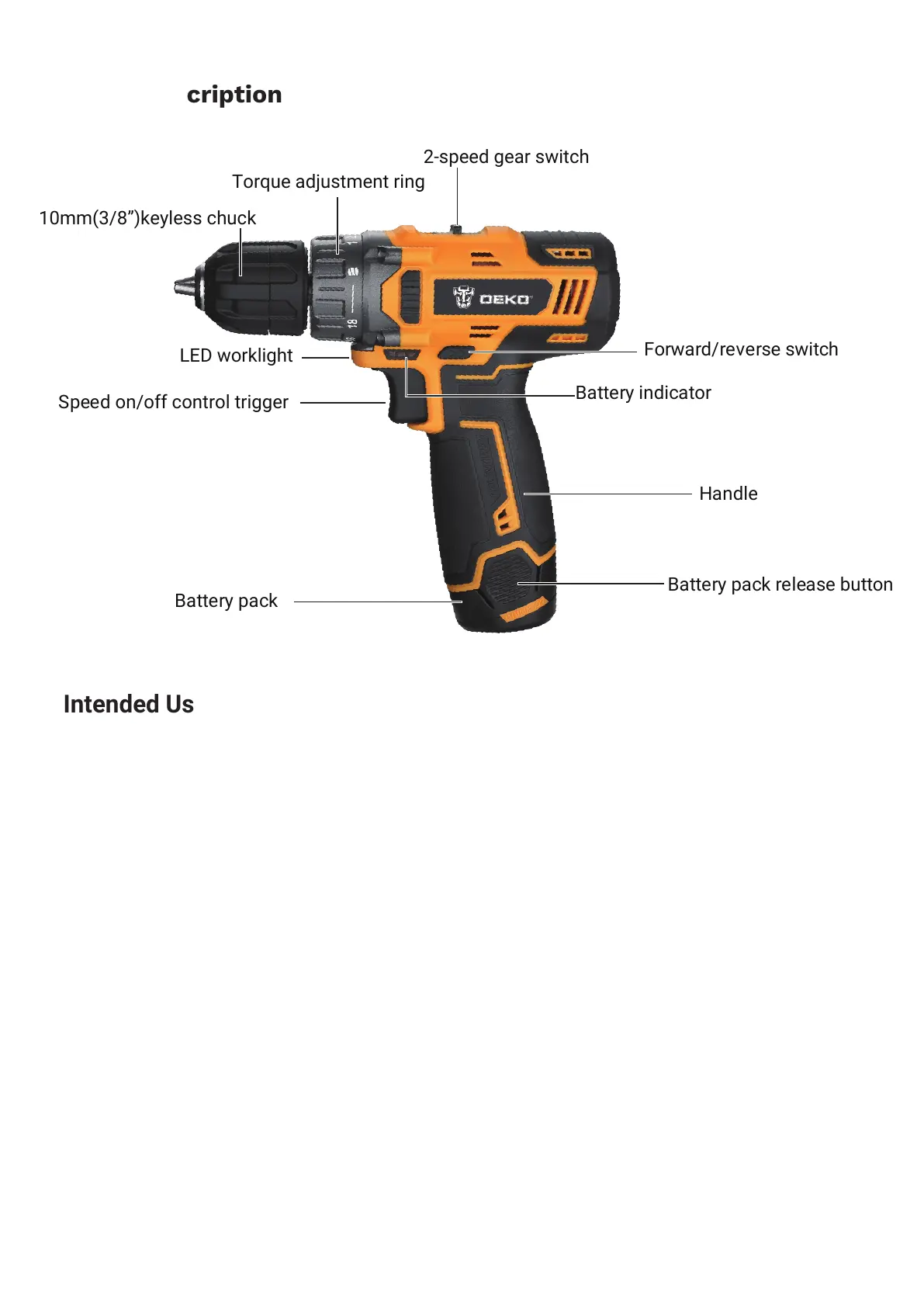
Parts Description
7
Intended Use
The machine is intended for driving in and loosening screws as well as for drilling in wood,
metal, ceramics and plastic.
DO NOT use under wet conditions or in presence of flammable liquids or gases.
DO NOT let children come into contact with the tool. Supervision is required when inexperi-
enced operators use this tool.
Variable Speed Control Trigger
To turn the tool on, squeeze the
speed on/off control trigger
. To turn the tool off, release the
trigger. The chuck will stop as soon as the trigger is fully released.
NOTE: Continuous use in variable speed range is not recommended. It may damage the switch
and should be avoided.
Forward/Reverse Switch
A forward/reverse switch determines the direction of the tool and also serves as a lock-off
button.
To select forward rotation, release the switch and depress the forward/reverse control button
on the right side of the tool.
To select reverse, release the switch and depress the forward/reverse control button on the left
side of the tool.
Speed on/off control trigger
Battery pack
Handle
Battery pack release button
10mm(3/8”)keyless chuck
Torque adjustment ring
2-speed gear switch
Forward/reverse switch
Battery indicator
LED worklight


 To Next Page
 Loading...