Quick Installation Guide Installation
deliberant Page 12
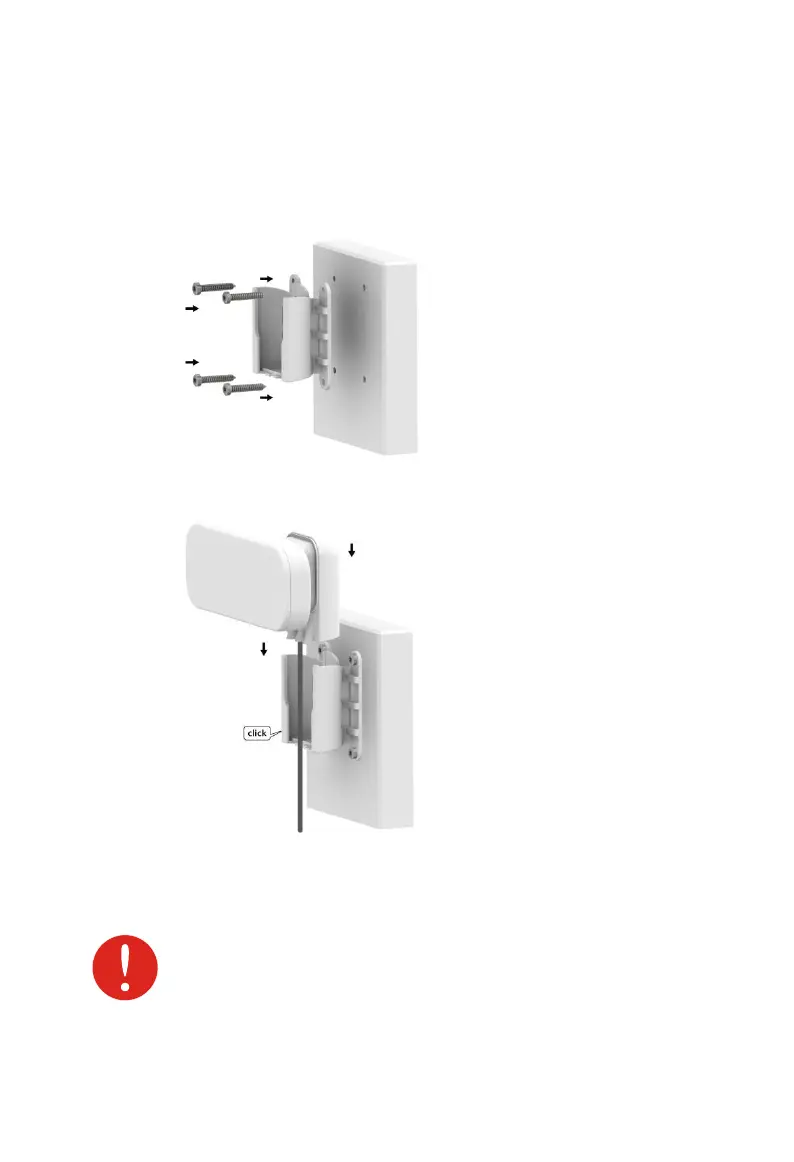
Wall Mounting
Step 1. Make sure that the APC unit is powered-off.
Step 2. Attach APC mounting bracket (item 3 in the Figure 1 – Package Contents)
to the wall using screws (item 6 in the Figure 1 – Package Contents) as
displayed below:
Step 3. Attach the assembled unit to a mounting bracket and push it downwards
until it clicks into position:
Step 4. Power-up the APC unit. The green Power LED must be on (refer at the
respective section LEDs). Dependently on link quality, up to four green
LEDs will switch on indicating that link between two units was established
successfully.
Avoid standing directly in front of an operating antenna.



 To Next Page