10-2 Dell PowerEdge 4100/180 and 4100/200 Systems Installation and Troubleshooting Guide
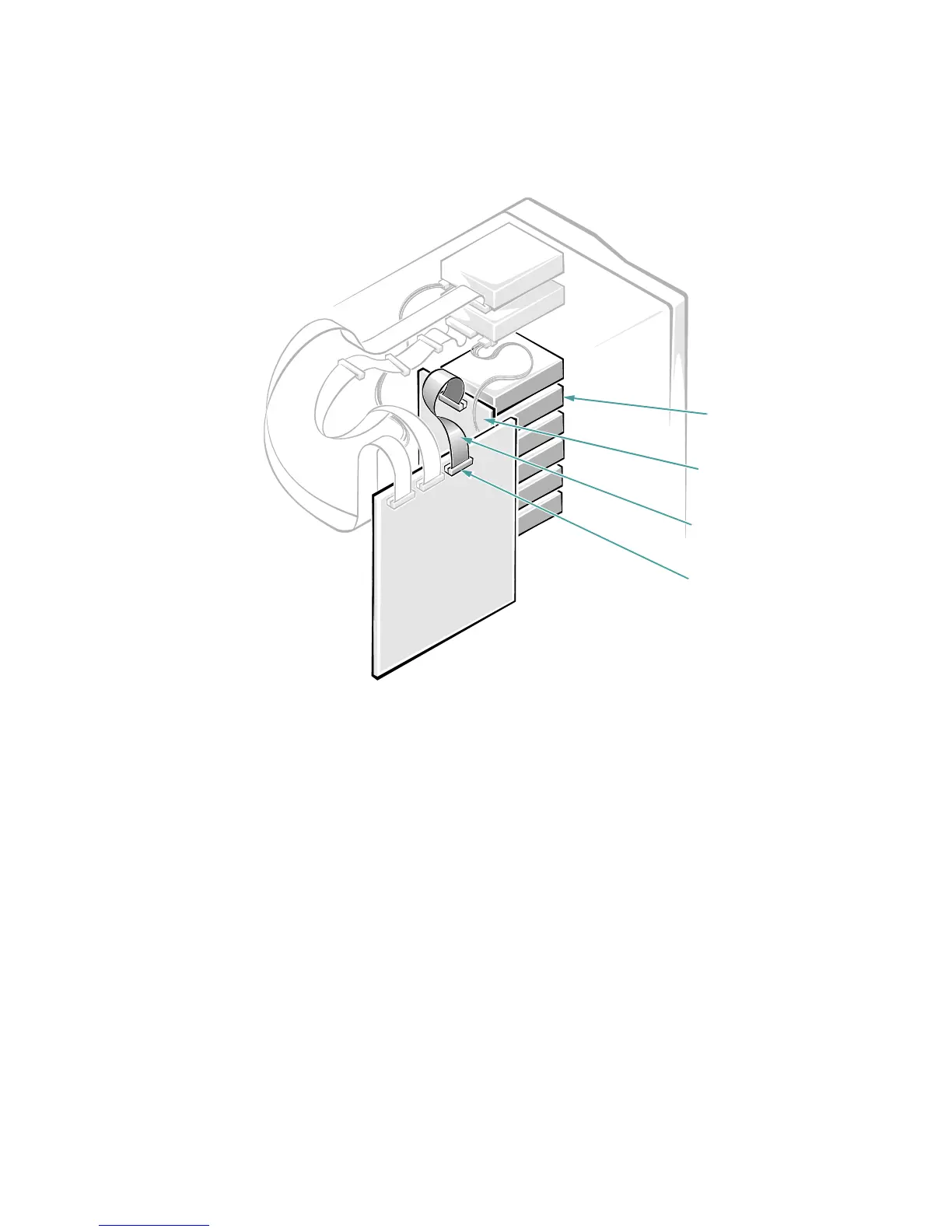
Figure 10-1. Internal Drive Hardware
I
nstalling SCSI Hard-Disk Drives
in the Internal Drive Bays
SCSI hard-disk drives are supplied by Dell in special
drive carriers that fit in the internal drive bays (see Fig-
ure 10-2). The printed circuit board at the back of the
drive carrier acts as an interface between the SCSI hard-
disk drive and the SCSI backplane board.
NOTE: Dell recommends that you use only drives that
Dell has tested and approved for use with the SCSI back-
plane board.
SCSI Hard-Disk Drive Configuration
The SCSI backplane board provides termination for the
SCSI bus. None of the drives connected to the SCSI
backplane board should have their termination enabled.
All SCSI ID numbers for the drives are set by the SCSI
backplane board.
Removing and Installing a SCSI
Hard-Disk Drive
The following subsections describe how to remove or
install SCSI hard-disk drive carriers in the computer’s
internal drive bays.
Ultra/Wide SCSI host
adapter connector
(SCSI BACKPLANE)
SCSI hard-disk drive
bays (6)
SCSI backplane board
Ultra/Wide SCSI
interface cable










 To Next Page