Learning about the printer
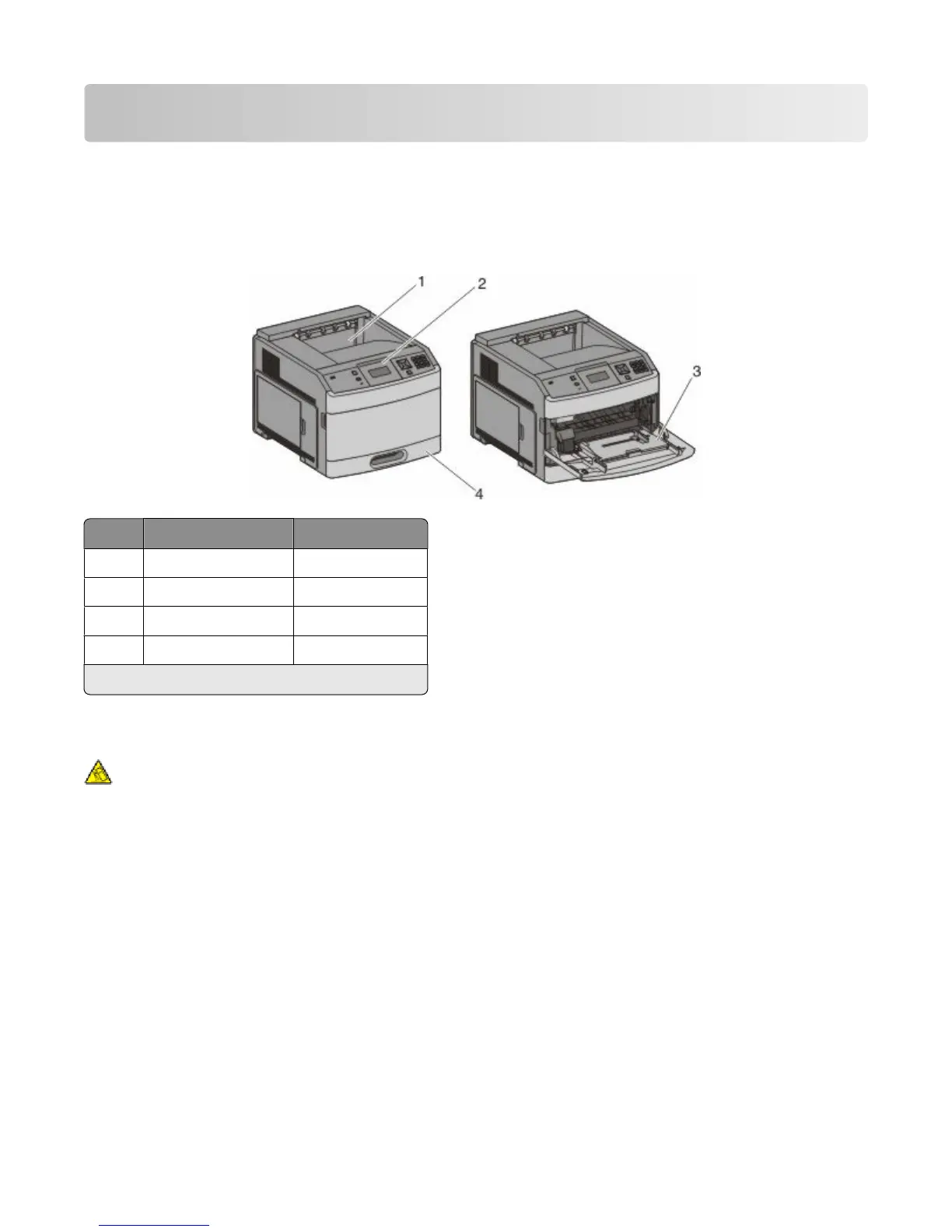
Printer configurations
Basic model
Feature
Paper Capacity
*
1
Standard exit bin 350 or 550 sheets
2
Printer control panel Not applicable
3
Multipurpose feeder 100 sheets
4
Standard tray (Tray 1) 250 or 550 sheets
*
Based on 75 g/m
2
(20 lb.) paper.
Fully configured model
CAUTION—TIPPING HAZARD: Floor-mounted configurations require additional furniture for stability. You
must use either a printer stand or printer base if you are using a high-capacity input tray, a duplex unit and an
input option, or more than one input option. If you purchased a multifunction printer (MFP) that scans, copies,
and faxes, you may need additional furniture. For more information, see the safety sheet that came with your
printer.
Learning about the printer
10











 To Next Page