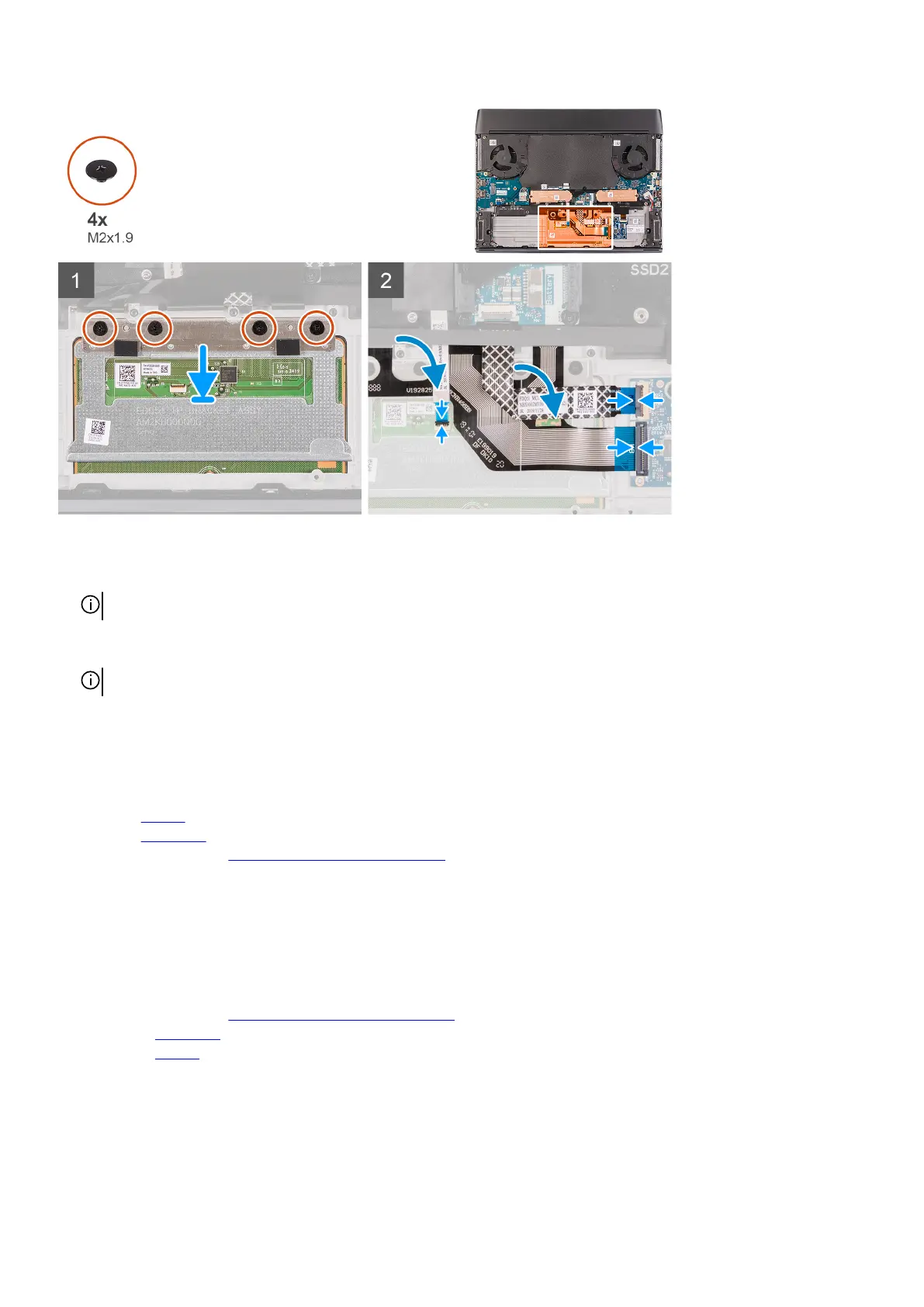
Steps
1. Place the touchpad into the slot on the palm-rest assembly.
NOTE: Turn the computer over and open the display. Ensure that the touchpad is equally aligned along all four sides.
2. Replace the four (M2x1.9) screws that secure the touchpad to the palm-rest assembly.
3. Connect the touchpad cable to the touchpad and close the latch.
NOTE: This step is only applicable when the touchpad cable is not being replaced.
4. Fold down the keyboard cable.
5. Connect the keyboard cable to the keyboard-controller board and close the latch.
6. Connect the keyboard-controller board cable to the keyboard-controller board and close the latch.
Next steps
1. Install the battery.
2. Install the
base cover.
3. Follow the procedure in After working inside your computer.
Keyboard-controller board
Removing the keyboard-controller board
Prerequisites
1. Follow the procedure in
Before working inside your computer.
2. Remove the
base cover.
3. Remove the battery.
About this task
The following image(s) indicate the location of the keyboard-controller board and provides a visual representation of the removal
procedure.
38













 To Next Page