About Your Monitor 13
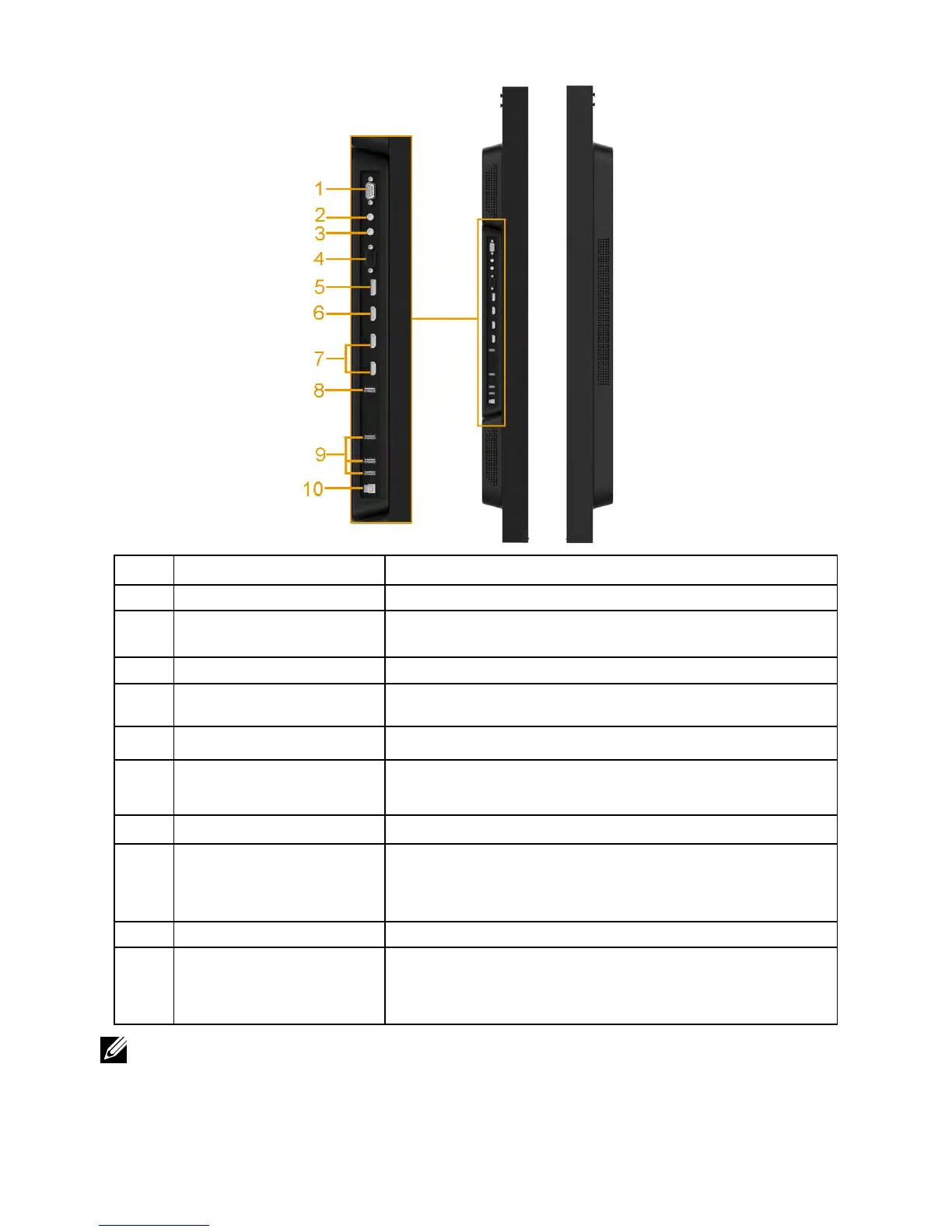
Side View
Label Description Use
1 RS232 connector Connect your computer with RS232 cable.
2 Audio Out Connect the soundbar mini stereo plug (Supports
two channel output ).
3 Audio in Analog audio (two channel) input.
4 VGA connector Connect your computer to the monitor with VGA
cable.
5 DisplayPort connector Connect your computer with DP cable.
6
HDMI/MHL connector
Connect your computer with HDMI cable.
Connect your MHL devices with MHL cable.
7 HDMI connector Connect your computer with HDMI cable.
8 USB Down Stream Port
(Dedicated Charging
Port)
Connect your USB devices for charging.
DCP port is for charging devices and has no data
lines.
9 USB Down Stream Port Connect your USB devices.
10 USB upstream port Connect the USB cable that came with your monitor
to the computer. Once this cable is connected, you
can use the USB connectors on the monitor.
NOTE: Excessive sound pressure from ear-/headphones can cause hearing damage/
hearing loss.


 To Next Page