Operating your monitor │ 51
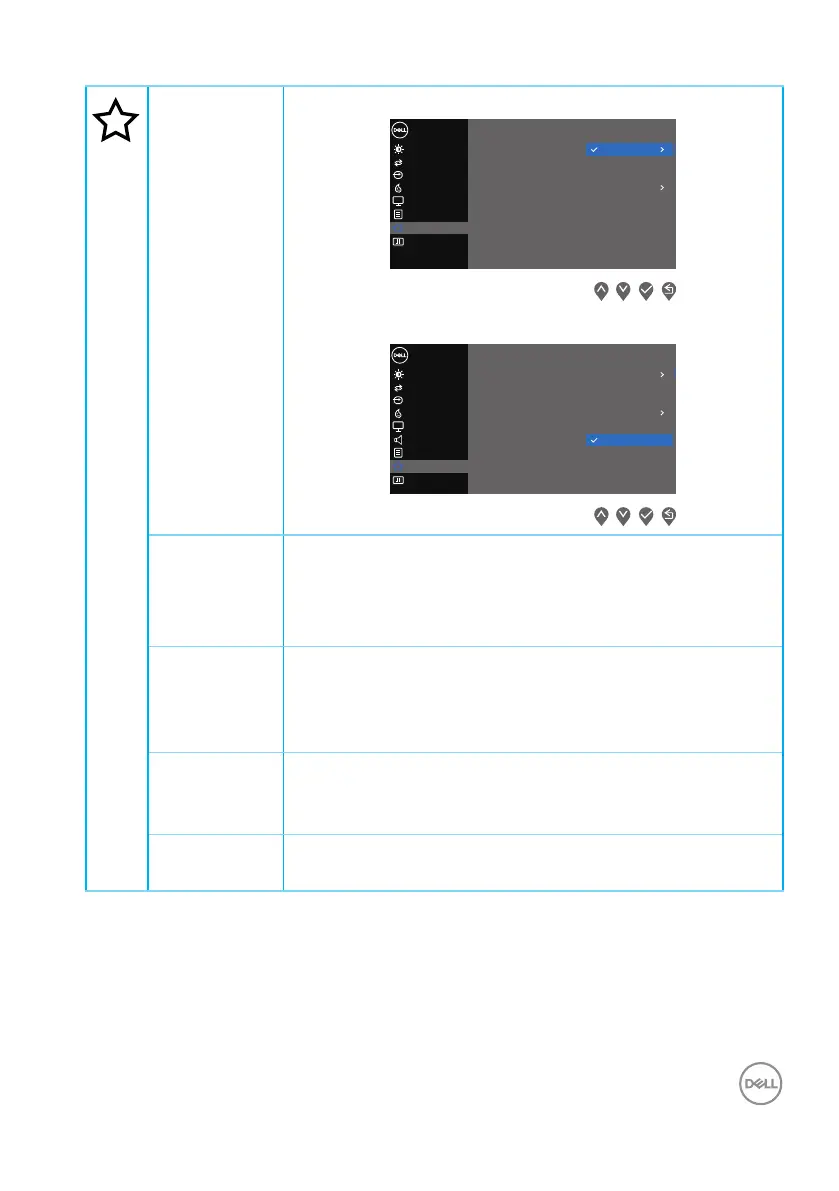
Personalize E2722H
Input Source
Others
Personalize
Menu
Color
Display
B
Auto Adjust
rightness / Contrast
Dell 27 Monitor
Shorout Key 1
Shorout Key 2
Power Button LED Auto Adjust
Input Source
Aspect Ratio
Brightness/Contrast
Reset Personalization
Preset Modes
E2722HS
Input Source
Others
Personalize
Menu
Color
Display
B
Auto Adjust
rightness / Contrast
Dell 27 Monitor
Shorout Key 1
Shorout Key 2
Power Button LED Auto Adjust
Input Source
Aspect Ratio
Brightness/Contrast
Reset Personalization
Preset Modes
Audio
Volume
Shortcut
Key 1
Select one of the following: Preset
Modes, Brightness/Contrast, Auto Adjust, Input
Source, Aspect Ratio, Volume (E2722HS only), to set
the shortcut key 1.
Shortcut
Key 2
Allow you to select one of the following: Preset Modes,
Brightness/Contrast, Auto Adjust, Input Source,
Aspect Ratio, Volume (E2722HS only), to set the short-
cut key 2.
Power
Button LED
Allows you to set the power LED indicator On in On Mode
or Off in On Mode to save energy.
Reset Per-
sonalization
Restores shortcut keys to factory defaults.


 To Next Page