EasyManua.ls Logo

Dell IN2030M - Operating the Monitor; Using the Front Panel Controls

Dell IN2030M
41 pages
Print Icon
To Next Page IconTo Next Page
To Previous Page IconTo Previous Page
Loading...
Back to Contents Page
Operating the Monitor
Dell™IN1930/IN2030M Monitor User's Guide
Using the Front Panel Controls
Using the On-Screen Display (OSD) Menu
Setting the Maximum Resolution
Using the Dell Soundbar (Optional)
Using the Tilt

Power On the Monitor
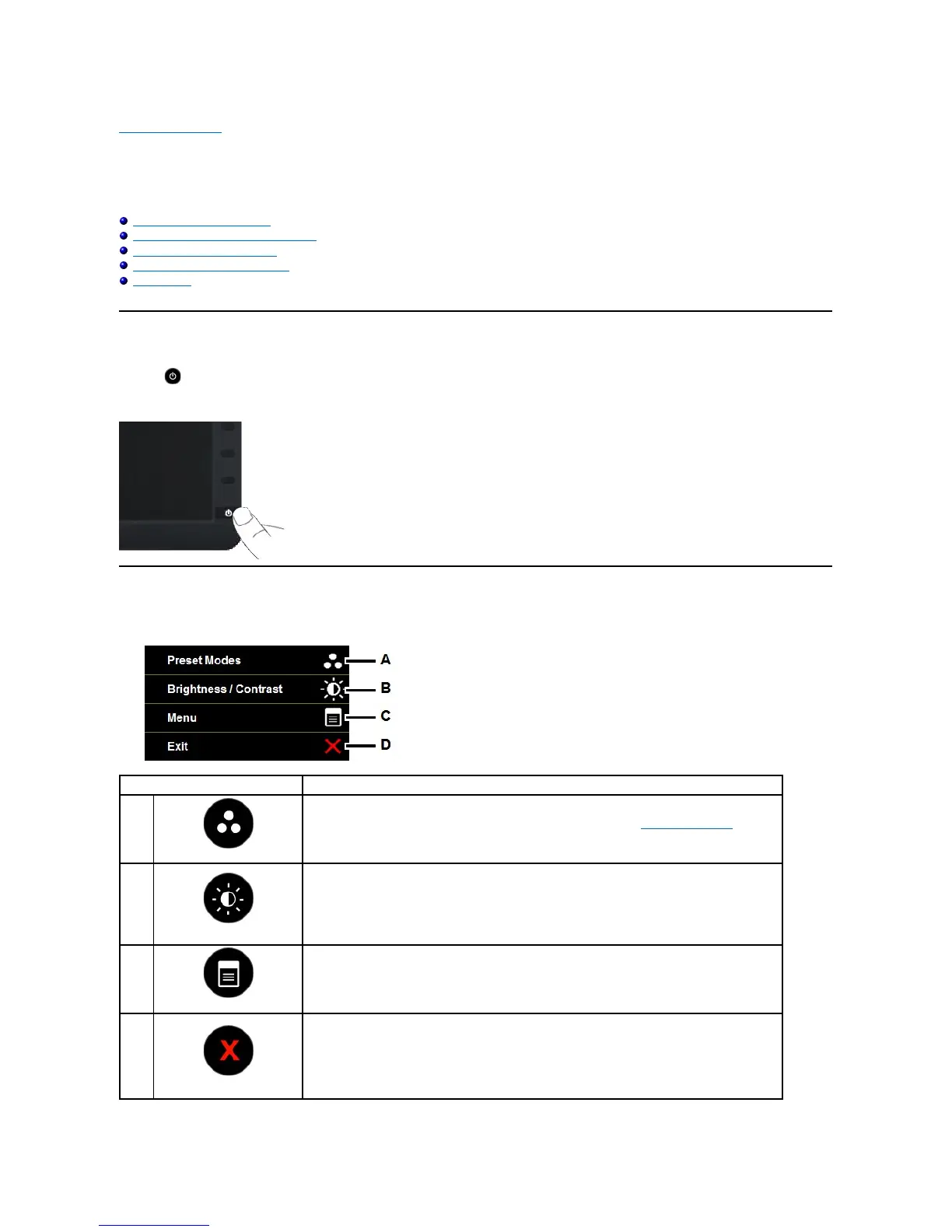
Press the button to turn on the monitor.

Using the Front Panel Controls
Usethekeysonthefrontofthemonitortoadjusttheimagesettings.

Front panel Key
Description
A
Preset modes
Use the Preset modes key to choose from a list of preset color modes. See Using the OSD Menu.
B
Brightness / Contrast
Use the Brightness / Contrast key to direct access to the "Brightness" and "Contrast" control menu.
C
Menu

Use the Menu key to open the on-screen display (OSD).
D
Exit
Use the Exit key to exit on-screen display (OSD) from menu and sub-menus.

Other manuals for Dell IN2030M

Related product manuals