Mute audio
Couper le son
Silenciar el audio
Decrease volume
Diminuer le volume sonore
Disminuir el volumen
Increase volume
Augmenter le volume sonore
Aumentar el volumen
Play/Pause
Lire/Pause
Reproducir/Pausar
Open Search charm
Ouvrir l’icône Rechercher
Abrir acceso Buscar
Open app menu
Ouvrir le menu des applications
Abrir menú de aplicaciones
Decrease brightness
Diminuer la luminosité
Disminuir brillo
Increase brightness
Augmenter la luminosité
Aumentar brillo
+
Toggle Fn-key lock
Verrouiller/Déverrouiller la touche Fn
Alternar bloqueo Fn-tecla
Shortcut Keys
Touches de raccourci
Teclas de acceso directo
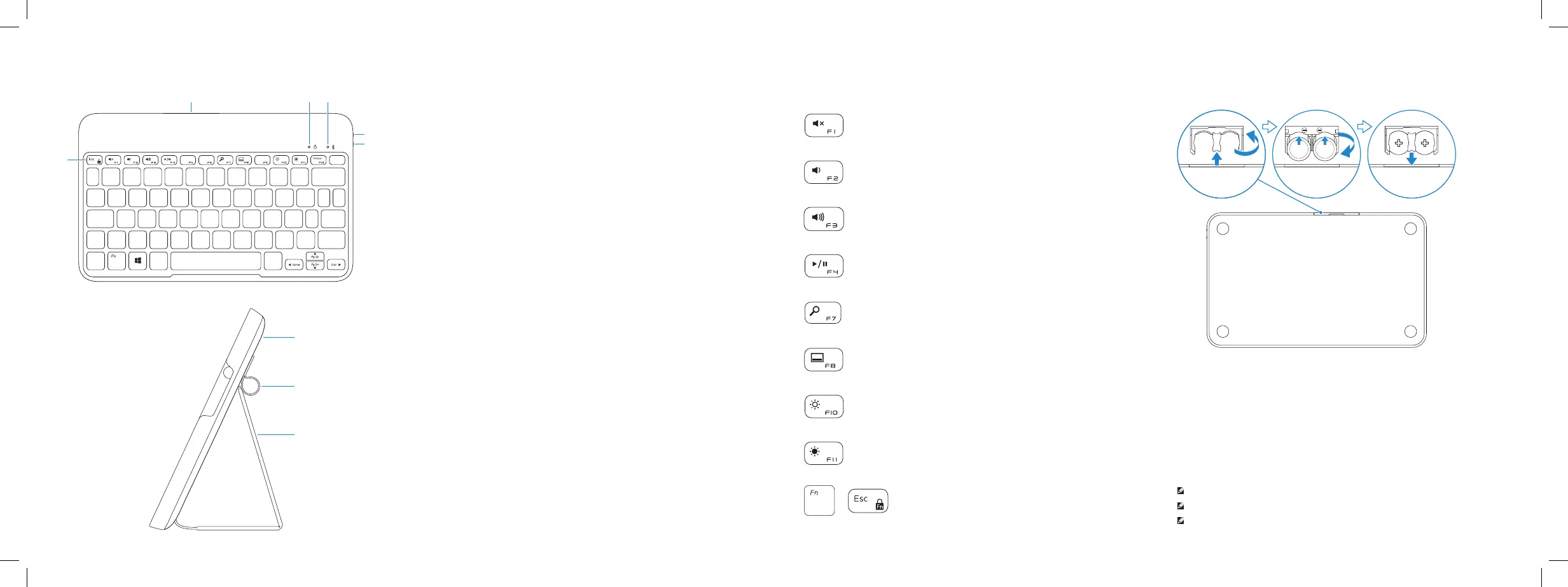
1. Shortcut keys
2. Battery tray
3. Power-status light
4. Bluetooth-status light
5. Bluetooth button
6. Power switch
7. Tablet case
8. Stylus holder
9. Tablet stand/Flip cover
1. Touches de raccourci
2. Support de la batterie
3. Voyant d’état de l’alimentation
4. Voyant d’état de Bluetooth
5. Bouton Bluetooth
6. Bouton d’alimentation
7. Boîtier de la tablette
8. Porte-stylet
9. Support de la tablette/
Couvercle rabattable
1. Teclas de acceso directo
2. Bandeja de la batería
3. Indicador luminoso de estado
dealimentación
4. Indicador luminoso de estado
deBluetooth
5. Botón de Bluetooth
6. Interruptor de encendido
7. Funda de la tableta
8. Soporte Stylus
9. Apoyo de la tableta/tapa abatible
Features
Fonctionnalités | Funciones
32
1
4
5
6
8
9
7
Replacing the batteries
Remplacer les batteries
Sustitución de las pilas
NOTE: The batteries are installed when you receive the keyboard.
REMARQUE : Les batteries sont installées lorsque vous recevez le clavier.
NOTA: Al recibir el teclado las pilas ya están instaladas.


 To Next Page