EasyManua.ls Logo

Dell Laser Printer 1110 - Page 11

Dell Laser Printer 1110
47 pages
Print Icon
To Next Page IconTo Next Page
To Previous Page IconTo Previous Page
Loading...
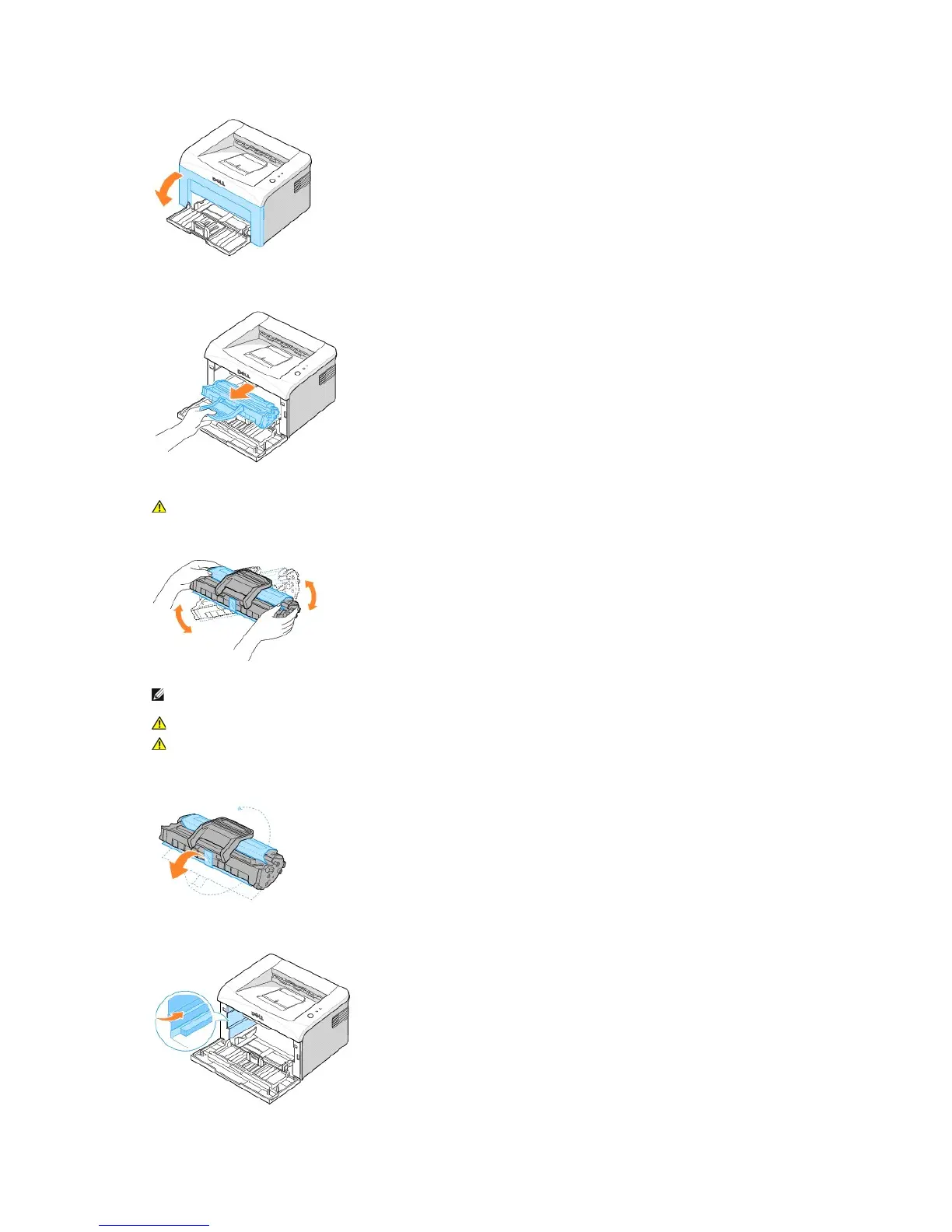
2. Pull the used toner cartridge out and lift it up and away from the printer.
3. Unpack a new toner cartridge. Hold the cartridge carefully and thoroughly shake it from side-to-side 5 or 6 times to distribute the toner.
4. Pull the tape to remove the protective paper.
5. Locate the cartridge slot inside the printer, one on each side.
CAUTION: Avoid reaching too far into the printer. The fusing area may be hot.
NOTE: If toner comes into contact with your clothing, wipe the toner off with a dry cloth and wash your clothing in cold water. Hot water sets
toner into fabric.
CAUTION: Do not touch the green underside of the toner cartridge. Use the handle on the cartridge to avoid touching this area.
CAUTION: To prevent damage to the toner cartridge, do not expose it to light for more than a few minutes.

Table of Contents

Related product manuals