NOTE: Some systems have magnetic surfaces. Ensure that the screws are not left attached to such surface when
replacing a component.
NOTE: Screw color may vary with the configuration ordered.
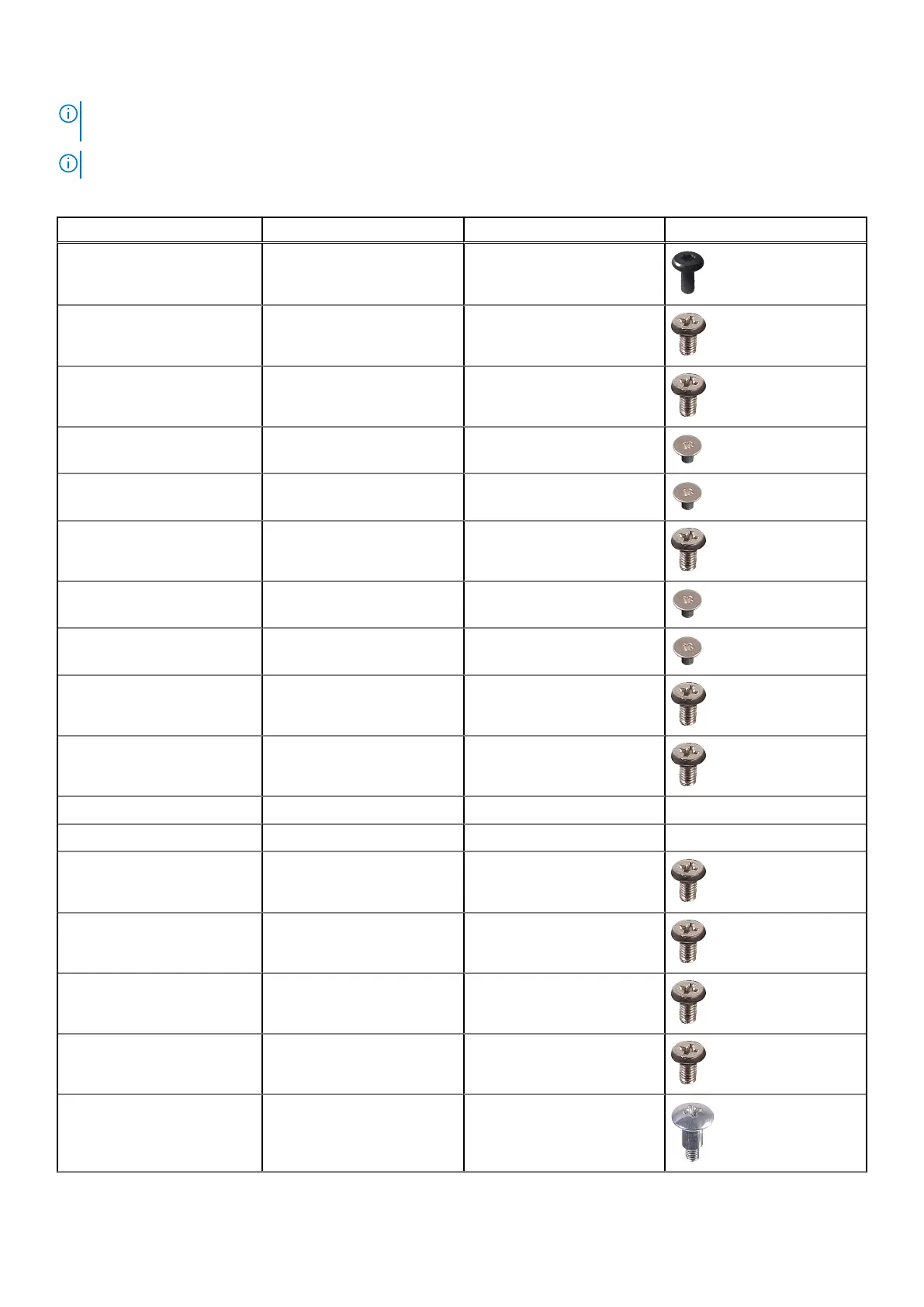
Table 1. OptiPlex 5490 All-in-One screw list
Component Screw type Quantity Screw image
Cable cover—optional M3x9 1
System-board shield M3x5 5
Bottom cover M3x5 4
M.2 2230 solid-state drive M2x2.5 1
M.2 2280 solid-state drive M2x2.5 1
System fan M3x5 3
Wireless-card shield M2x2.5 2
Wireless card M2x2.5 1
Camera assembly M3x5 2
Camera door M3x5 2
Heat sink—UMA Captive screws 5
Heat sink—Discrete Captive screws 9
Power-supply unit (PSU) M3x5 2
PSU fan M3x5 2
Rear-I/O bracket M3x5 4
System board M3x5 9
Speakers M3 4+7.1xZN 6
Removing and installing components 11











 To Next Page