Need help?
Do you have a question about the Dell OptiPlex 780-USFF and is the answer not in the manual?
Details symbols, signal words, and hazard levels for safety alerts.
Warning regarding risk of electric shock and contact with liquids.
Warning to place the AIO Stand on a level, stable surface to prevent injury.
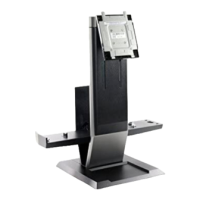
Identifies and labels the various parts of the Dell OptiPlex 780-USFF AIO Stand.
Lists the necessary components for setting up the AIO Stand and system.
Instructions for placing the AIO Stand on a level, stable surface.
Guides for routing VGA or DisplayPort cables through the stand.
Steps for physically attaching the monitor to the AIO stand assembly.
Instructions for connecting power, monitor, and USB cables to the monitor.
Procedure for routing accessory cables like keyboard and mouse through the cable tray.
Steps to unlock/lock the system sleeve and AIO stand, and insert the system.
Instructions on how to unlock, attach, and lock the cable cover.
Details on locking the AIO stand and attaching security accessories.
Connecting network/power and overview of the stand's range of motion.
Details on the physical size, weight, and weight capacities of the AIO stand.
Information on operating temperatures and power input/output ratings.
Specifies compatible security accessories like Kensington locks and padlocks.
Guidance on locating safety, regulatory, and warranty information.
 Operating Environment
| operating temperature range | 32°F to 95°F (0°C to 35°C) |
|---|---|
| storage temperature range | -40°F to 149°F (-40°C to +69°C) |
| transportation temperature range | -40°F to 149°F (-40°C to +69°C) |
 Weight and Dimensions
| system weight capacity | 3.2 kg |
|---|

 To Next Page