EasyManua.ls Logo

Dell OptiPlex SFF 980 - User Manual

Dell OptiPlex SFF 980
15 pages
Print Icon
To Next Page IconTo Next Page
Loading...
1/15
Dell
TM
OptiPlex
TM
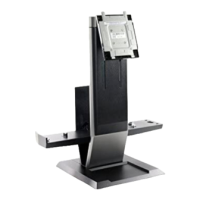
SFF 980 All In One (AIO) Stand
The Dell OptiPlex SFF 980 All-in-One Stand is a unique
design that can integrate monitor, system and cables
management to adapt to your unique environment.
User's Guide
www.dell.com/regulatory_compliance
Question and Answer IconNeed help?

Do you have a question about the Dell OptiPlex SFF 980 and is the answer not in the manual?

Summary

Hazard Symbols Review

Hazard Signal Word Explanations

Explains NOTE, CAUTION, WARNING, and ELECTRICAL hazard symbols and their meanings.

Stable Surface Placement Warning

Warns to place the AIO Stand on a level, stable surface to reduce injury risk.

About the Dell OptiPlex SFF 980 AIO Stand

AIO Stand Components Overview

Lists and identifies key components of the Dell OptiPlex SFF 980 AIO Stand.

Setting Up the Dell OptiPlex SFF 980 AIO Stand

Setup Components

Lists the necessary components for setting up the AIO Stand.

Step-by-Step Setup Instructions

Provides detailed instructions for connecting and securing the monitor and system.

Component Removal Procedure

Details the steps required to safely remove components from the AIO stand.

Product Specifications and Features

Range of Motion and Dimensions

Details the physical movement capabilities and overall dimensions of the AIO stand.

Weight Capacities and Temperature

Specifies weight limits for monitor/system and environmental operating temperatures.

Security Features

Describes the available security features, such as the Kensington Security Slot.

Finding Additional Information

Summary

Hazard Symbols Review

Hazard Signal Word Explanations

Explains NOTE, CAUTION, WARNING, and ELECTRICAL hazard symbols and their meanings.

Stable Surface Placement Warning

Warns to place the AIO Stand on a level, stable surface to reduce injury risk.

About the Dell OptiPlex SFF 980 AIO Stand

AIO Stand Components Overview

Lists and identifies key components of the Dell OptiPlex SFF 980 AIO Stand.

Setting Up the Dell OptiPlex SFF 980 AIO Stand

Setup Components

Lists the necessary components for setting up the AIO Stand.

Step-by-Step Setup Instructions

Provides detailed instructions for connecting and securing the monitor and system.

Component Removal Procedure

Details the steps required to safely remove components from the AIO stand.

Product Specifications and Features

Range of Motion and Dimensions

Details the physical movement capabilities and overall dimensions of the AIO stand.

Weight Capacities and Temperature

Specifies weight limits for monitor/system and environmental operating temperatures.

Security Features

Describes the available security features, such as the Kensington Security Slot.

Finding Additional Information

Dell OptiPlex SFF 980 Specifications

General IconGeneral
BrandDell
ModelOptiPlex SFF 980
CategoryRacks & Stands
LanguageEnglish

Related product manuals