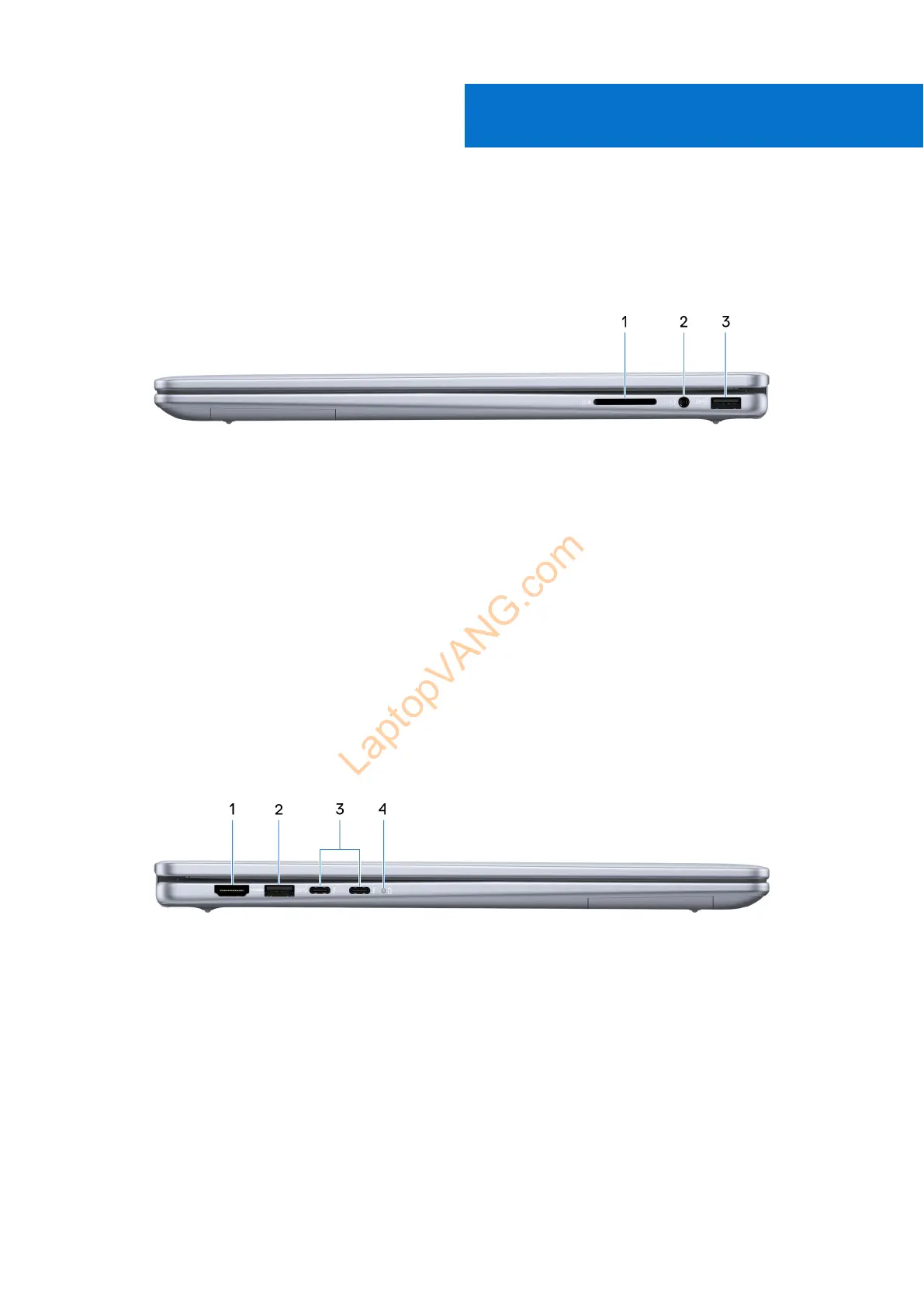
Views of Inspiron 16 7640 2-in-1
Right
Figure 1. Right view
1. SD-card slot
Reads from and writes to the SD card. The computer supports the following card types:
● Secure Digital (SD)
● Secure Digital High Capacity (SDHC)
● Secure Digital Extended Capacity (SDXC)
2. Universal audio jack
Connect headphones or a headset (headphone and microphone combo).
3. USB 3.2 Gen 1 port
Connect devices such as external storage devices and printers. Provides a data transfer speed of up to 5 Gbps.
Left
Figure 2. Left view
1. HDMI 1.4 port
Connect to a TV, external display or another HDMI-in enabled device. Provides video and audio output.
2. USB 3.2 Gen 1 port
Connect devices such as external storage devices and printers. Provides a data transfer speed of up to 5 Gbps.
3. Thunderbolt 4.0 with Power Delivery and DisplayPort ports (2)
Supports DisplayPort 2.1, Thunderbolt 4 and also enables you to connect to an external display using a display adapter.
Provides a data transfer rate of up to 40 Gbps for Thunderbolt 4.
1
6 Views of Inspiron 16 7640 2-in-1



 To Next Page