About Your Monitor:Dell P2211H/P2311H Flat Panel Monitor User's Guide
file:///S|/SSA_Proposal/P2211_P2311/about.htm[7/13/2011 12:17:52 PM]
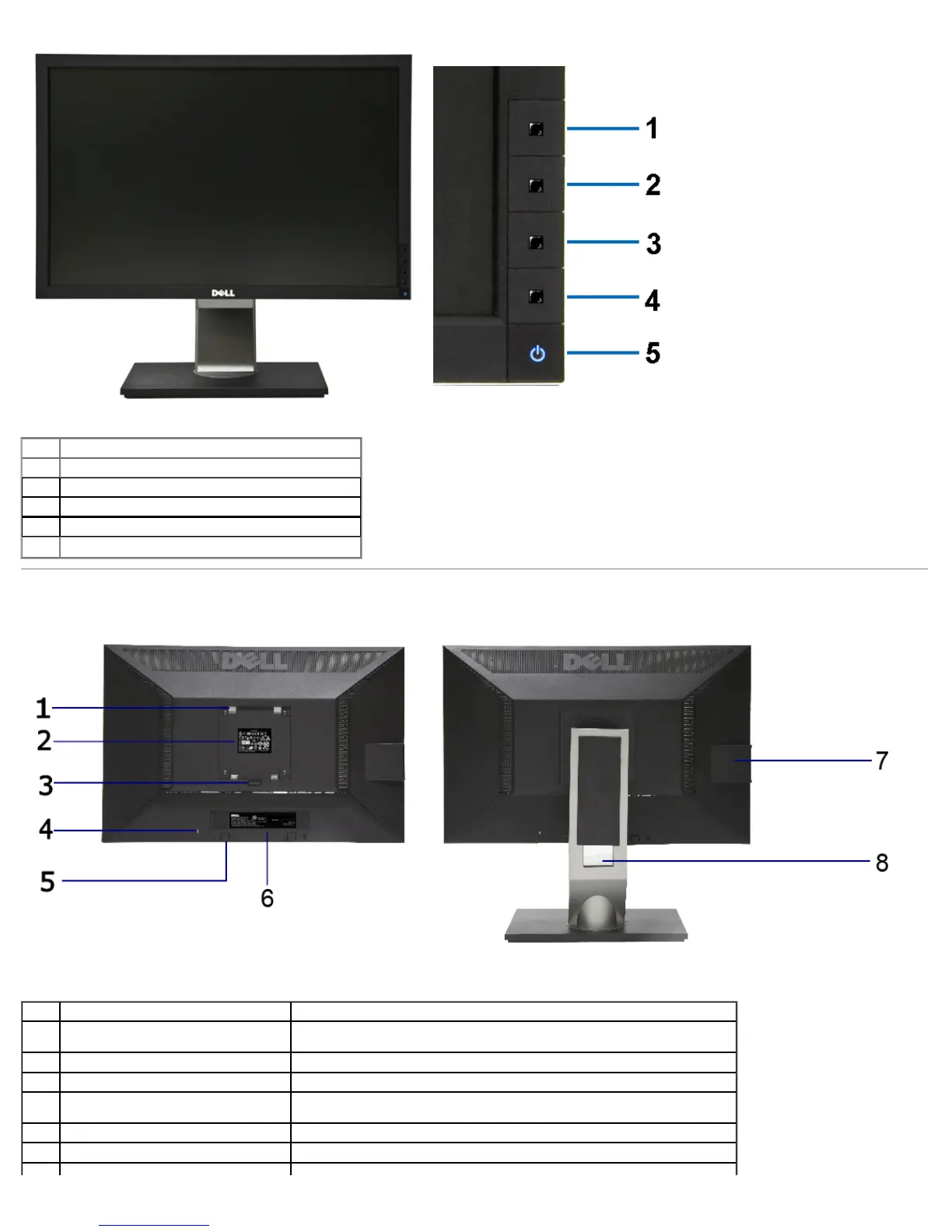
Front View Front panel controls
Label Description
1 Preset Modes (default, but configurable)
2 Brightness & Contrast (default, but configurable)
3 Menu
4 Exit
5 Power button
(with power light indicator)
Back View
Back view Back view with monitor stand
Label Description Use
VESA mounting holes (100 mm x 100 mm -
1
Wall mount monitor using VESA-compatible wall mount kit (100 mm x 100 mm)
behind attached VESA Plate)
2 Regulatory label Lists the regulatory approvals.
3 Stand release button Release stand from monitor.
Secures monitor with security cable lock
4 Security lock slot
5 Dell Soundbar mounting brackets Attaches the optional Dell Soundbar.
6 Barcode serial number label Refer to this label if you need to contact Dell for technical support.



 To Next Page