46 | Operating the Monitor
Icon Menu and
Submenus
Description
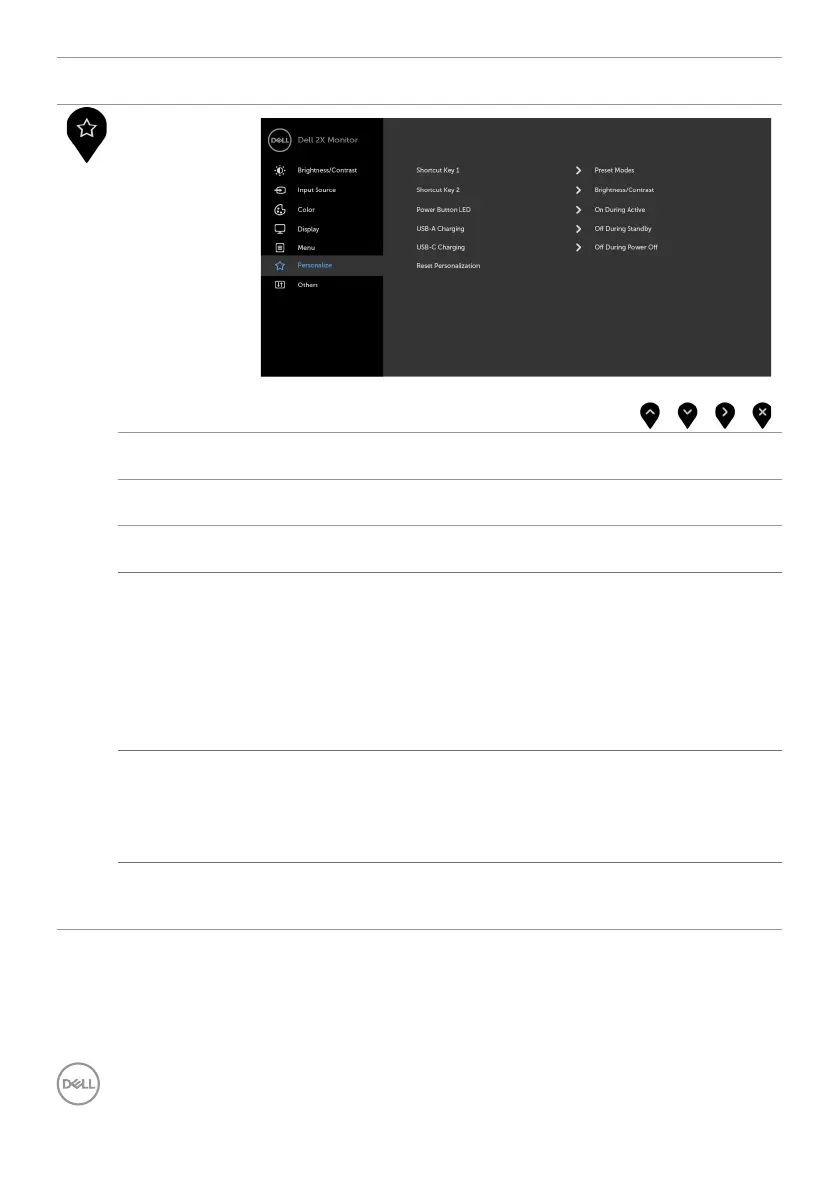
Personalize
Shortcut
key 1
Select from Preset Modes, Brightness/Contrast, Input
Source, Aspect Ratio, Rotation set as shortcut key 1.
Shortcut
key 2
Select from Preset Modes, Brightness/Contrast, Input
Source, Aspect Ratio, Rotation set as shortcut key 2.
Power Button
LED
Allows you to set the state of the power light to save energy.
USB-A
Charging
Allows you to enable or disable USB Type-A (Downstream Ports)
charging function during monitor standby mode.
NOTE: This option is only available when the USB Type-C
(Upstream Port) cable is unplugged. If the USB Type-C cable is
connected, USB-A Charging follows the USB host power status
and the option is not accessible.
NOTE: This option was previously called “USB” in older monitor
firmware revisions.
USB-C
Charging
Allows you to enable or disable Always On USB Type-C Charging
function during monitor Power Off mode.
NOTE: This option is only available in newer monitor
firmware revisions. See Always On USB Type-C Charging for
troubleshooting.
Reset
Persona-
lization
Restores Shortcut Keys and Power Button LED to factory
defaults.


 To Next Page