About Your Monitor | 9
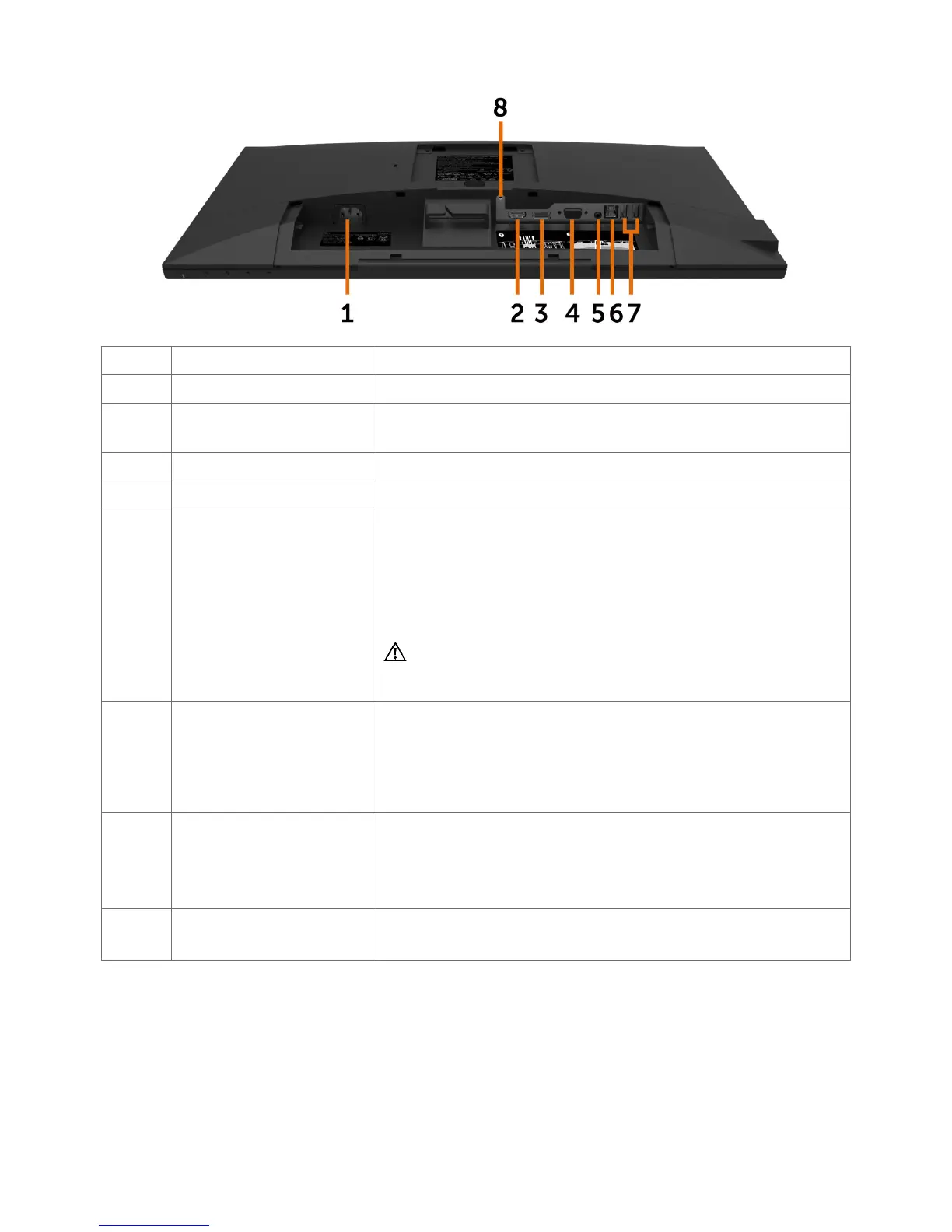
Bottom View
Label Description Use
1 AC power connector To connect the monitor power cable.
2 HDMI connector Connect your computer with HDMI cable (optional
purchase).
3 DP connector Connect your computer with DP cable.
4 VGA connector Connect your computer with VGA cable.
5 Audio line-out port Connect speakers to playback audio coming through
HDMI or DP audio channels.
Only supports 2-channel audio.
NOTE: The audio line-out port does not support
headphones.
WARNING: Excessive sound pressure from
earphones or headphones can cause hearing
damage or loss.
6 USB 3.0 upstream port Connect the USB cable that comes with your monitor
to the computer. Once this cable is connected,
you can use the USB downstream connectors on
the monitor and the touch screen function on the
monitor.
7 USB 2.0 downstream
ports
Connect your USB device.
You can only use this connector after you have
connected the USB cable to the computer and USB
upstream connector on the monitor.
8 Stand lock Lock the stand to the monitor using a M3 x 6 mm
screw (screw not included).



 To Next Page