About your monitor │ 11
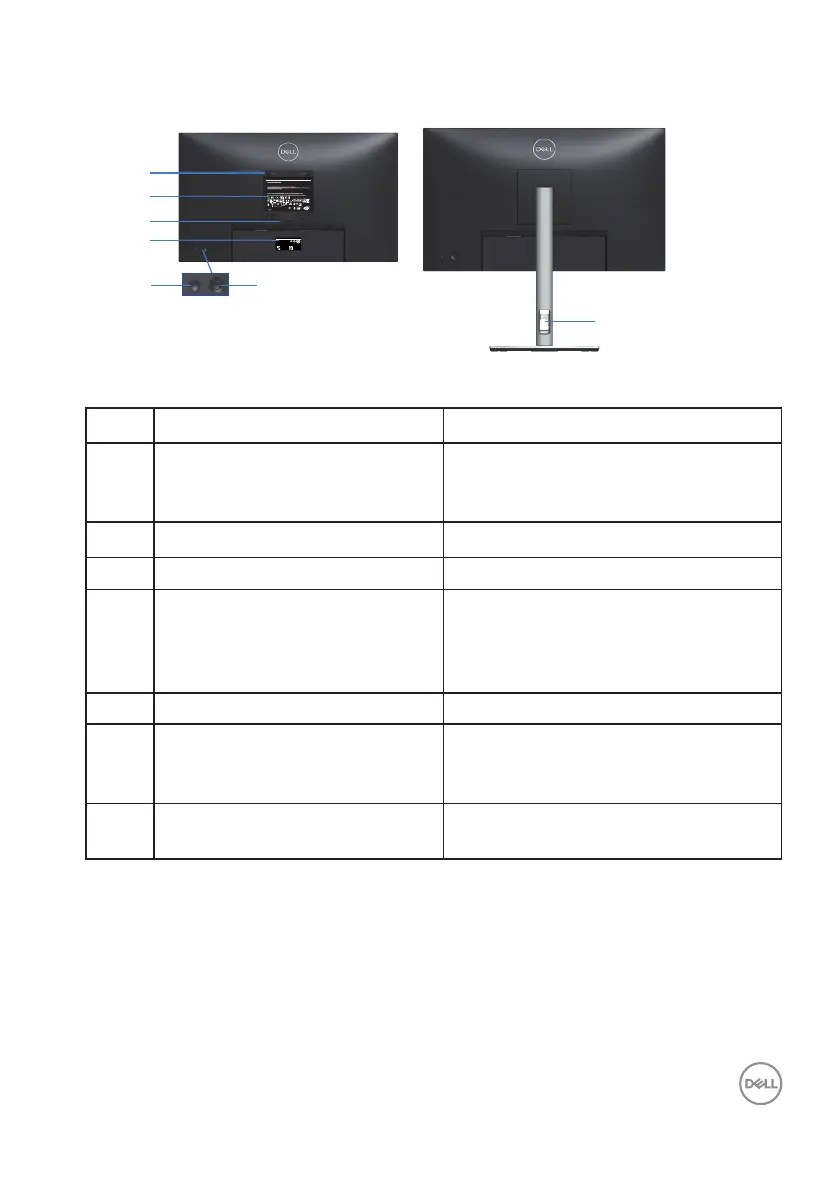
Back view
7
6
1
2
3
4
5
Q40G024N-700-XXA
DELL P2423D
Flat Panel Monitor /Monitor Plano Panel /Moniteur écran plat /液晶顯示器
Model No. /Modelo /N°de modelo /型號/모델명/モデル番号: P2423Dc
정격입력/
Entrada de energía:100-240V 50/60Hz,1.5A
輸入電源:交流電壓100-240伏特,1.5安培,50/60赫茲
Удельная мощность рабочего режима - XXXX Вт/см² Consumo de energía en operación: XXX Wh
Потребляемая мощность изделием в режиме ожидания - 0,XX Вт
Потребляемая мощность изделием в выключенном режиме - 0,XX Вт
The equipment must be connected to an earthed mains socket-outlet.
L'appareil doit être branché sur une prise de courant munie d'une mise à la terre.
Made in China /Fabricado en China/сделанный в Китай /Fabriqué en Chine/中國製造 警語: 使用過度恐傷害視力。
www.dell.com/regulatory_compliance Raheen Business Park Limerick Ireland (for EU Only)
CAN ICES-003(B)/NMB-003(B) For UK only: Cain Road, Bracknell, RG12 1LF
(1) this device may not cause harmful interference, and
XXXXX
R33037
RoHS
XXXXXX-XX
IS 13252 (Part 1)/
IEC 60950-1
R-41082465
www.bis.gov.in
XXXXXX-XXXX
R-R-E2K-P2423Dc
신청인:DELL INC.
제조자:L&T Display Technology(Fujian)Ltd.(for Korea)
080-200-3800
デル・テクノロジーズ
入力:100V, 1.5 A, 50/60 Hz
XXXXXXXX
SVC Tag:
1234567
Express Service
Code:
123 456 789 0
S/N: CN-0723H6-
TV200-1C1-001L
-A00
Date of Mfg/生产日期/生產日期: December. 2021
Q40G024N-700-XXA
液晶显示器
型号:P2423D
输入电源:
100-240V 50/60Hz,1.5A
中国制造
DELL P2423D
Back View with monitor stand
Label Description Use
1 VESA mounting holes (100 mm x
100 mm - behind attached VESA
Cover)
Wall-mount the monitor using VESA-
compatible wall mount kit (100 mm x
100 mm).
2 Regulatory label Lists the regulatory approvals.
3 Stand release button Releases the stand from the monitor.
4 Barcode, serial number, and
Service Tag label
Contains monitor details and support
information. Refer to this label if you
need to contact Dell for technical
support.
5 Power On/Off button To turn the monitor on or off.
6 Joystick Use to control the OSD menu. (For
more Information, see Operating your
monitor)
7 Cable-management slot Use to organize cables by inserting
them through the slot.



 To Next Page