Setting up the monitor │ 29
Setting up the monitor
Attaching the stand
NOTE: The stand is not installed at the factory when shipped.
NOTE: The following instructions are applicable only for the stand that
was shipped with your monitor. If you are attaching a stand that you
purchased from any other source, follow the setup instructions that
were included with the stand.
To attach the monitor stand:
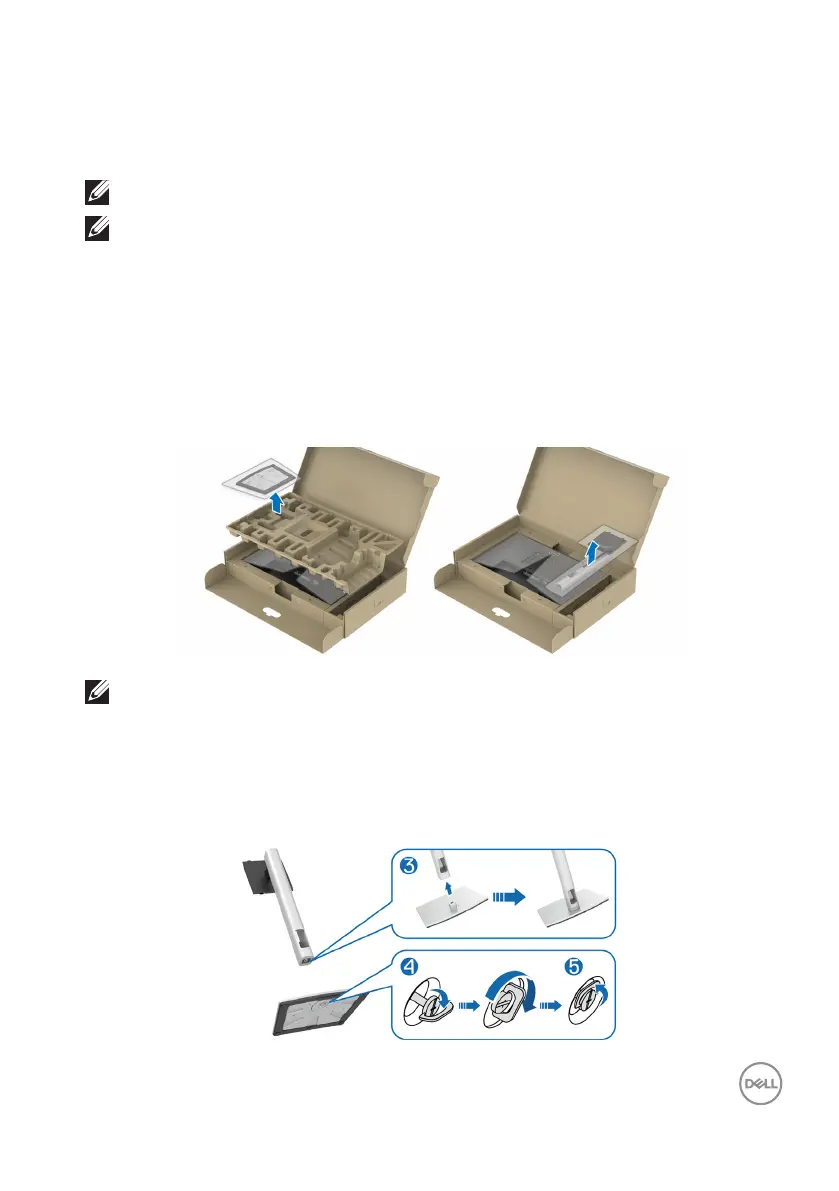
1. Follow the instructions on the aps of carton to remove the stand from the top
cushion that secures it.
2. Remove the stand riser and stand base from the packaging cushion.
NOTE: The graphics are used for the purpose of illustration only. The
appearance of the package cushion may vary.
3. Insert the stand base blocks fully into the stand slot.
4. Lift the screw handle and turn the screw clockwise.
5. After fully tightening the screw, fold the screw handle flat within the recess.



 To Next Page