10 │ About your monitor
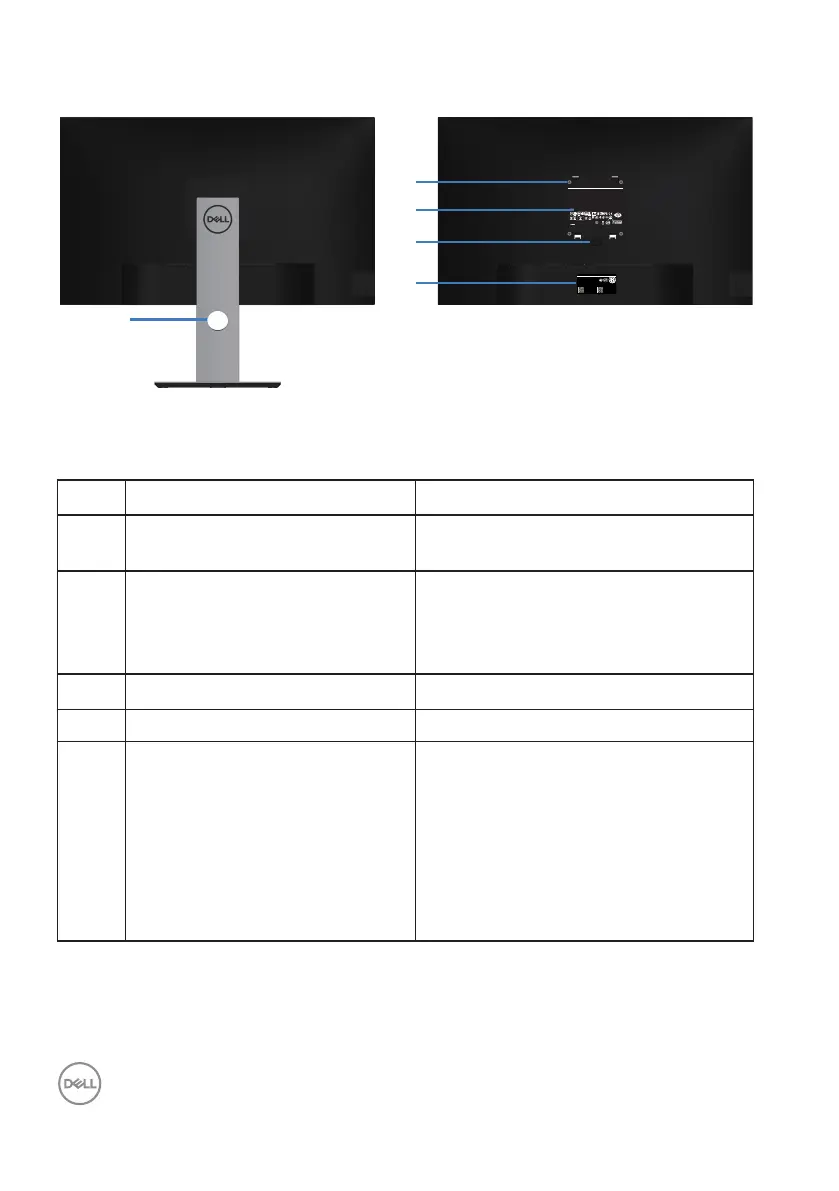
Back view
Q40G027N-700-XXA
DELL P2720D
Flat Panel Monitor /Monitor Plano Panel /Moniteur écran plat /⏢Ღ亟⽪ಘ
Model No. /Modelo /N°de modelo /ර㲏: P2720Dc
Input Rang /Entrade /Daya Tegangan:100-240V 50/60Hz,1.6A
䕨ޕ䴫ⓀӔ⍱䴫༃100-240Կ⢩,1.6ᆹษ,50/60䎛㥢
Consumo de energía en operación: xxxxx Wh
Удельная мощность рабочего режима - xxxx Вт/см²
Потребляемая мощность изделием в режиме ожидания - xx Вт
Потребляемая мощность изделием в выключенном режиме - xx Вт
Apparatet må lkoples jordet skkontakt.
Apparaten skall anslutas ll jordat u±ag.
Laite on liite±ävä suojakoskeµmilla varuste±uun pistorasiaan.
Apparatets skprop skal lslu±es en skkontakt med jord,
som giver forbindelse l skproppens jord.
The equipment must be connected to an earthed mains socket-outlet.
L'appareil doit être branché sur une prise de courant munie d'une mise à la terre.
Made in China /сделанный в Китай /Fabriqué en Chine /ѣു㼳䙖䆜䃔ֵ⭞䚄ᓜᚆۭᇩ㿌࣑Ⱦ
www.dell.com/regulatory_compliance Raheen Business Park Limerick Ireland (for EU Only)
CAN ICES-3 (B)/NMB-3(B)
This device complies with part 15 of the FCC Rules. Operaon is subject to the following two condions:
(1) this device may not cause harmful interference, and
(2) this device must accept any interference received, including interference that may cause undesired operaon.
XXXXX
R33037
RoHS
䊂
ޛ࣑100V, 1.6 A, 50/60 Hz
XXXXXX-XX
IS 13252 (Part 1)/
IEC 60950-1
R-41018660
www.bis.gov.in
xxxxxxxxxxxxx
R-R-TPF-P2720Dc
㐔㷡㢬ڕTPV Electronics (Fujian) Co., Ltd.(for Korea)
㥐㦤㣄ڕL&T Display Technology(Fujian)Ltd.(for Korea)
080-200-3800
SVC Tag:
1234567
Express Service
Code:
123 456 789 0
S/N: CN-012345-
TV100-96N-001V
-A00
Date of Mfg/⭕ӝᰛᵕ⭕⭘ᰛᵕ: June. 2019
Q40G027N-700-XXA
⏨Წᱴ⽰ಞ
ශ:P2720D
䗉ޛ⭫Ⓠ:
100-240V 50/60Hz,1.6A
ѣള䙖
DELL P2720D
2
3
4
5
1
Back View with monitor stand
Label Description Use
1 Cable management slot Use to organize cables by routing them
through the slot.
2 VESA mounting holes (behind
VESA cover)
VESA mounting holes (100 mm x
100 mm). Use for Wall mounting the
monitor through a VESA-compatible
wall mount kit.
3 Regulatory information label Lists the regulatory approvals.
4 Stand release button Releases stand from monitor.
5 Regulatory label (including
Barcode serial number and
Service Tag label)
Lists the regulatory approvals. Refer
to this label if you need to contact
Dell for technical support.The Service
Tag is a unique alphanumeric identifier
that enables Dell service technicians
to identify the hardware components
in your computer and access warranty
information.



 To Next Page