50 │ Setting up the monitor
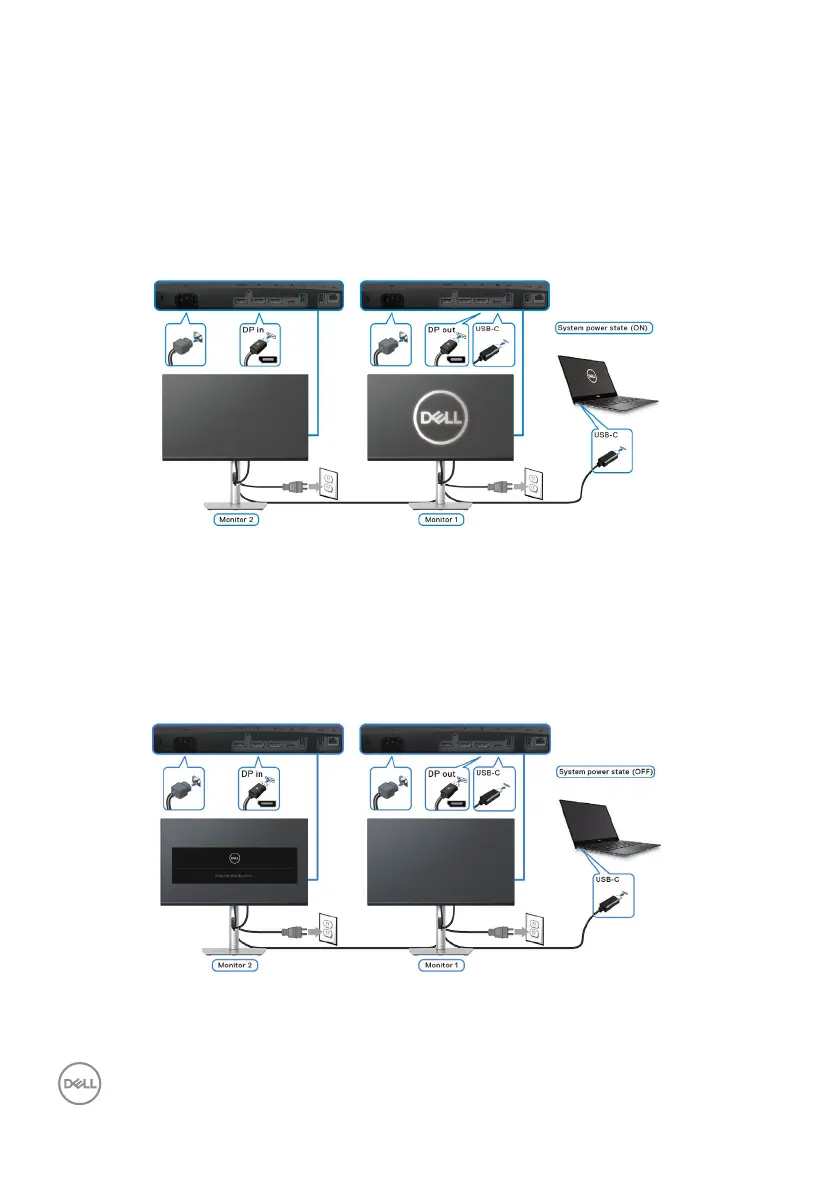
Connecting the monitor for USB-C Multi-Stream Transport (MST) function
A PC is connected to two monitors in an initial OFF power state, and the PC
system power state is in sync with Monitor 1 power button. When you press
Monitor 1 or PC power button, both Monitor 1 and PC turns ON. Meanwhile,
Monitor 2 will remain OFF. You need to manually press the power button on
Monitor 2 to turn it ON.
Similarly, a PC is connected to two monitors in an initial ON power state, and the
PC system power state is in sync with Monitor 1 power button. When you press
Monitor 1 or PC power button, both Monitor 1 and PC turns OFF. Meanwhile,
Monitor 2 will be in Standby mode. You need to manually press the power button
on Monitor 2 to turn it OFF.



 To Next Page