Amber—Computer is running on battery and the battery has less than 5% charge.
Off
● Power adapter is connected, and the battery is fully charged.
● Computer is running on battery, and the battery has more than 5% charge.
● Computer is in sleep state, hibernation, or turned off.
3. HDMI port
Connect to a TV, external display or another HDMI-in enabled device. Provides video and audio output.
NOTE: The maximum resolution supported by the HDMI port is 1920 x 1080 at 60Hz (24-bit).
4. Network port
Connect an Ethernet (RJ45) cable from a router or a broadband modem for network or Internet access.
5. USB 3.2 Gen 1 ports (2)
Connect devices such as external storage devices and printers. Provides data transfer speeds up to 5 Gbps.
6. Headset port
Connect headphones or a headset (headphone and microphone combo).
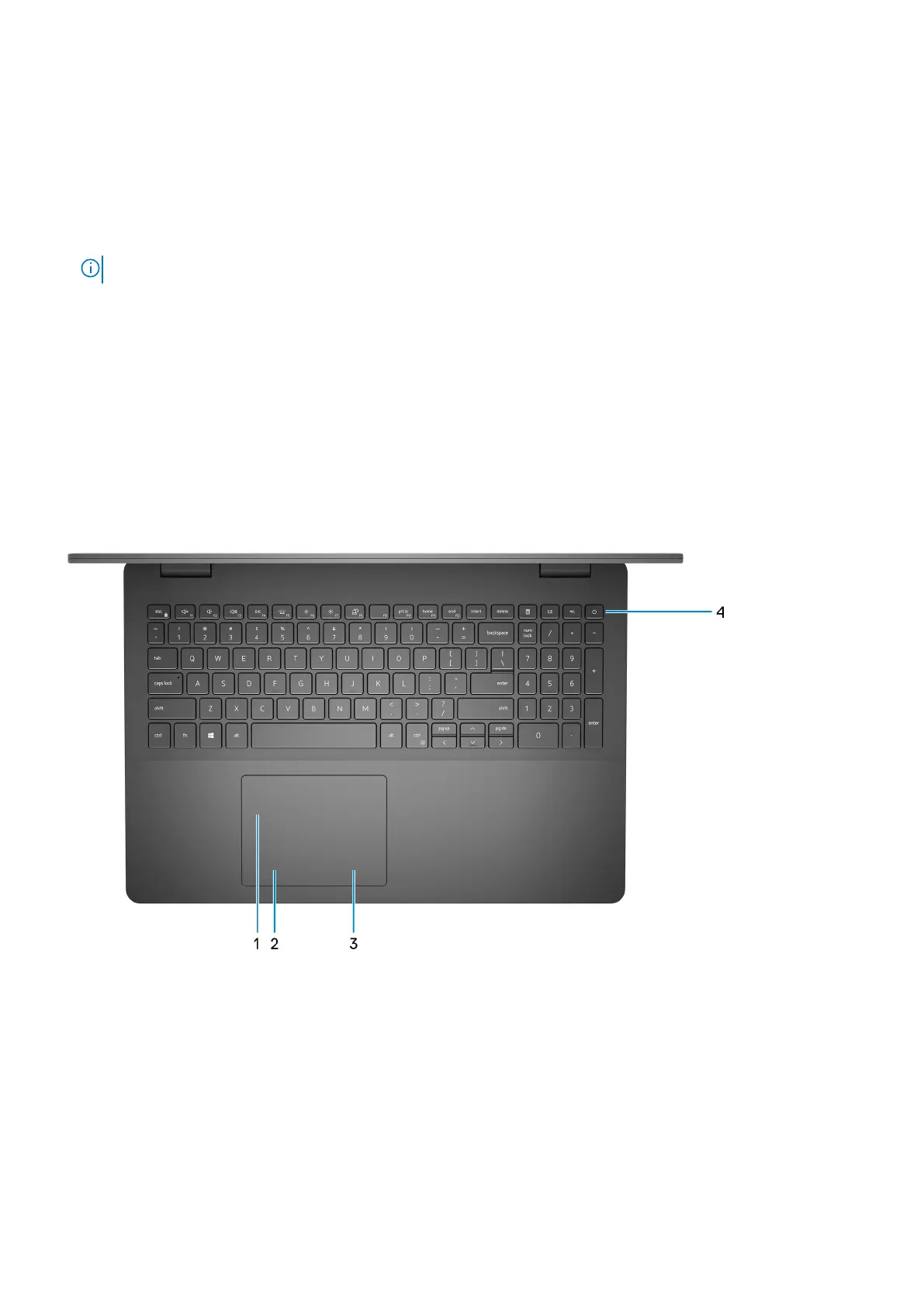
Top
1. Touchpad
Move your finger on the touchpad to move the mouse pointer. Tap to left-click and two fingers tap to right-click.
2. Left-click area
Press to left-click.
3. Right-click area
Press to right-click.
4. Power button with optional fingerprint reader
Press to turn on the computer if it is turned off, in sleep state, or in hibernate state.
Views of Inspiron 3502
7



 To Next Page