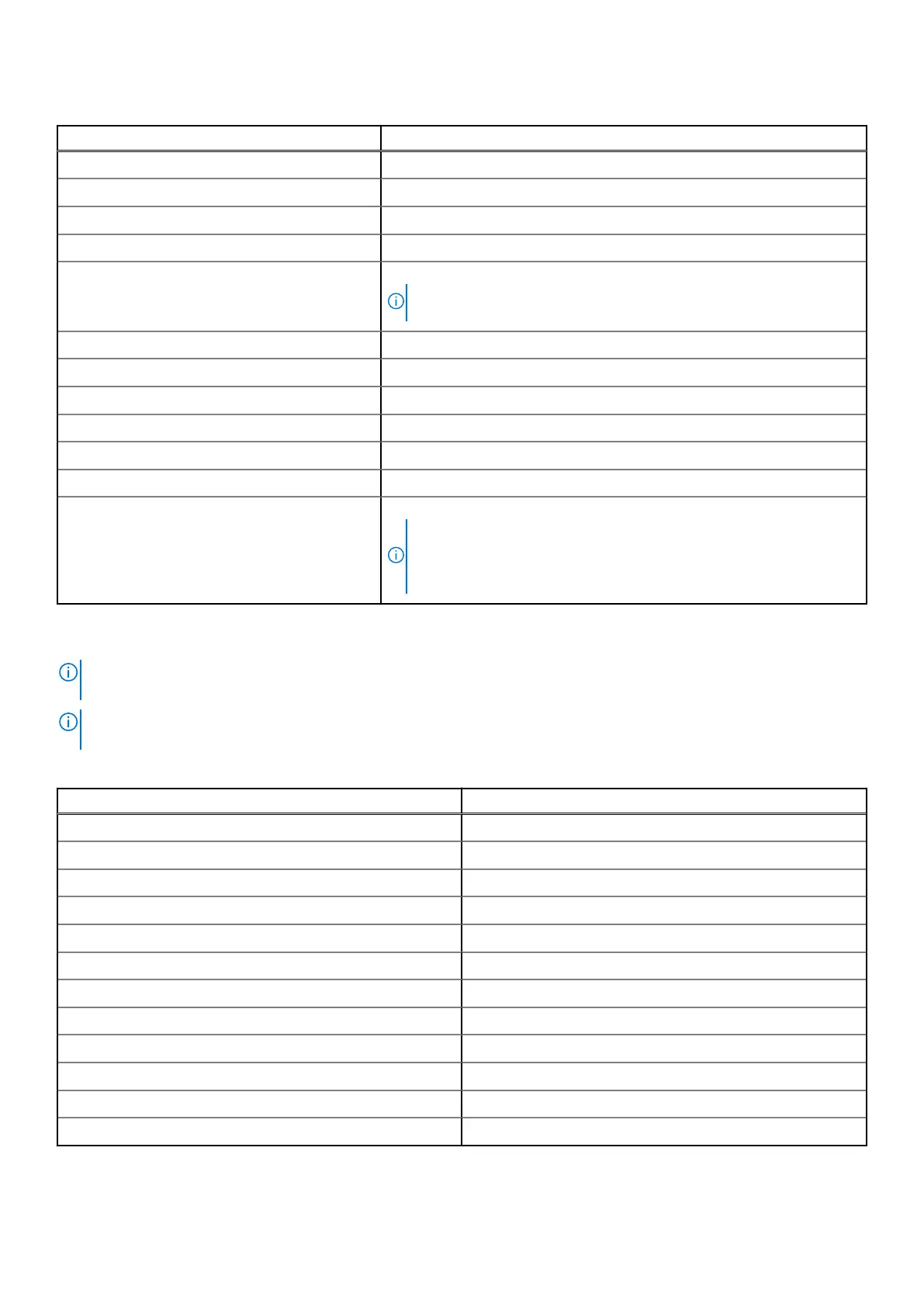
Table 15. List of keyboard shortcuts
Function key Primary behavior
F1 Mute audio
F2 Decrease volume
F3 Increase volume
F4 Mute microphone
F5 Keyboard backlight
NOTE:
Toggle to cycle the keyboard backlight status through off, low-
backlight, and high-backlight.
F6 Decrease brightness
F7 Increase brightness
F8 Switch to external display
F10 Print Screen
F11 Home
F12 End
Copilot Launch Copilot in Windows
NOTE:
If Copilot in Windows is not available on your computer, the
Copilot key launches Windows Search. For more information about
Copilot in Windows, search in the Knowledge Base Resource at
www.dell.com/support.
You can run the secondary tasks that are indicated by the symbols on the function keys by pressing the function key with fn, for
e
xample, fn and F1. See the table below for the list of secondary tasks and the key combinations to run them.
NOTE:
Keyboard characters may differ depending on the keyboard language configuration. Keys that are used for tasks
remain the same, regardless of the keyboard language.
NOTE:
You can define the primary behavior of function keys in the Function Key Behavior menu of the BIOS setup
program.
Table 16. Secondary tasks of keyboard keys
Key combination for task What the task does
fn and F1 Operating system and application-specific F1 behavior
fn and F2 Operating system and application-specific F2 behavior
fn and F3 Operating system and application-specific F3 behavior
fn and F4 Operating system and application-specific F4 behavior
fn and F5 Operating system and application-specific F5 behavior
fn and F6 Operating system and application-specific F6 behavior
fn and F7 Operating system and application-specific F7 behavior
fn and F8 Operating system and application-specific F8 behavior
fn and F9 Operating system and application-specific F9 behavior
fn and F10 Operating system and application-specific F10 behavior
fn and F11 Operating system and application-specific F11 behavior
fn and F12 Operating system and application-specific F12 behavior
Specifications of Precision 3490 19












 To Next Page